seo keyword analysis, keyword research, search intent, keyword difficulty, AI search visibility
SEO Keyword Analysis: A Step-by-Step Guide for 2026
Written by LLMrefs Team • Last updated November 29, 2026
You've got a spreadsheet open with four hundred keyword ideas exported from a research tool, sorted from highest monthly volume to lowest. Your content calendar for next quarter is due Friday, and half the terms at the top of that sheet are owned by massive incumbents while another chunk gets answered inside an AI summary before a searcher ever scrolls to a blue link.
That gap between collecting search terms and choosing which ones deserve a page is where SEO keyword analysis earns its keep. Keyword research builds the raw inventory; keyword analysis evaluates every candidate so your team invests writing time only where you can win visibility and influence pipeline.
Old playbooks reduced that choice to search volume, difficulty, and blue-link rank. Those inputs still matter, yet they miss half of how buyers research products today. Every candidate keyword now needs a score for AI answer visibility and citation value right alongside traditional demand, so low-click terms get judged on their real business role rather than deleted from the sheet automatically.
A Scorecard for Every Keyword Before You Commit
Say a B2B SaaS marketing team is planning its next content quarter and debating two candidates: "project management software" and "project management software for nonprofits". Looking at estimated monthly reach alone makes the broad head term look like the obvious priority. Yet Google's SEO Starter Guide makes an important distinction about Google Keyword Planner data: estimated monthly searches and competition figures are only starting estimates, and comparing a broad phrase against a narrower, business-specific variant requires weighing relevance and intent before committing to a dedicated page.
Before anyone drafts an outline, score every keyword candidate against five pre-publish criteria. Keep the scorecard below open as your working reference through the rest of the selection process.
The Five Pre-Publish Criteria
| Criterion | What It Tells You | Where to Get It | Healthy Signal |
|---|---|---|---|
| Search volume | Estimated average monthly searches over 12 months | Google Keyword Planner | Steady or rising across the year |
| Keyword difficulty | How hard page one is to win | SEO tool difficulty score | Within reach of your domain's authority |
| Search intent | What the searcher wants to do next | Live SERP review | One dominant intent across the top 10 |
| AI answer presence | Whether an AI summary appears and cites sources | Manual check or AI visibility tracker | Your brand or page cited in the answer |
| Business value | Revenue or lead potential per visit | Analytics and CRM data | At least one clear conversion path |
Record the target country, language, and date window beside every search volume entry in your sheet. A monthly average without geographic and calendar context turns into guesswork six months later when someone asks why traffic missed forecast.
Run our two project software terms through that table and the winner flips fast. "Project management software" brings higher estimated reach, yet page one is locked down by enterprise directories and household SaaS brands, and the broad intent splits across learners, students, and buyers. "Project management software for nonprofits" pulls lower monthly volume, yet it matches a specific buyer segment, faces lighter domain competition, and links directly to a demo or pricing flow, which is why it earns a dedicated page.
Applying the Pass Rule
Treat the scorecard as a strict gate rather than a loose suggestion. A keyword advances to your production queue only when it clears two checks:
- Four Healthy Signals Minimum: At least four of the five rows must show a healthy signal for your site and market.
- Zero Blocking Rows: No single criterion can act as a hard stop, such as an impossible domain authority gap or a topic with no believable conversion path.
Notice what's intentionally missing from this pre-publish table: click-through rate (CTR). You can't filter keywords by CTR before a page exists, because your own title tag, snippet, and ranking position don't exist yet. Save CTR for post-publish monitoring once real impressions start rolling in.
A lower-volume keyword that aligns with your domain strength, buyer workflow, and product positioning will outperform a crowded vanity term every single quarter.
Read Search Intent From the Results Before You Score
The fastest way to waste a writer's week is aiming a product landing page at an informational query, then blaming domain authority when it stalls on page three. No amount of backlink outreach fixes a format mismatch. Search engines already tell you what searchers want to see, because the live results page reflects what users click and stay on.
Every query falls into one of four search intent categories, each signaled by familiar phrasing:
- Informational Queries: Searchers want an explanation or process, signaled by words like "how to", "what is", or "guide".
- Commercial Investigation Queries: Buyers are comparing options before choosing, signaled by modifiers such as "best", "vs", or "reviews".
- Transactional Queries: Users are ready to take action, signaled by "buy", "pricing", "demo", or "near me".
- Navigational Queries: Searchers already know the destination and type a specific brand or product name to get there.
Four Steps to Audit Live Intent
Don't guess intent from the keyword wording alone. Verify it directly against the live search engine results page (SERP) in four quick steps:
- Search the exact keyword in a private browser window configured to your target country so personal history doesn't skew the rankings.
- Write down the page format for each of the top 10 organic results, noting whether each listing is a long-form guide, interactive tool, comparison roundup, category hub, or product landing page.
- Count how many of those top 10 listings share one dominant format. If seven or eight results follow the same template, search intent is settled.
- Check whether your planned URL matches that dominant format. If you planned a sales page and nine results are tutorials, change the page format or pick a different keyword.
Test this on "SEO keyword analysis" right now. The top 10 organic results lean heavily toward in-depth guides and dedicated keyword analysis tool pages. A structured walkthrough featuring a reusable scoring table fits cleanly into what searchers expect; a short agency landing page pitching retainer packages won't crack page one.
Reading SERP Signals Beyond Blue Links
Organic listings give you the primary format, while surrounding SERP features expose the exact angles readers expect you to address.
- Mine Featured Snippets and People Also Ask Boxes: The questions displayed inside expandable People Also Ask boxes reveal the exact phrasing searchers use for subtopics, helping you structure subheadings around real buyer questions instead of internal jargon.
- Bridge Mixed SERPs Above the Fold: When the top 10 splits almost evenly between informational guides and commercial tool pages, design your first screen of content to satisfy both needs, such as opening with a quick evaluation matrix before diving into step-by-step instructions.
How to Pull Volume, Trend and Difficulty Data
Static keyword lists go stale faster than many teams realize. Search language expands and shifts constantly. The Internet Live Stats record of Google Search statistics illustrates that scale, noting that Google handled approximately 10,000 queries per day at its September 1998 launch and grew to roughly 3.5 million queries per day by September 1999. For day-to-day forecasting, Google Ads Keyword Planner reports average monthly searches for your selected location, language, and matching settings, and the Google Ads API exposes monthly search-volume history for the same keywords.
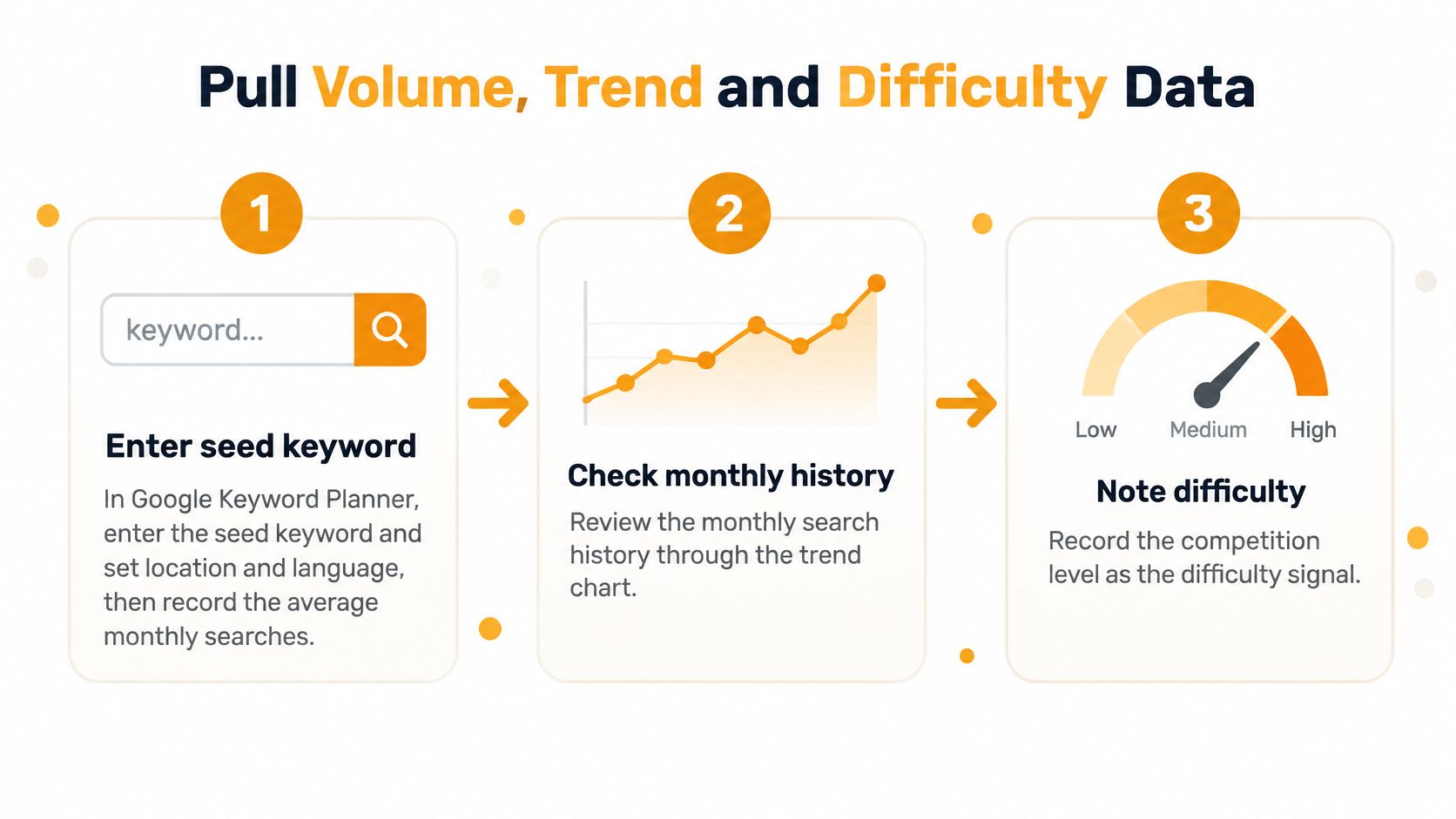
The graphic below outlines the core three-step sequence for gathering baseline demand and competition numbers inside Keyword Planner before layering on trend history.
Step-by-Step Data Collection Workflow
Pull your baseline metrics in one repeatable pass so every keyword in your sheet sits on comparable footing:
- Pull Location-Locked Averages in Google Keyword Planner: Enter your seed keyword, explicitly select the target country and language, and record the average monthly searches. Leaving location set to "All locations" blends disparate markets together and distorts your traffic ceiling.
- Inspect Multi-Year Seasonality via the Google Ads API: Pull monthly volume history across several years to spot recurring peaks and valleys. Searches for project management software often surge in January when teams reset annual operations, a pattern that a single annual average completely flattens.
- Compare Relative Demand in Google Trends: Plot your target phrase against two close synonyms across multiple years and geographies. According to Google's Trends documentation, Google Trends analyzes a random sample of aggregated, anonymized, and categorized Google and YouTube searches across global, national, regional, and city-level geographies, which means you must read its numbers as relative interest rather than exact search counts.
- Gauge Real Page-One Difficulty: Review the domain authority and referring domain counts of the top 10 ranking pages rather than trusting an automated difficulty number blindly. If you want a structured process for sizing up incumbent pages, review our walkthrough on how to check competition for keywords.
- Log Source Metadata Beside Every Figure: Record the exact date range, country, language, and tool source in dedicated columns next to every volume entry so anyone reviewing the sheet later knows how the estimate was produced.
One mistake trips up even experienced analysts: treating a monthly search volume number as a timeless global fact. A phrase with strong commercial demand in the United States can register barely a ripple in the United Kingdom or peak three months earlier in Australia due to different fiscal calendars.
Geography changes the number. The number changes the decision.
For a visual walkthrough of pulling and filtering keyword data directly inside Google's interface, watch the short tutorial below.
Matching Each Metric to Its Source
External research tools estimate market demand, whereas first-party search data proves what your own domain earns. Keep each tool assigned to the job it handles best. Keyword Planner tells you how large the market looks, the Ads API tells you when that market breathes in and out, Trends tells you which synonym is gaining ground, a difficulty score tells you how strong the incumbents are, and Search Console tells you what your published pages capture.
| Source | Metric | How to Read It |
|---|---|---|
| Google Keyword Planner | Average monthly searches for a location and language | Estimate, not guaranteed visits |
| Google Ads API | Monthly search-volume history across multiple years | Seasonality pattern |
| Google Trends | Relative interest over time and place | Direction of change, not exact counts |
| SEO tool difficulty score | Strength of the top 10 ranking pages | Compare with your own authority |
| Google Search Console | Impressions and clicks for your own site | Validation after publishing |
You know your dataset is ready for scoring when the multi-year trend line and your page-one difficulty check point in the same direction. A rising topic with attainable referring domain counts on page one is an immediate green light; a shrinking trend paired with entrenched enterprise domains belongs in the archive. When the two signals disagree, trust the difficulty check for the next quarter and the trend line for the next year, since trend data reflects where demand is heading while page-one strength reflects where competition sits today.
Practical rule: Never drop a search volume figure into a client deck or content roadmap without logging its target country, language, and date range right beside it.
Separate Click-Seeking From Answer-Seeking Queries
A keyword can keep every ounce of its search demand while sending far fewer visitors to your website. That measurement gap breaks traditional spreadsheets that sort strictly by estimated clicks. A Pew Research Center study found that 58% of U.S. adults conducted at least one Google search in March 2025 that produced an AI-generated summary, and users who encountered a summary were less likely to click through to external websites than users who didn't.
Traditional keyword analysis reacts to that trend by tossing low-click queries in the trash. That reflex costs B2B and high-consideration brands real pipeline.
The sketch below captures how modern search optimization connects classic page-level analysis with the pathways searchers take across generated answers.

For complex purchases, buyers don't convert on the first touch. When a searcher asks an AI engine about "project management software for nonprofits", the generated answer frequently compiles a short list of recommended vendors with brief strengths for each. Even if only a handful of people click a citation link during that first session, being named inside that answer puts your brand onto the buyer's mental shortlist. Days later, that same buyer searches your brand name directly or types your URL into their browser, creating an assisted conversion that standard last-click reporting misses completely. Being absent from the answer hands that shortlist slot straight to a competitor.
Four Checks Before You Tag a Query
Instead of treating every low-click keyword as dead weight, run each candidate through four diagnostic checks:
- AI Summary Probability: Does searching the query reliably trigger an AI Overview on Google or a synthesized answer inside tools like ChatGPT and Perplexity?
- External Citation Behavior: When a summary appears, does it cite third-party pages and comparison guides, or does it answer purely from model weights without linking out?
- Need for Deeper Evidence or Action: Can a three-sentence paragraph finish the searcher's task, or do they still need a pricing calculator, security checklist, or signup form on your site?
- Value of Unclicked Brand Presence: If zero visitors click through today, does showing up as a cited source still build category trust that lifts future branded searches?
Once you run those four checks, apply a clear operational label to every keyword in your sheet: click-worthy, citation-worthy, or both. That single tag prevents your team from killing a high-impact awareness query just because its direct session forecast looks modest.
Making AI Presence Checks Repeatable
Spot-checking one prompt on a Tuesday afternoon isn't an audit. Turn AI presence into a repeatable tracking habit in three steps:
- Run each candidate keyword across every answer engine you monitor, set explicitly to your target country and language.
- Record whether a generated summary appears, which external domains earn citations, and whether your brand name or page URL shows up in the text.
- Repeat the check once a month and log the results beside your volume and difficulty scores, attaching the four diagnostic checks above as tags so even queries without AI summaries stay anchored to their real commercial role.
Prioritize Keywords Across Markets With a Weighted Score
International content teams often build one English keyword list, translate the top fifty rows, and publish the same roadmap everywhere. That shortcut breaks down fast in AI-assisted search, because AI Overview availability and depth vary substantially by country, topic, and query style. A query that triggers a detailed, citation-rich answer in one market may get a thin summary or none at all in another.
That uneven coverage changes where your easiest wins live. A commercial query that looks brutally crowded in U.S. English can have far fewer authoritative citation competitors in Dutch, French, or Spanish, giving your brand stronger visibility inside local AI answers even at lower raw search volume.
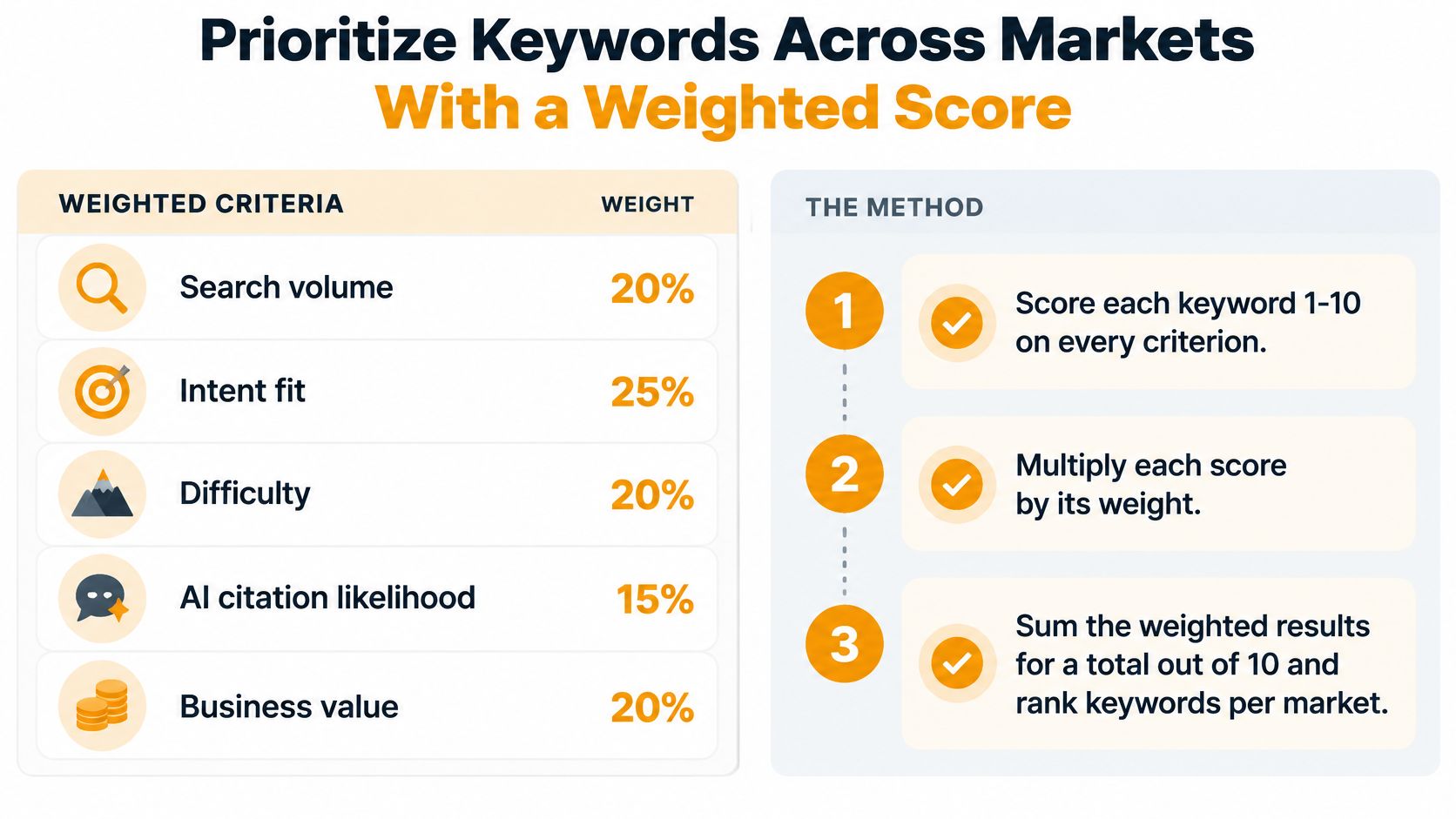
The checklist below lays out the five-factor weighting system and the ranking calculation you can replicate for every regional market you serve.
The Weighted Scoring Formula
Assign explicit weights so no single metric hijacks your content calendar: search volume (20%), intent fit (25%), difficulty (20%), AI citation likelihood (15%), and business value (20%). Intent fit carries the largest single share, and AI citation likelihood guarantees that answer-engine opportunity factors into every rank order. Without that 15%, your team will drop low-click definitional queries that build the citations feeding your branded search growth later.
Score difficulty in reverse so that 10 means easiest and 1 means hardest. Flipping that scale keeps every column pushing the final total in the same positive direction, which prevents the classic spreadsheet error where a high difficulty number accidentally boosts a keyword you cannot realistically rank for.
Run every shortlist through four steps:
- Score each keyword from 1 to 10 on all five criteria.
- Pull the business value score directly from your analytics conversion rates or CRM deal data before computing totals, since it accounts for 20% of the final number.
- Multiply each criterion score by its weight, then sum the five results to get a single composite score out of 10.
- Repeat the exact scoring pass for the localized equivalent in at least one secondary market before finalizing your publishing order. When adapting keywords across borders, combine this formula with proven multilingual SEO best practices so you evaluate local terminology, entities, and SERP features rather than trusting literal translations.
Worked Example Across Three Keywords
The table below shows illustrative values on a 1 to 10 scale for the first four criteria. Replace every number with your own live market data, then add your CRM-backed business value score (weighted at 20%) to finalize each keyword's total out of 10.
| Keyword | Volume Score | Intent Fit | Difficulty (10 = easiest) | AI Citation Value |
|---|---|---|---|---|
| technical SEO audit checklist | 7 | 9 | 6 | 5 |
| seo keyword analysis tool | 6 | 7 | 4 | 7 |
| what is keyword cannibalization | 8 | 6 | 8 | 9 |
Look at how different roles jump off the page. "Technical SEO audit checklist" dominates on intent fit (9) and pairs naturally with a downloadable resource or service lead form. "What is keyword cannibalization" posts the easiest difficulty score (8) and the highest AI citation value (9), making it an ideal candidate to win citations and topical authority even when an AI summary answers the basic definition directly. Kill that query on click potential alone and you lose the cheapest authority builder in the set. Meanwhile, "SEO keyword analysis tool" carries tough page-one difficulty (4), so you should only commit if your business value score is near 10 and you offer an interactive tool that satisfies the intent.
Rules That Keep Your Priority Sheet Clean
A weighted spreadsheet only stays accurate if you enforce strict hygiene before calculating totals:
- Merge Near-Duplicate Keywords Into One Page: Combine close variations onto one focused URL rather than publishing competing drafts. As Google's people-first content guidance notes, Google doesn't use the keywords meta tag and warns against keyword stuffing; a strong page targeting "technical SEO audit" naturally covers crawling, indexing, structured data, redirects, and Core Web Vitals instead of cramming the exact phrase into every paragraph.
- Skip Keywords Without a Realistic Page: Never waste time scoring a high-volume term if your site lacks the product, feature, or firsthand expertise to satisfy the reader.
- Assign One Dominant Intent Per URL: Keeping each page anchored to a single intent prevents you from writing unfocused hybrids that fail both educational and commercial searchers.
Localization check: Never let a single global English difficulty score dictate your international roadmap. Smaller-language markets frequently offer lower citation competition and faster visibility inside local AI answers.
Track Rankings, Clicks and AI Citations Over Time
Keyword analysis doesn't end when you hit publish. Live search performance is where your pre-publish scoring gets tested against real users. Open the Performance report in Google Search Console, switch to the Queries dimension, and examine four metrics side by side: clicks, impressions, CTR, and average position.
Start with the most common post-publish opportunity: a page generating strong impressions while its click-through rate sits well below normal for its ranking slot. As Google Search Console's Performance report documentation explains, filtering query data across pages, countries, and devices lets you isolate high-impression, low-CTR queries so you can rewrite the matching page title and meta description to better fit search intent. Export those underperforming queries, mirror the exact problem wording searchers used in a sharper title tag, and test two variations instead of guessing.
Set a Realistic Monitoring Cadence
Reacting to weekly rank jitters leads teams to break pages that were still settling. Stick to a disciplined review schedule:
- Run Monthly Audits Across Segments: Review Search Console monthly, splitting performance by page, country, and device so mobile snippet issues or regional drops don't hide inside site-wide averages.
- Wait a Full 90-Day Window Before Judging Edits: Give title rewrites, content refreshes, and new pages a full 90 days to stabilize across crawl cycles and seasonal fluctuations before declaring success or failure.
- Track AI Citations Beside Blue-Link Rankings: A page can earn growing influence inside generated answers while generating modest direct clicks, so log cited URLs and brand mentions in the same monthly report.
Traditional rank trackers can't show you what happens inside generated answers. LLMrefs fills that measurement gap by tracking brand visibility, citations, and share of voice across 10+ AI search engines, including ChatGPT, Gemini, Perplexity, and Google AI Overviews, so you can see where your brand wins answers alongside classic Google rankings. For a structured reporting framework, read our guide on how to measure AI visibility.
Diagnosing Common Post-Publish Symptoms
When a published keyword underperforms, match the exact symptom to its root cause before touching the copy.
| Symptom | Likely Cause | Fix |
|---|---|---|
| High impressions, CTR well below average for the position | Weak title or meta description | Rewrite the title to match the dominant intent and test two versions |
| Position 4-10 with almost no clicks | Result looks less useful than the top rivals | Compare the top results and add the missing format or answer |
| Impressions falling for several months | Seasonality or an AI summary above your result | Check the date range, then review whether the query now shows an AI summary |
| Clicks but no conversions | Intent mismatch | Move the page toward the dominant intent or split the query into its own page |
| Cited in AI answers with few clicks | The answer satisfies the query | Track citations and branded search lift alongside clicks |
Each of those bottom four patterns calls for a distinct response rather than a generic content rewrite. When a page sits in positions 4 to 10 with negligible clicks, open the top three rivals side by side and spot what they deliver that you omitted, such as a comparison table, template, or direct pricing breakdown.
If impressions trend downward for several consecutive months, pull a multi-year date comparison first to rule out normal seasonal dips, then check the live SERP to see whether a new AI summary now pushes organic links below the fold. Strong clicks paired with zero leads or demos point straight to an intent mismatch, which you solve by refocusing the page on the dominant commercial need or splitting the informational subtopic onto its own URL. Finally, when a page earns steady AI citations with light click volume, resist the urge to call it a failure; monitor branded search lift and citation share right next to sessions.
Clicks alone never prove whether a keyword is doing its job.
Build Your Keyword Shortlist This Week
Most SEO teams don't fail because they lack keyword ideas; they stall because they keep collecting hundreds of unranked terms without turning them into a clear, testable plan. You can put this entire workflow into motion in one focused week.
- Set Up Your Tracking Workspace: Sign up for a free LLMrefs account and create a project using your brand name and domain.
- Load Your First Core Terms: Add 10 to 15 core SEO keywords that have already cleared your live SERP intent check and location-locked volume review.
- Score and Weight Every Candidate: Run each term through the five-criterion scorecard and calculate its weighted total out of 10, including a second market if you sell across regions.
- Let Weekly AI Data Accumulate: Every tracked keyword updates in your dashboard at least once per week, giving your team consistent visibility data across answer engines to pair with your click and impression reports in Google Search Console.
- Review at 30 Days, Judge at 90 Days: Check your shortlist after 30 days purely for early indexing, impression, and citation signals, then wait for the full 90-day window before making final keep-or-cut calls. You can add more keywords as your content library expands.
That leaves one decision to make before the week closes: pick the exact five keywords that get dedicated pages first, and state upfront which ones you're publishing to capture clicks and which ones you're publishing to own AI citations.
Ready to score and monitor your keywords across both traditional search and answer engines? LLMrefs tracks your brand visibility, rankings, share of voice, and cited sources across 10+ AI search engines with weekly updates, giving your SEO keyword analysis the citation data Search Console can't show alone. Start tracking your shortlist for free at LLMrefs.
Related Posts

November 9, 2026
Claim your business in ChatGPT
A screenshot shows a "Claim your business in ChatGPT" page with mention and click tracking. We are skeptical it is real. If it is, it shares no prompts, no citations and no competitor data.

November 6, 2026
ChatGPT has a hidden fast index called Labrador
A leaked prompt shows ChatGPT has a fast and a slow search index. The fast one is Labrador, OpenAI's own index. It found a page Google, Bing and Brave never indexed.

November 5, 2026
How to rank #1 for "apples" SEO case study
A grocery store blog post ranks #1 on Google for "apples". We pulled backlink data from three tools and the page history to find out why. Some of it is unclear.

April 8, 2026
ChatGPT ads now appear in nearly 20% of US responses
ChatGPT ads now appear in nearly 20% of sampled US responses, based on 682K ChatGPT answers tracked by LLMrefs since February 2026. See who is buying, how fast ads are growing, and how we measure it.