ChatGPT has a hidden fast index called Labrador
Written by James Berry • Last updated November 6, 2026
ChatGPT can search the web in two ways. The fast index is OpenAI's own copy of the web, built by its own crawler. The slow index scrapes Google results. We tested both and the fast index found a page that no search engine had indexed yet.
A leaked ChatGPT system prompt lists two search engines. One is called fast and the other is called slow. A system prompt is the hidden set of instructions OpenAI gives ChatGPT before every conversation.
We think the fast engine is ChatGPT's own search index. Researchers who studied ChatGPT's network traffic found that index has an internal codename, Labrador.
So we ran a test. The fast index found brand new pages that Google, Bing and Brave had not indexed. The slow index could not find them.

What The Fast And Slow Indexes Are
A search index is a big database of web pages. A search engine fills it by sending a crawler to visit pages and save a copy. When you search, the engine looks up its saved copies instead of visiting every site live.
ChatGPT has two ways to get search results.
- The fast index. ChatGPT crawls the web itself and builds its own index. The crawler is called OAI-SearchBot. No other search engine is involved, so a page can be in here even if Google has never seen it.
- The slow index. ChatGPT runs your question on a traditional search engine and scrapes the results page. A results page is the list of ten blue links you see after a search. This data points mostly to Google, collected through scraping companies like Bright Data and Oxylabs.
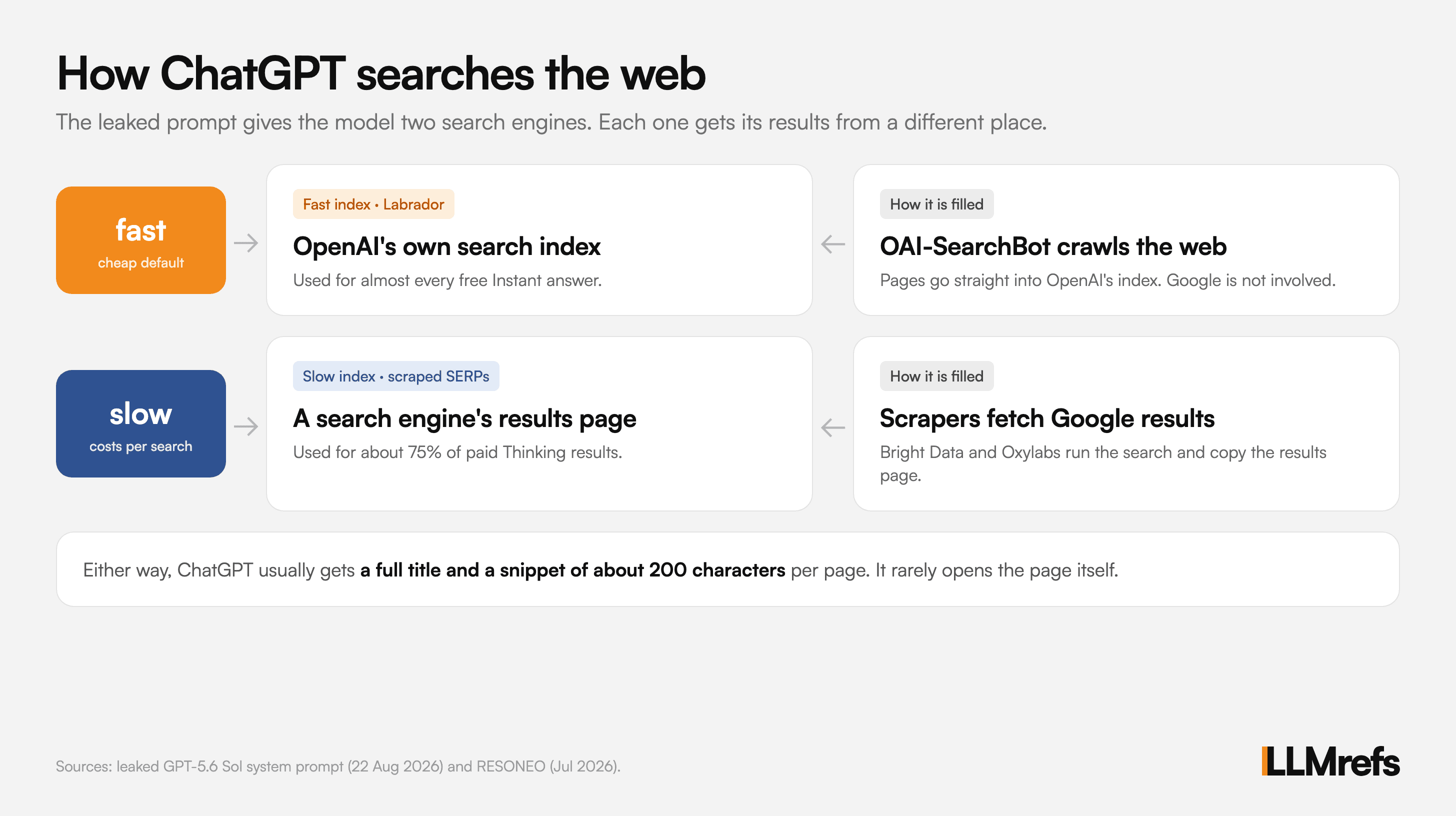
The difference matters for your site. To show up in the slow index, you need to rank on Google first. To show up in the fast index, you only need OpenAI's crawler to reach your page.
What The Leaked System Prompt Says
The leaked prompt is for a model called "GPT-5.6 Sol" and is dated 22 Aug 2026. It was posted to the public system_prompts_leaks repo on GitHub. OpenAI has not confirmed it is real.
It tells ChatGPT it "can retrieve web search results from two search engines". Each one is a command the model can call.
slow|<query>|<recency?>|<domains?>
fast|<query>|<recency?>|<domains?>
The prompt also explains when to use each one.
fast | slow | |
|---|---|---|
| When to use it | "often a good default for broad exploration" | "when you need harder-to-find or higher-confidence results" |
| Queries per call | "you can usually fit more queries in one call" | "Be more selective with the number of queries" |
| Cost | Called "the cheaper search system" | Only when "the cheaper search system is unlikely to be enough" |
The fast engine is the cheap default. That fits an index OpenAI owns. Every slow search costs OpenAI money, because it pays a scraping company to fetch Google results.
How We Tested The Two Indexes
We asked ChatGPT to run the same search with each engine on 5 and 6 Nov 2026. The search was "llmrefs", limited to the past day.
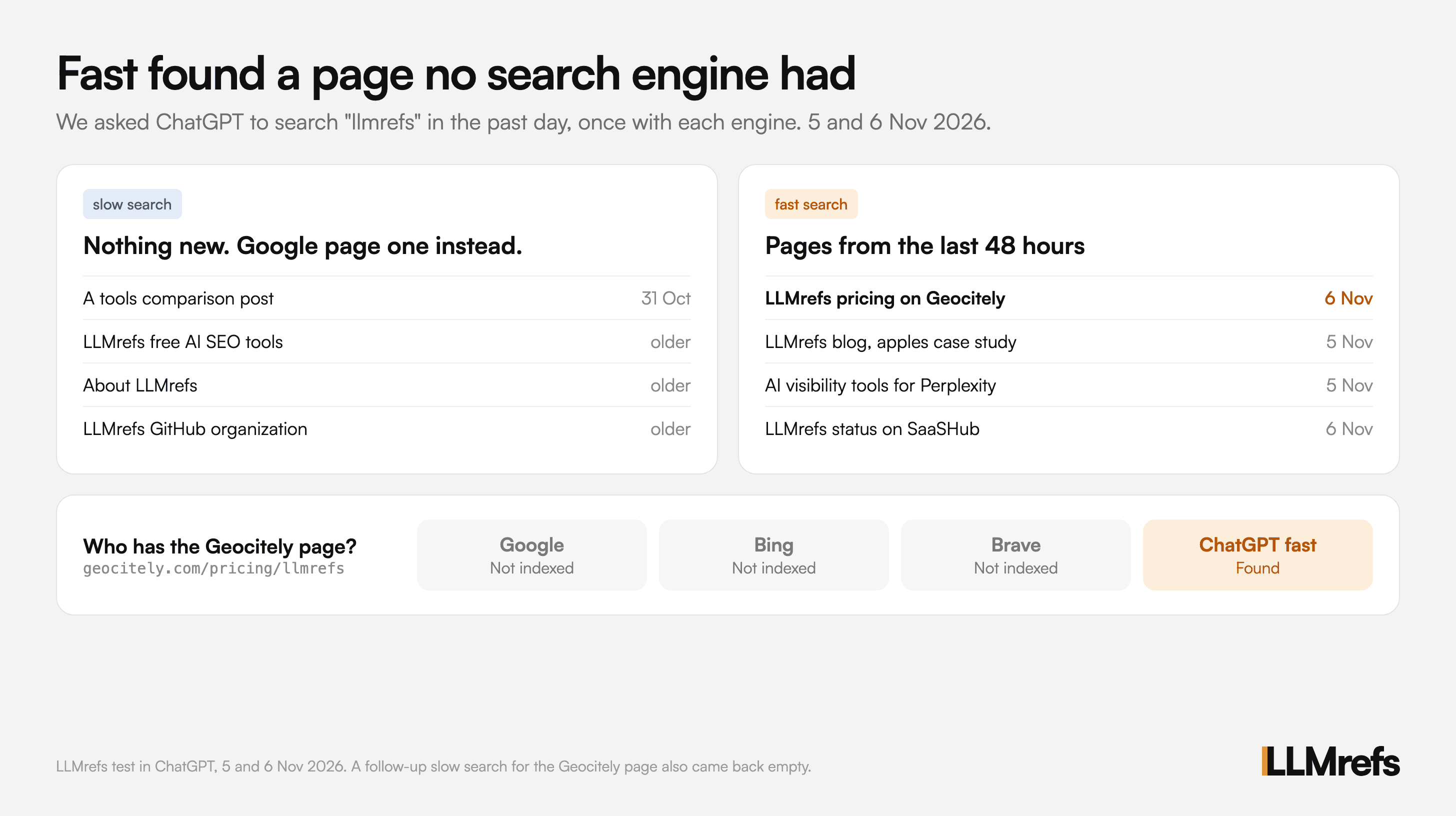
The slow search found nothing new
We typed "run a slow search for llmrefs in past 1 day". ChatGPT said it found no pages published in the past 24 hours.
It returned older pages instead. These included a comparison post from 31 Oct, our free tools page, our About page and our GitHub profile. That is roughly what you see on page one when you search "llmrefs" on Google.
The fast search found pages from today
Next we typed "run a fast search for llmrefs in past 1 day". This time ChatGPT found fresh pages.
- Our latest blog post. Our apples case study went live on 5 Nov. The fast index already had it.
- A pricing page we had never seen. A site called Geocitely had written about LLMrefs pricing. The page was updated on 6 Nov, the day we ran the test.
- Two other recent pages. A Perplexity tracking tools comparison from 5 Nov and a status page checked that day.
Google, Bing and Brave had not indexed the page
We searched for the Geocitely page on Google with a site: search. A site: search shows whether a search engine has a specific page in its index. Google had nothing.
Bing and Brave had nothing either. Yet ChatGPT's fast index had already found it, read it and summarized it.
The slow search still could not find it
As a final check, we asked the slow engine to look for anything about a Geocitely review of LLMrefs from the past day. It came back empty. ChatGPT said it could not find a review of LLMrefs by Geocitely in the past 24 hours.
That is what you would expect if the slow engine scrapes Google. Google did not have the page, so the slow engine could not see it.
What the test does not prove
This was one search on one day. Google may index the Geocitely page next week. ChatGPT also summarized the results for us, so we did not see the raw data.
Still, the result is hard to explain any other way. The fast index found a page that no traditional search engine had.
What Other Researchers Found About Labrador
We are not the first to spot this index. Researchers studied ChatGPT's network traffic in 2026.
From 21 May to 21 July, every search result ChatGPT received came with a tag. The tag named the system that fetched it. It only ever had four values.
| Tag | Where the result came from |
|---|---|
labrador | OpenAI's own index (fast) |
bright | Scraped Google results, very likely through Bright Data (slow) |
oxylabs | Scraped Google results through Oxylabs, mostly news (slow) |
serp | A live search results fallback (slow) |
OpenAI removed the tag on 22 July. But the data collected before then tells us a lot.
Free users mostly get the fast index
ChatGPT has two answer modes. Instant answers quickly and is the default for free users. Thinking takes longer and runs more searches.
RESONEO captured 1,249 ChatGPT answers in July 2026 and split them by mode.
| Type of question | Instant: fast index | Instant: Google | Thinking: fast index | Thinking: Google |
|---|---|---|---|---|
| Settled facts | 100% | 0% | 1% | 99% |
| Businesses and places | 100% | 0% | 3% | 95% |
| Products | 100% | 0% | 1% | 99% |
| News and live info | 50% | 50% | 0% | 96% |
Instant mode answers almost everything from the fast index. Thinking mode mostly uses scraped Google. The leaked prompt says "most users occupy the default 'Instant' configuration", so the fast index serves most ChatGPT searches.
The fast index is many indexes
Labrador is not one big index. Researchers who studied ChatGPT's network traffic found separate indexes for different types of content.
- General web pages
- PDFs
- YouTube
- News, split into the last day, the last 7 days and older
- arXiv research papers
- Wikipedia
- Local businesses
- Finance, legal and medical
- Shopping
- Images
The leaked prompt lines up with this. It gives ChatGPT separate commands for products, businesses and images. Its suggested freshness filters of 1, 7 and 30 days also match the news tiers.
ChatGPT Rarely Opens Your Page
This is the part most site owners miss. In Instant mode, ChatGPT almost never visits the pages it cites.
RESONEO found that nine answers out of ten never open a single page. Across the whole study, only 1.2% of the links in the sources panel were actually read.
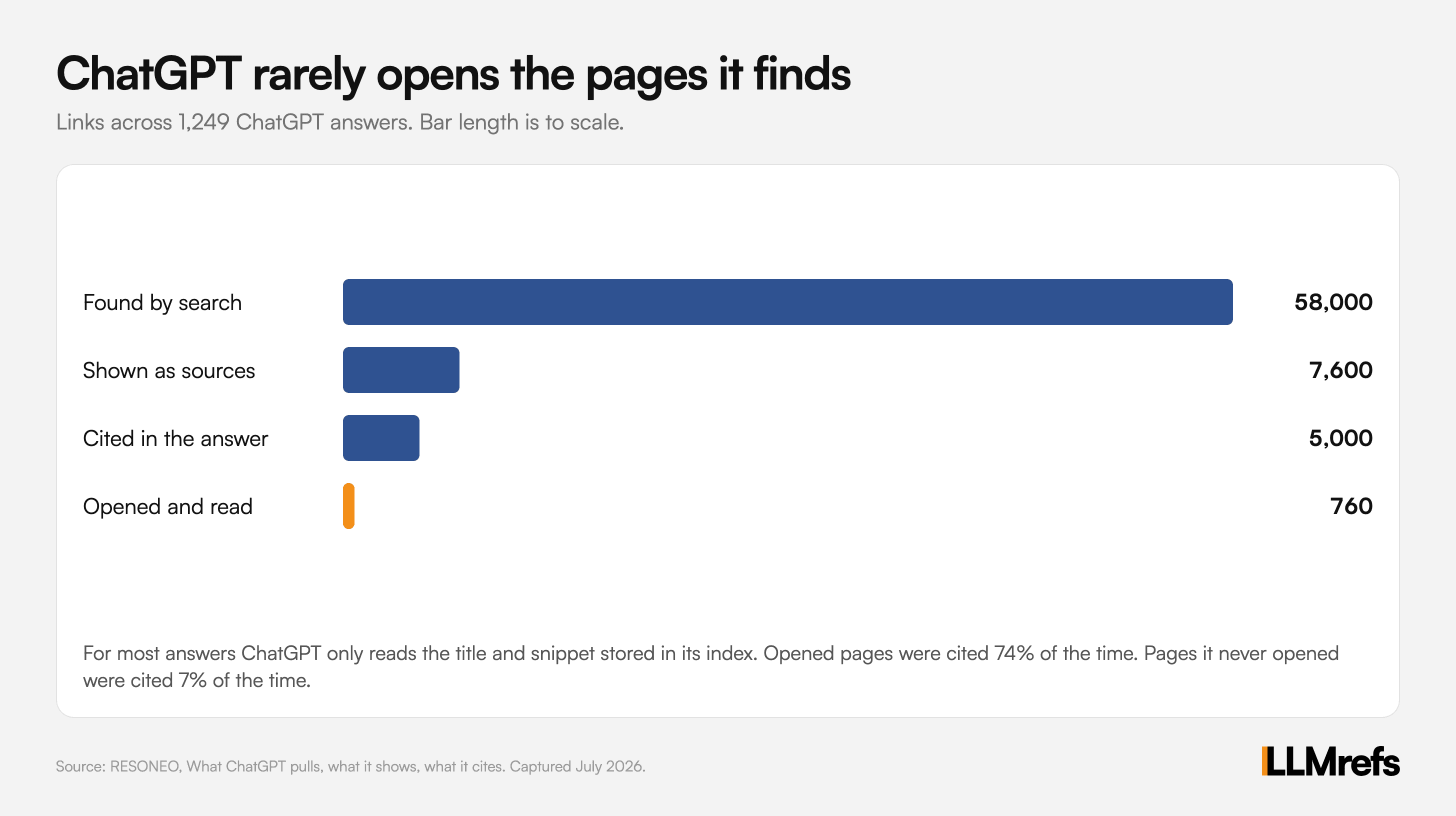
So for most answers, ChatGPT never reads your page. It reads the short summary the fast index saved about your page.
What the fast index saves about your page
The fast index stores two things that ChatGPT sees.
- Your full title. It never cuts it short. One title in the study was 977 characters long.
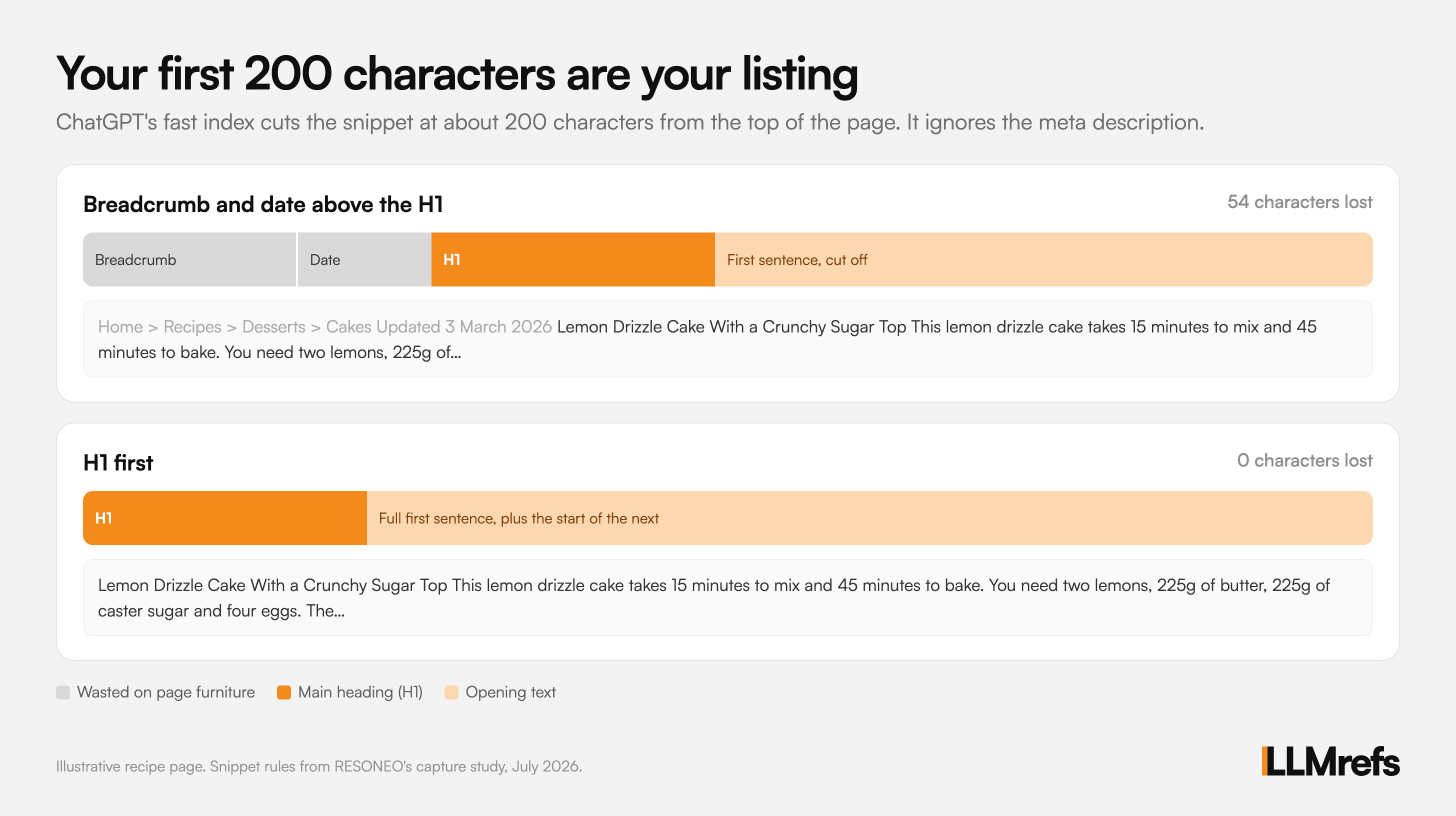
- A snippet of about 200 characters. The snippet is taken from the top of the visible page text. Your meta description is ignored.
A meta description is the short summary you write in your page code for search engines. Google often uses it. The fast index does not.
Anything above your main heading wastes space
Most pages start with a main heading, called the H1. When a page has one, it lands in the snippet 83.6% of the time.
But many pages put other things above the H1. Each of those eats into your 200 characters.
- Section labels. A small "Guides" or "News" label sits above the heading on 29% of pages.
- Dates. A published date appears first on 11% of pages.
- Image alt text. The description of a top image appears first on 9% of pages.
- Breadcrumbs. A trail like "Home > Blog > Guides" appears first on 7% of pages.
Think about a recipe page that starts with "Home > Recipes > Desserts > Cakes" and "Updated 3 March 2026". That is 54 characters gone before the reader even sees the recipe name.
How The Fast Index Stays Fresh
OpenAI keeps two stores of web content.
- The index. OAI-SearchBot fills it with titles and snippets. 13% of snippets were more than a month behind the latest crawl.
- The read cache. This holds full copies of pages for the rare times ChatGPT opens one. It is filled by ChatGPT-User, the bot that visits pages during a chat.
The read cache keeps pages for a long time. Researcher Jérôme Salomon found pages still being served 91 days after they were fetched. We wrote about how to test this in our post on OpenAI's cached index.
The cache also ignored a Cache-Control: no-store header, which normally tells systems not to keep a copy. Salomon's tests found it ignored noindex tags too.
What OpenAI Has Said About Its Index
OpenAI has never used the name Labrador or the words fast and slow in public. It has confirmed it runs its own index.
- Court testimony. In the Google search antitrust case, ChatGPT head Nick Turley said OpenAI started building its own index in 2023. The goal was to answer 80% of searches from it by the end of that year.
- Help Center. An OpenAI Help Center article describes offline web search for some business workspaces. It says "ChatGPT uses OpenAI's indexed and cached web content for web search."
How To Get Into ChatGPT's Fast Index
You cannot submit a page to the fast index. There is no ChatGPT version of Google Search Console. But you can make it easy for OpenAI's crawler.
- Allow OAI-SearchBot. Check your robots.txt file and your firewall. If you block this bot, you are not in the fast index. OpenAI says robots.txt changes take about 24 hours to apply. Our AI crawl checker shows whether you are blocking it.
- Do not worry about GPTBot for this. GPTBot is OpenAI's training crawler. It does not feed the fast index, so blocking it will not remove you from search.
- Put your H1 first. Move breadcrumbs, dates and labels below your main heading. Your first 200 characters are your listing.
- Write a strong opening line. After the H1, the next sentence fills the rest of your snippet. Make it say exactly what the page is about.
- Keep pages readable without JavaScript. Pages that need heavy JavaScript or sit behind bot protection may never make it into the index.
- Track Instant and Thinking separately. They draw from different indexes. A page can be cited in one and missing from the other. You can track AI search citations to see where you show up.
The good news is that the fast index does not need you to rank on Google first. A brand new page from a small site got in within a day. If OpenAI's crawler can reach you, you have a chance.
Related Posts

November 26, 2025
OpenAI is quietly building a hidden cached index for ChatGPT Search
OpenAI maintains a hidden cached index of webpages and search grounding results for ChatGPT web search. How to test if your pages are indexed using the Web Search API.

November 14, 2025
How ChatGPT reads your content and sees the web
GPT does not browse web pages like humans do. It receives small snippets through a windowed retrieval system. How web search, expansions, and context sizes actually work.

June 29, 2025
We leaked the ChatGPT-4o System Prompt 2025
LLMrefs leaked the system prompt behind ChatGPT-4o. We discovered that ChatGPT has no search index, why it triggers web search and how it queries the web.

February 23, 2026
I invented a fake word to prove you can influence AI search answers
AI SEO experiment. I made up the word "glimmergraftorium". Days later, ChatGPT confidently cited my definition as fact. Here is how to influence AI answers.