url parameters, query strings, utm parameters, seo crawlability, url canonicalization
What Are URL Parameters and How Do They Work
Written by LLMrefs Team • Last updated September 23, 2026
URL parameters are key-value pairs appended after a question mark in a URL, such as ?color=red&size=m, to pass state, filters, and tracking data to a page. They help a website understand what a visitor wants to see, but poorly governed parameters can also create duplicate URLs and crawl bloat.
You may already be seeing the problem in your analytics reports. One email campaign sends visitors to the same landing page, yet the report lists several versions of that page because each link carries different tracking values. The page looks like one destination to a person, while the browser, analytics platform, and search engine may treat each full URL as a separate address.
That makes URL parameters more than a formatting detail. They're a measurement-governance decision: each parameter should earn its place by improving attribution, changing useful content, or supporting a necessary user experience.
What URL Parameters Actually Are
Start with a basic URL:
`
Add a question mark, then a key-value pair:
`
The part after the question mark is the query string. A parameter is the individual key-value pair inside it. In this example, color is the key and red is its value. The key identifies the variable being passed, while the value identifies the selected state or instruction. Ahrefs explains URL parameters as query-string values used to pass information to a page.
Add another selection:
`
Read this from left to right:
?separates the main URL path from the query string.coloris the first key.=connects the key to its value.redis the selected value.&joins another parameter.size=mpasses a second key-value pair.
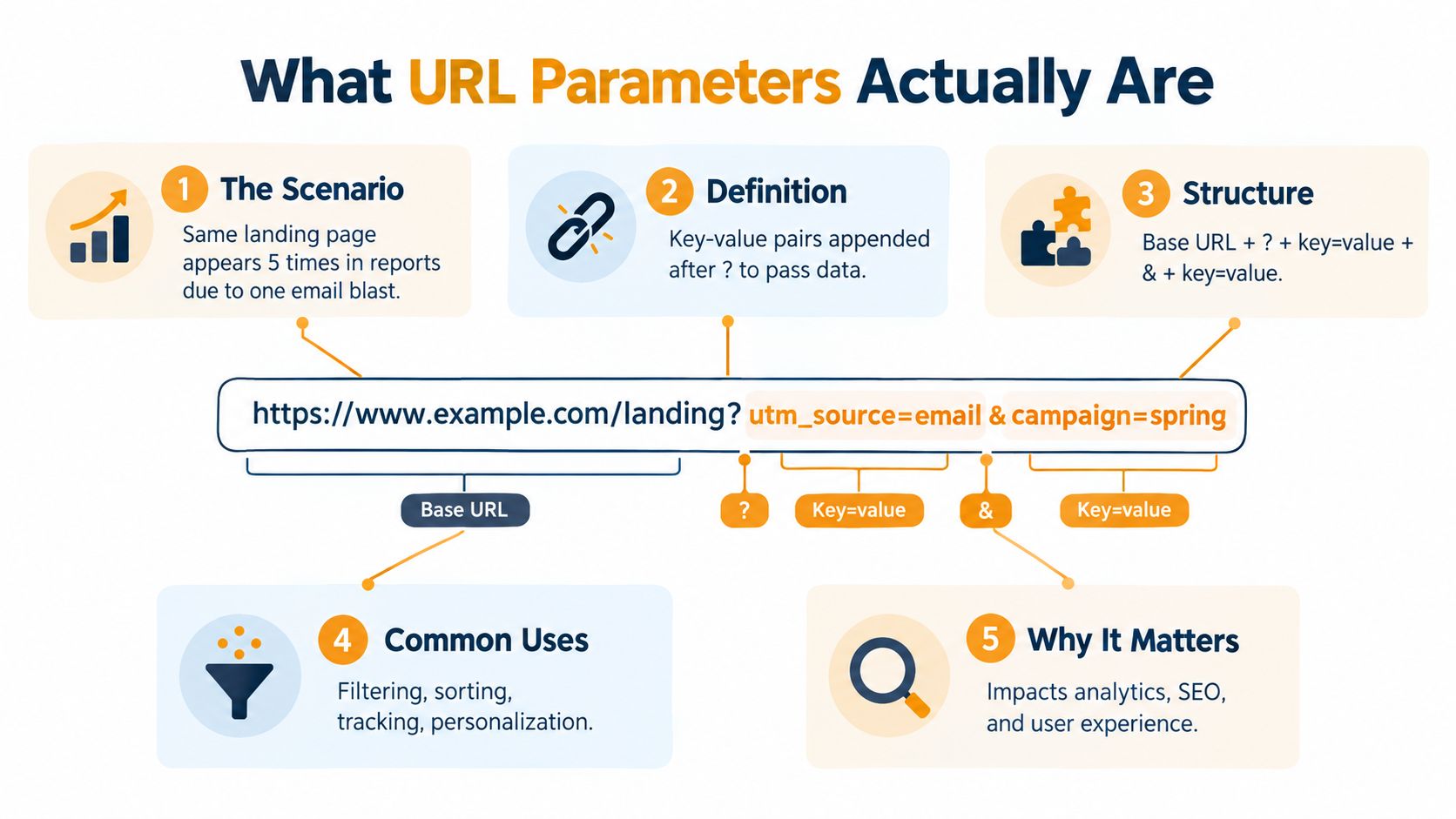
Parameters versus URL paths
A path usually identifies a resource or route, such as /shoes or /products/blue-running-shoes. A parameter usually supplies additional state to that route, such as a filter, sort order, language preference, session identifier, or campaign label.
An ecommerce site can use /shoes as the product category and ?color=red to adjust the displayed selection. A SaaS application might use a parameter to preserve a dashboard tab or pass a report identifier. The server reads the query string and decides what response to return.
The important distinction is whether the parameter changes the page's meaningful content. A color filter may alter the products shown. A campaign tag may leave the page visually identical while adding attribution data. Both are valid uses, but they carry different SEO consequences.
Practical rule: Treat every parameter as a piece of data with an owner, a purpose, and a defined handling policy.
This article uses that rule throughout. The question isn't just whether parameters work. It's whether a parameter improves measurement or user experience enough to justify the extra URL variation it creates.
Common Types of URL Parameters Explained
Most websites use parameters for a small group of recurring jobs. Learning to recognize those jobs makes your analytics reports and crawl data much easier to interpret.
A filter parameter narrows a collection. For example, an online store might use:
`
Here, category and color describe the selected product state. This is usually content-changing, because the visible product set can differ from the unfiltered category.
A sort parameter changes the order rather than the underlying collection:
`
The page may show the same products in a different sequence. That's commonly content-preserving from a search perspective, even though the user experience changes.
A pagination parameter identifies another page of a collection:
`
Some sites use an offset instead:
`
Pagination can expose a distinct slice of content, but it doesn't automatically deserve independent indexing. The correct treatment depends on whether that URL provides useful, discoverable content and how the site links to it.
A localization parameter selects language or regional content:
`
If the response is French and offers a complete localized experience, the parameter changes content meaningfully. A session parameter such as ?sid=abc123, by contrast, usually identifies a visitor state without creating a new editorial page. It's typically content-preserving and potentially problematic for crawling.
| Parameter Type | Example | Typical Purpose |
|---|---|---|
| Filter | ?category=shoes&color=blue |
Narrow a product or content collection |
| Sort | ?sort=price_asc |
Change result order |
| Pagination | ?page=2 |
Request another collection page |
| Localization | ?lang=fr |
Select language or regional content |
| Session | ?sid=abc123 |
Preserve temporary visitor state |
Location parameters can also affect search results without changing the underlying website content. For example, LLMrefs' guide to searching Google from a location shows how query parameters can provide geographic context for search requests. That's a useful reminder that parameters may control an external search context, not just a page component.
How UTM Parameters Power Campaign Tracking
UTM parameters are a familiar tracking-specific use of query strings. Analytics platforms such as Google Analytics and HubSpot recognize standard UTM keys by name, allowing campaign links to carry structured attribution data.
A conventional tagged URL can look like this:
`
The commonly used fields are:
utm_sourceidentifies the referring source, such asnewsletter.utm_mediumdescribes the channel, such asemail.utm_campaigngroups links under a campaign, such asspring_launch.utm_termcan identify a paid search term or audience label.utm_contentdistinguishes creatives, placements, or calls to action within the same campaign.
The values matter because reporting systems group them according to their exact spelling. If one team uses Email, another uses email, and a third uses e-mail, dashboards can split what should be one channel. Create a shared naming convention before campaigns launch, and keep parameter order consistent. Salt Agency recommends consistent parameter ordering and one value per key to reduce URL variation.
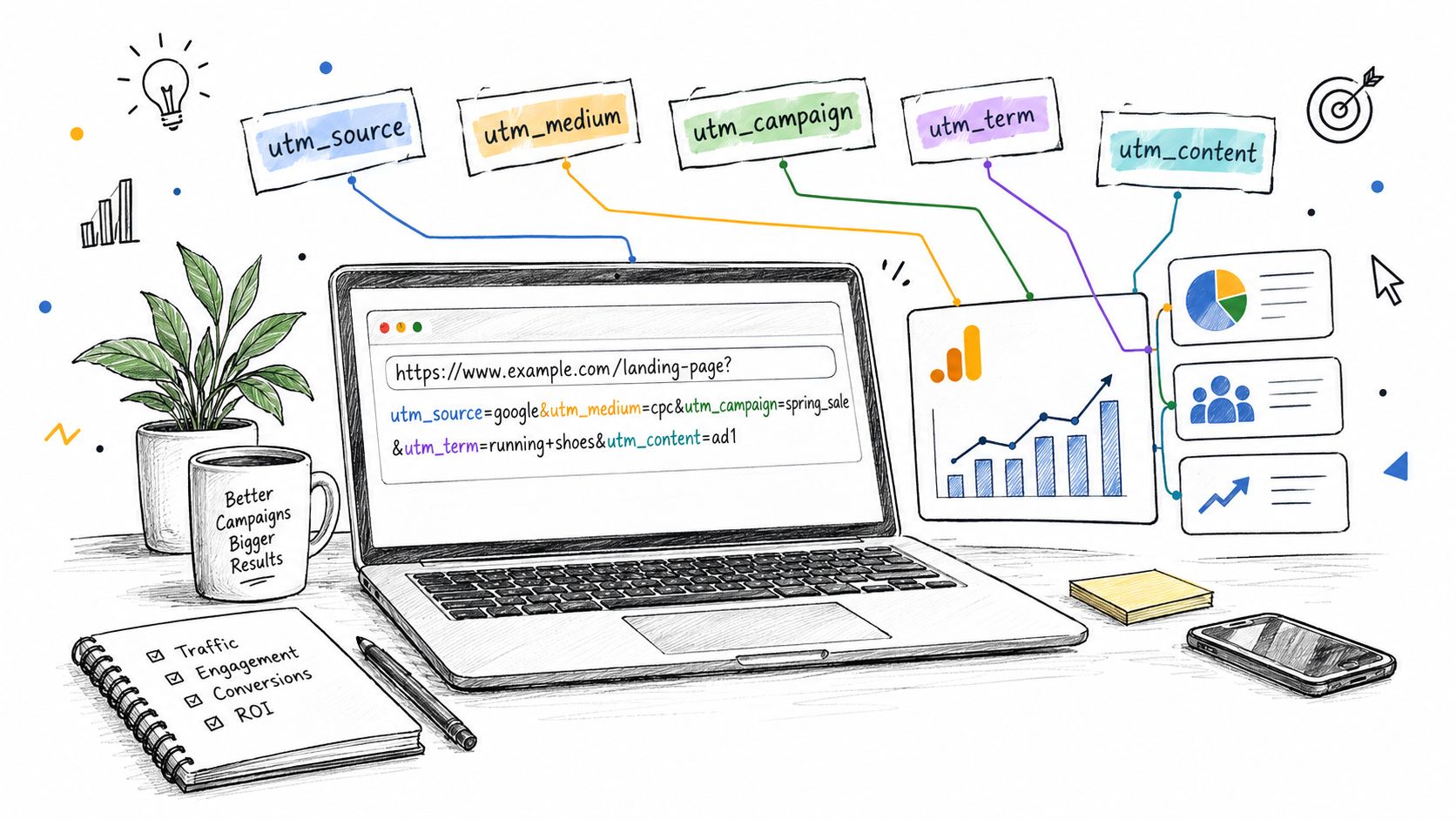
What the report can show
When a tagged link receives a visit, the analytics platform can associate that session with its source, medium, and campaign. A newsletter link might roll into an email channel and a named product launch. Several links in that same email can share the campaign values while using different utm_content values to distinguish a hero button from a text link.
That structure gives marketers useful attribution without changing the landing page's content. The trade-off is that each tagged link creates a distinct full URL. Analytics may need the values, but search engines usually don't need separate indexable copies of the page for each campaign.
A cleaner governance policy separates the tracking purpose from the indexation policy. Keep campaign data available to the measurement system, while ensuring canonical signals, internal linking, and crawl controls point search engines toward the stable landing-page URL.
SEO and Crawlability Impacts You Need to Understand
A category page can become several crawlable addresses after a shopper changes the results. Start with:
/shoes/
Selecting a color may create:
/shoes/?color=red
Adding a size produces another variant:
/shoes/?color=red&size=10
Sorting can create one more:
/shoes/?color=red&size=10&sort=price-asc
The product set may overlap heavily across all four URLs. Search engines can discover and request these variants through filter links, internal references, or external links. Botify describes how parameterized URLs can create duplicate-content risk and consume crawl resources.
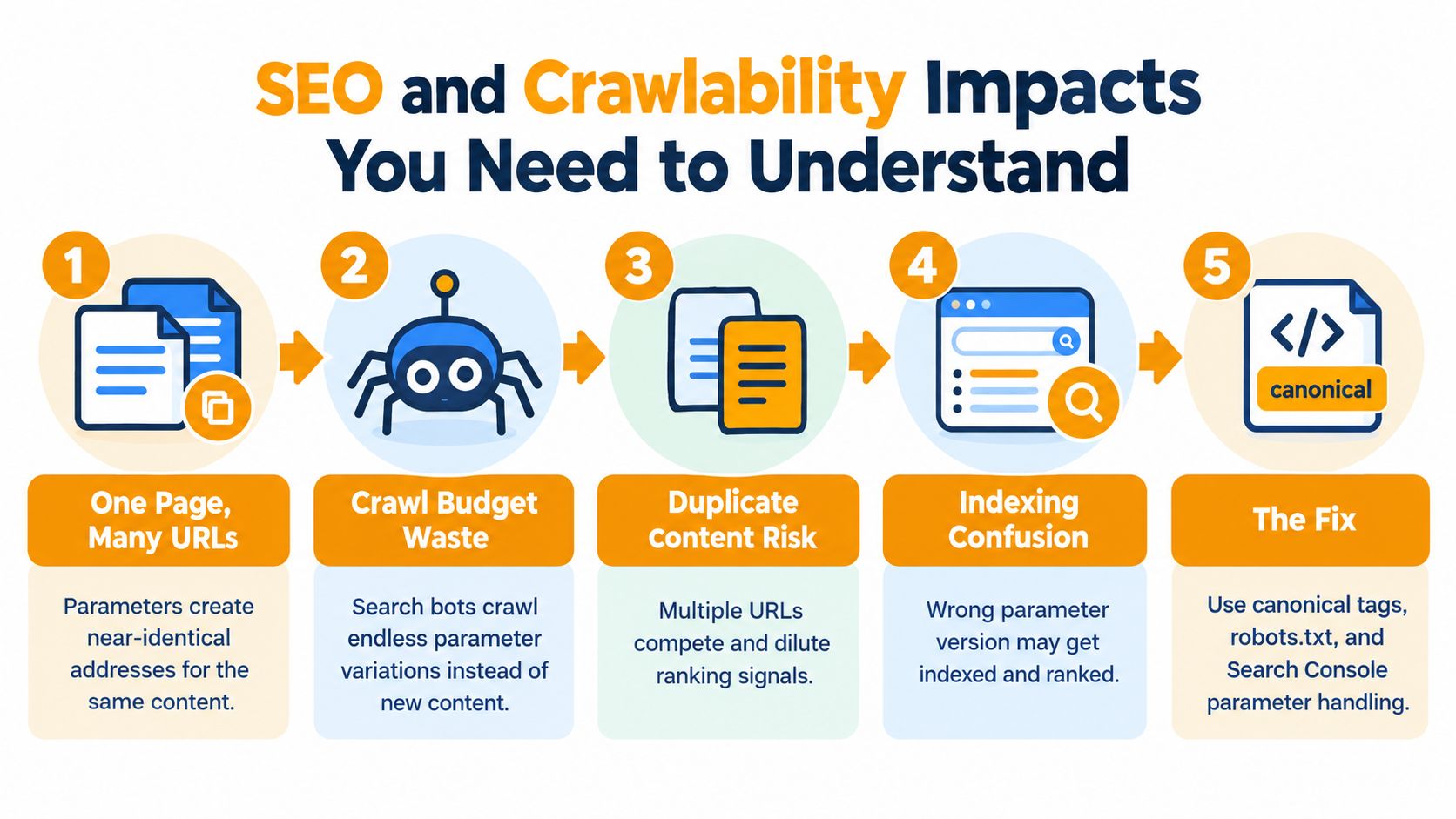
Why duplication and crawl waste occur
Duplicate-content risk does not require identical source code. Near-identical pages still make search engines choose which URL should represent the primary version. If a site generates combinations for every color, size, sort option, tracking tag, and empty value, the set of possible addresses can expand quickly.
Crawl efficiency declines when bots spend resources fetching variations with little independent value. Important pages may then be harder to discover and revisit, especially on large ecommerce sites with faceted navigation. Google's URL-structure guidance recommends using parameters only when they're needed and avoiding unnecessary variants.
Treat parameter handling as measurement governance, not just URL formatting. A campaign parameter can improve attribution, while a filter or sort parameter may create another page that search engines do not need to index. The page's purpose should determine its SEO treatment.
A practical SEO team can apply three controls:
- Canonical tags: Add a canonical link on an accessible duplicate variant that points to the preferred clean URL. This consolidates signals when the variant should not be the primary page.
- Robots.txt rules: Disallow parameter patterns that create thin results or effectively unlimited combinations. This prevents crawling, but does not guarantee that a blocked URL will never appear in search.
- Google Search Console's legacy URL Parameters tool: This historical tool communicated parameter behavior. Do not treat it as a substitute for current canonical signals, internal linking, and crawl controls.
The same classification improves reporting. Teams reviewing digital marketing performance metrics should separate campaign identifiers from page-state parameters, so attribution data remains distinct from the quality and discoverability of the underlying URLs.
A Decision Framework for Handling Parameterized URLs
A paid campaign lands visitors on ?utm_source=newsletter, while a product filter creates /shoes?color=red. Both URLs contain parameters, but they serve different measurement and SEO purposes. Classify each parameter by asking two questions: does it create a distinct search-worthy experience, and should search engines discover that experience?
| Tier | Action | When to Use | Example Parameter |
|---|---|---|---|
| Tier 1 | Index | The parameter creates complete content with independent search value | ?lang=es |
| Tier 2 | Canonical | The parameter supports tracking or temporary state but duplicates a stable page | ?utm_source=newsletter |
| Tier 3 | Block | The parameter creates thin, repetitive, or unlimited combinations | ?q=running+shoes or ?sort=price-asc |
| Tier 4 | Rewrite | The state matters to users and searchers, but a stable path communicates it better | ?color=red changed to /shoes/red/ |
Tier 1 and Tier 2
Index a parameterized URL when it produces distinct content. A Spanish page at ?lang=es may deserve search visibility when it is fully localized and internally discoverable. Confirm that it is a complete language version, not merely a display switch over the same text.
Canonicalize tracking and session variants when they must remain accessible for attribution but should not compete with the clean URL. A newsletter landing page can process ?utm_source=newsletter for reporting while identifying the unparameterized page as canonical. Google's documentation on canonicalization explains how to consolidate duplicate URLs.
Tier 3 and Tier 4
Block internal-search and low-value sorting combinations when they generate thin pages or near-unlimited URL sets. ?q=red+shoes may help a visitor find products, yet it rarely deserves treatment as an indexable destination. Choose crawl controls only after confirming how the site links to these URLs and whether any valuable pages share the pattern.
Rewrite valuable facets into descriptive paths. If red shoes represent a meaningful category, /shoes/red/ is easier to share, link to, and govern than /shoes?color=red. A stable path does not replace technical controls, but it gives an important user state a clear URL identity and keeps measurement decisions separate from crawl management.
Encoding and Security Considerations for Parameters
Browsers and servers need a predictable way to distinguish data from URL syntax. Percent-encoding represents reserved characters safely. A space can become %20, and an ampersand inside a value can become %26.
For example, a search for red shoes & socks needs the ampersand encoded so it isn't mistaken for the separator between parameters:
`
Without encoding, a server might interpret socks as a new key or truncate the original search value. Google's parameter guidance describes the standard use of = between keys and values and & between parameters.
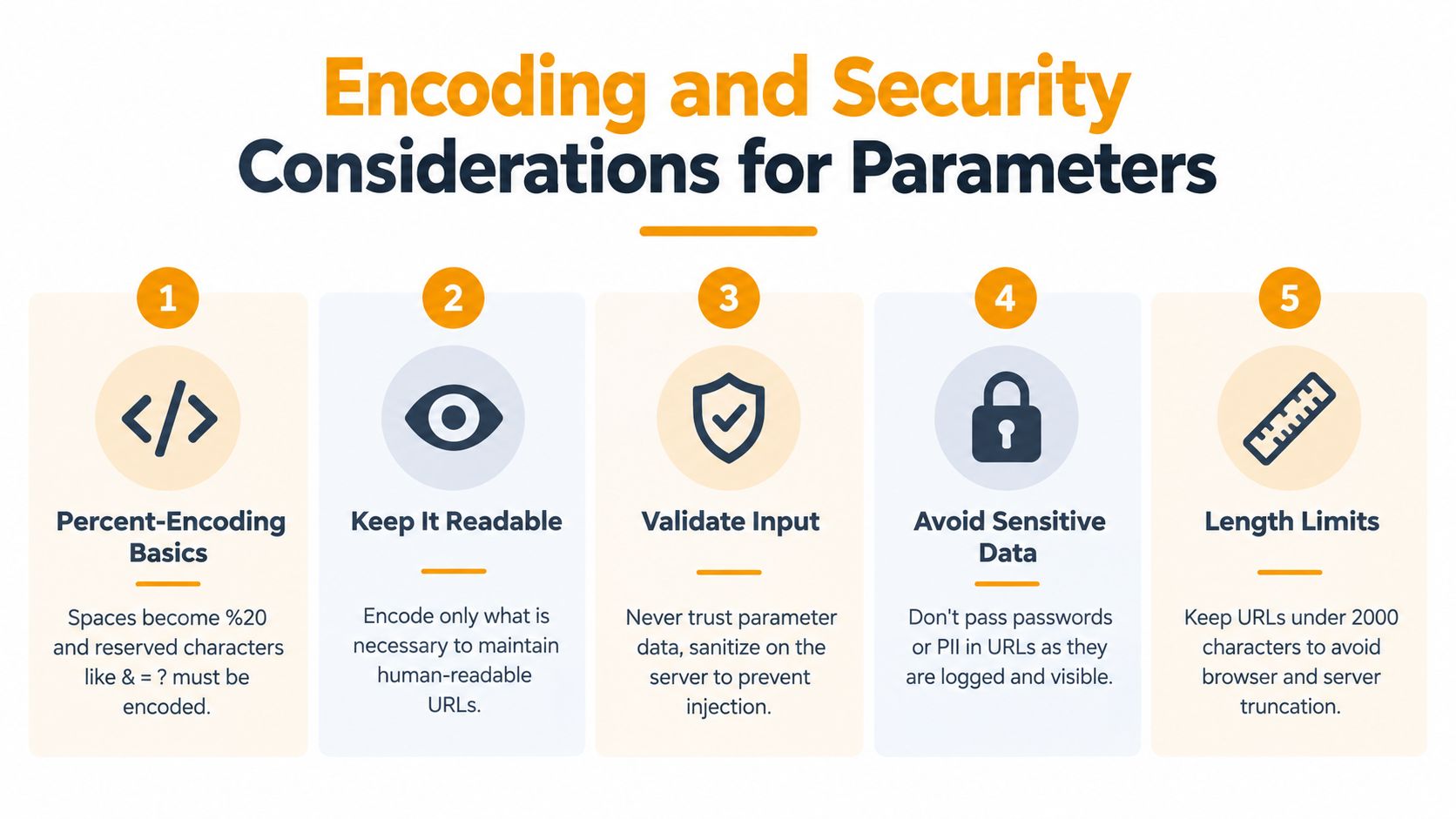
Treat every value as untrusted input
Parameters are visible in browser history, analytics systems, server logs, referrer data, and shared links. Never put passwords, access tokens, or unnecessary personal information in them.
Common risks include:
- Open redirects: A parameter such as
?redirect_to=https://evil.comcan send users from a trusted domain to a phishing site. Use an allowlist of approved destinations rather than accepting arbitrary URLs. - Reflected cross-site scripting: A search term or error value that the page echoes without sanitization can execute attacker-controlled JavaScript in the visitor's session.
- SQL injection: An unsanitized identifier such as
?id=1 OR 1=1can alter a database query and expose records.
Developers should validate values on the server, encode output for its destination context, and reject unexpected formats. A Web Application Firewall can provide another defensive layer, but it shouldn't replace secure application code.
Keep values readable when possible, encode reserved characters when necessary, and establish sensible length limits at the application and infrastructure levels. Shopify's explanation of URL parameters also recommends using them only when they add genuine value.
How to Audit and Detect Parameter Issues
A parameter audit starts with inventory, not assumptions. Crawl the site with Screaming Frog or Sitebulb, export URLs containing query strings, and group the results by parameter key. Include canonical targets, indexability signals, response status, internal-link counts, and the page template associated with each variant.
Then assign every key a purpose:
- Tracking: UTM or other campaign values.
- Filtering: Category, color, size, brand, or price state.
- Sorting: Price, popularity, newest, or relevance order.
- Pagination: Page or offset navigation.
- Session: Temporary visitor or login state.
- Internal search: User-entered query strings.
Map each group to the index, canonical, block, or rewrite policy. Don't judge a parameter only by how often it appears. A frequently crawled filter may support a valuable landing page, while a less common session identifier may create a large number of useless variants over time.
Connect crawl data to business value
Compare the crawl export with analytics and Search Console data. Identify which parameterized URLs receive meaningful visits, which only create fragmented sessions, and which appear in indexing exclusions or duplicate-page reports. Review the former URL Parameters report where available as historical context, but prioritize current directives and observed crawling behavior.
Also inspect internal links. A canonical tag is less effective as a governance signal when navigation repeatedly links to every temporary variant. Check server logs for repeated requests to faceted combinations, blank values, reordered keys, and unexpected parameter names.
The website auditing checklist from LLMrefs can help structure the wider technical review around these URL findings. Prioritize fixes by crawl frequency, commercial importance, duplication risk, and the effort required to change routing or templates.
Best Practices and Final Recommendations
Marketers and developers need one shared parameter policy. Marketing controls naming and attribution, while development controls routing, rendering, encoding, and security. If those teams make separate decisions, a useful campaign tag can become an uncontrolled indexing pattern.
Daily rules for marketers
- Standardize UTM names: Agree on lowercase keys and values, then document them in a shared campaign sheet.
- Avoid redundant tags: Don't add several parameters that describe the same source or creative.
- Separate attribution from indexation: Keep tracking available to analytics while directing search engines toward the stable landing-page version.
- Test campaign links: Check the final URL, redirect behavior, analytics capture, and canonical target before distribution.
Engineering rules for developers
Use clean paths for states that deserve search visibility. Canonicalize filters that change the display but don't create independent content, and prevent session identifiers from becoming internally linked URLs.
Validate every parameter, encode output correctly, and use allowlists for redirect destinations. Review robots.txt behavior and Search Console indexing signals before launch, then monitor server logs for unexpected crawl spikes or newly generated parameter patterns.
Publish the policy in an SEO playbook. It should document each parameter's purpose, whether it changes content, the canonical target, crawl treatment, permitted values, and the owner responsible for future changes.
Parameter governance also affects AI visibility. As AI search systems select and cite web sources, controlling which URL variants can be crawled and indexed helps ensure that the version representing your real content is the one systems encounter. LLMrefs can support that visibility work by tracking brand mentions, citations, and competitor presence across AI answer engines, giving teams a practical view of how discoverable sources appear beyond traditional search.
LLMrefs helps teams monitor brand visibility, citations, and mentions across AI answer engines while connecting those results to SEO and content decisions. Visit LLMrefs to track the sources AI systems surface, identify content gaps, and build a clearer measurement workflow around your indexed URLs.
Related Posts

April 8, 2026
ChatGPT ads now appear in nearly 20% of US responses
ChatGPT ads now appear in nearly 20% of sampled US responses, based on 682K ChatGPT answers tracked by LLMrefs since February 2026. See who is buying, how fast ads are growing, and how we measure it.

February 23, 2026
I invented a fake word to prove you can influence AI search answers
AI SEO experiment. I made up the word "glimmergraftorium". Days later, ChatGPT confidently cited my definition as fact. Here is how to influence AI answers.

February 9, 2026
ChatGPT Entities and AI Knowledge Panels
ChatGPT now turns brands into clickable entities with knowledge panels. Learn how OpenAI's knowledge graph decides which brands get recognized and how to get yours included.

February 5, 2026
What are zero-click searches? How AI stole your traffic
Over 80% of searches in 2026 end without a click. Users get answers from AI Overviews or skip Google for ChatGPT. Learn what zero-click means and why CTR metrics no longer work.