ChatGPT Entities and AI Knowledge Panels
Written by James Berry • Last updated February 9, 2026
ChatGPT now turns brands, people, products, and places into clickable highlights inside conversations. Tap one and a side panel opens with key facts, images & links.
On January 30, 2026, OpenAI added a feature that changes how users interact with brands inside ChatGPT. Some names in responses are now clickable entities opening a side panel with a summary, key facts, images, and links to trusted sources.
From the changelog. "Answers now also highlight important people, places, products, and ideas. You can tap any highlight to open a side panel with key facts and trusted sources, making it easy to understand the context without asking follow-up questions."
This is not just a UI polish, it's the biggest change to how brands appear in AI search since ChatGPT launched.
What Are ChatGPT Entities?
An entity is any distinct, recognizable thing. A person, a company, a product, a place, an event. When ChatGPT identifies something as an entity, it creates a structured reference rather than just mentioning a name in text.
Google has done this for years with Knowledge Panels. The difference is where it happens. Google's panels appear while you are scanning search results. ChatGPT's panels appear while you are actively making decisions. The information lands at the exact moment you need it.
Types of entities ChatGPT recognizes
- People. Founders, public figures, authors, executives.
- Organizations. Companies, institutions, nonprofits.
- Products. Software tools, physical products, devices. These carry structured metadata like pricing and reviews.
- Places. Cities, landmarks, and local businesses with addresses and hours.
- Events. Conferences, historic moments, product launches.
- Brands. Brand-level entities that group products and services together.
Behind the scenes, ChatGPT uses Named Entity Recognition (NER) to classify these. "Nike" becomes an organization entity. "Sam Altman" becomes a person entity. "MacBook Pro" becomes a product entity.
What Entity Panels Look Like
Entities appear as bold, dotted underlined, clickable text in the response. Tapping an entity in ChatGPT will open a side panel on the right (or drawer if on mobile).
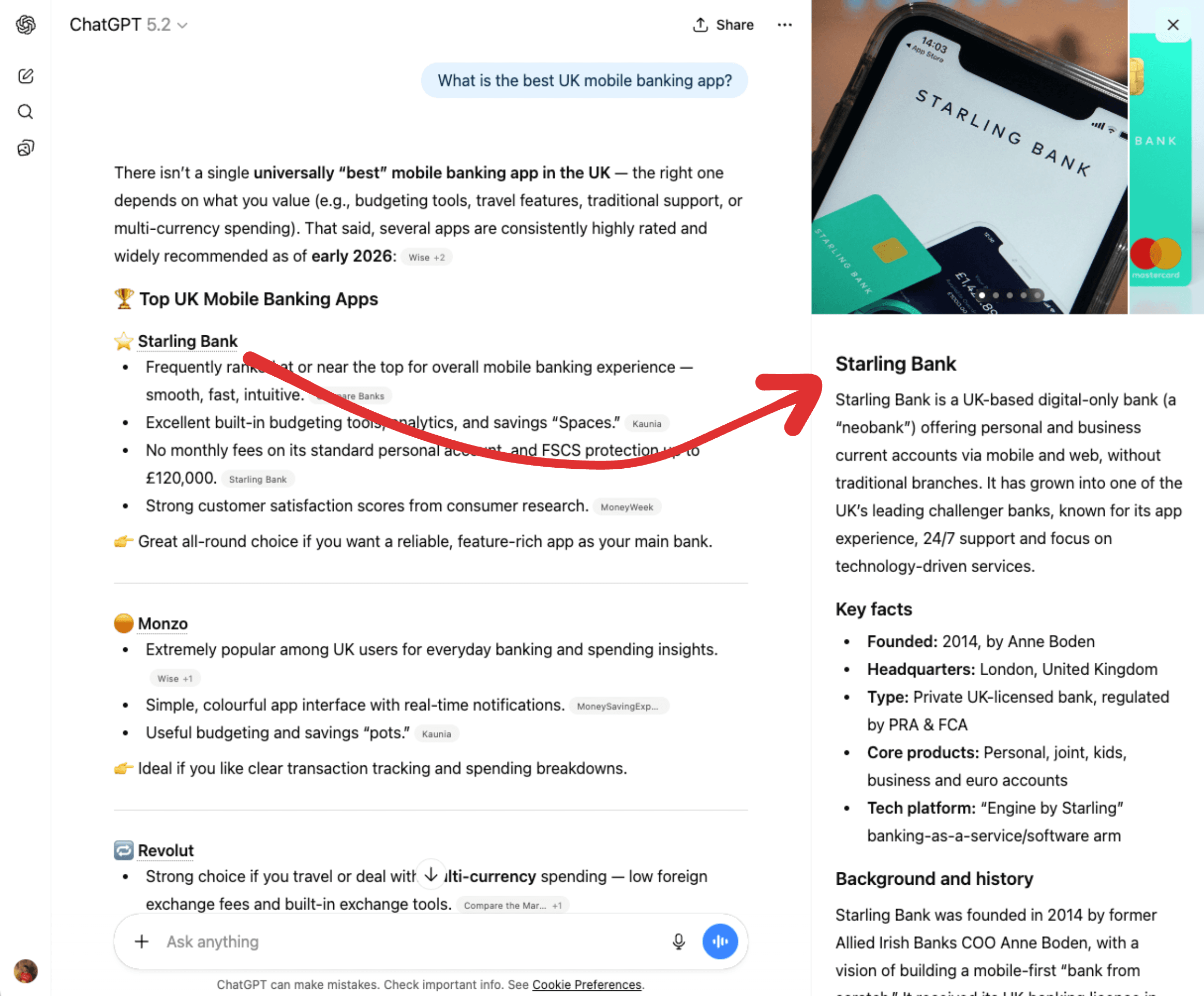
The panel typically includes:
- A summary. A brief description of the entity based on training data and grounding sources.
- Key facts. Founding year, headquarters, category, key people.
- Images. Photos or logos pulled from web sources.
- Source links. The URLs ChatGPT used to build the summary, listed at the bottom.
For local businesses, panels can also include map buttons, phone numbers, and hours of operation.
How Often Entities Appear
Entities do not show up for every ChatGPT response. They appear most often when the conversation involves well-known brands, and almost always when the response includes ChatGPT's embedded map feature.
They were first noticed in ChatGPT's codebase in mid-October 2025. A large percentage of responses started including entity metadata in the hidden response code. Before this date, ChatGPT only treated brand names as plain text.
At the same time this happened, ChatGPT started mentioning fewer brands per response. What used to be six or seven dropped to three or four. This behavior change meant that making your brand visible became more competitive, but being there is worth more.
Entities Are Not From Web Search
This is an important technical detail. ChatGPT has a web search feature that fetches live results and grounds responses with citations. You might assume entities come from that same search process. They do not.
We tested this by explicitly asking ChatGPT to answer without using web search. The model responded using only its training data. Entities still appeared in the output. Clickable, structured, with the same panel behavior. This confirms that entity recognition is baked into the response generation stage itself, not the search grounding layer.
Looking at the hidden metadata in ChatGPT responses, you can see how entities are structured. Here is an example from asking "what is Salesforce."
{
  "matched_text": "entity[\"company\",\"Salesforce\",\"cloud software company\"]",
  "type": "entity",
  "name": "Salesforce",
  "category": "company",
  "priority": 1,
  "extra_params": {
    "disambiguation": "cloud software company"
  },
  "status": "done"
}
The entity includes a category ("company"), a disambiguation field ("cloud software company"), and a priority score. This is NER running at the LLM synthesis stage. As the model generates its response, it identifies proper nouns it recognizes as known entities and tags them with structured metadata inline.
The disambiguation field is especially important. It is a constant. It does not change based on the user's prompt, the conversation history, or any surrounding context. Every time ChatGPT identifies Salesforce as an entity, the disambiguation will always be "cloud software company."
This is strong evidence that ChatGPT is looking up entities from a knowledge graph rather than generating them on the fly. LLMs are probabilistic. If ChatGPT were generating the disambiguation as part of its normal text output, the wording would vary between responses. "Cloud software company" might become "enterprise cloud platform" or "CRM and cloud computing provider" depending on the prompt and context. The fact that it is always identical, word for word, means it is being retrieved from a structured data source, not generated.
This also tells us entity tagging is a separate process from ChatGPT's live web search. We do not know the exact implementation. But we do know it operates independently from the web search grounding feature, because entities still appear even when search is disabled.
How entity panels generate their content
When a user taps an entity to open the panel, ChatGPT does not pull from a prebuilt profile. It effectively starts a new conversation behind the scenes using a prompt template that includes the entity metadata.
"Tell me about [entity name]. The entity category is [entity category]. The disambiguation is [entity description]."
For Salesforce, that prompt would be. "Tell me about Salesforce. The entity category is company. The disambiguation is cloud software company."
This means the disambiguation field directly shapes the panel content. It is not just metadata. It is the framing that tells ChatGPT how to describe your brand every single time a user opens your panel.
Why the disambiguation matters for your brand
If your company has evolved but the disambiguation has not kept up, every entity panel will describe you using an outdated identity. A company that pivoted from "web hosting provider" to a full cloud infrastructure platform would still be framed as a hosting company in every panel. The panel prompt explicitly asks ChatGPT to describe the brand using that disambiguation, so it reinforces whatever label is stored in the knowledge graph.
You cannot edit this field directly. It comes from whatever knowledge graph OpenAI is using. But you can influence it by updating how your brand is described across every authoritative source. Your Wikidata entry, your structured data, your Crunchbase profile, your homepage copy. If every source consistently describes your company the same way, the knowledge graph is more likely to reflect that description in future updates.
Why Entity Panels Matter for Your Brand
They combat the zero-click problem
More than 80% of searches now end without a click to any website. That is the zero-click problem. Entity panels partially solve it by giving users a clickthrough path that did not exist before. Tap the entity, see the panel, click a source link, land on a real website.
Before entity panels, ChatGPT would mention your brand in a paragraph and the user would move on. No link. No way to visit your site. Now there is one.
They build instant credibility
When ChatGPT treats your brand as an entity with structured facts and cited sources, it signals that your brand is established. If someone asks for project management tools and your brand appears as a clickable entity alongside Notion and Asana, that visual treatment puts you on the same level.
They influence decisions before the click
Imagine someone asking ChatGPT for "the best email marketing platform for ecommerce." Four tools come back. Two are highlighted as entities with panels, pricing info, and links. The other two are plain text. No panel. No link.
Those plain-text brands just lost the consideration game without knowing it. The user made a shortlist decision entirely inside ChatGPT.
How ChatGPT Decides What Becomes an Entity
Obviously, ChatGPT does not randomly highlight names. It needs enough structured, consistent information to confidently identify something as a distinct entity. To understand how, you need to understand knowledge graphs.
What is a knowledge graph
A knowledge graph is a structured database of facts about real-world things and the relationships between them. Instead of storing information as paragraphs of text, it stores it as structured statements. "Salesforce" is a "company." "Salesforce" is "headquartered in" "San Francisco." "Salesforce" "was founded by" "Marc Benioff." Each fact is a connection between two entities.
This structure is what makes entity recognition possible. When a system has a knowledge graph, it can look up whether "Salesforce" is a known entity, what category it belongs to, and how it relates to other entities. Without one, the system would have to infer all of this from unstructured text every time.
Google built its own Knowledge Graph over a decade ago and uses it to power Knowledge Panels, search cards, and entity understanding across its products. Wikidata is the largest open-source knowledge graph. It contains billions of structured statements covering people, places, companies, products, events, and more. Anyone can contribute to it and anyone can query it.
What knowledge graph is ChatGPT using
From our testing at LLMrefs, we can confirm ChatGPT is not directly querying Google's Knowledge Graph or Wikidata in real time.
We tested this with OpenClaw, an new AI tool that has consumed all of tech-twitter over the past week. OpenClaw has entries in both Wikidata and Google's Knowledge Graph. But when you ask ChatGPT about it, there is no entity. No clickable highlight. No knowledge panel. ChatGPT even hallucinated its response, describing it as an open-source video game from the 1990s.
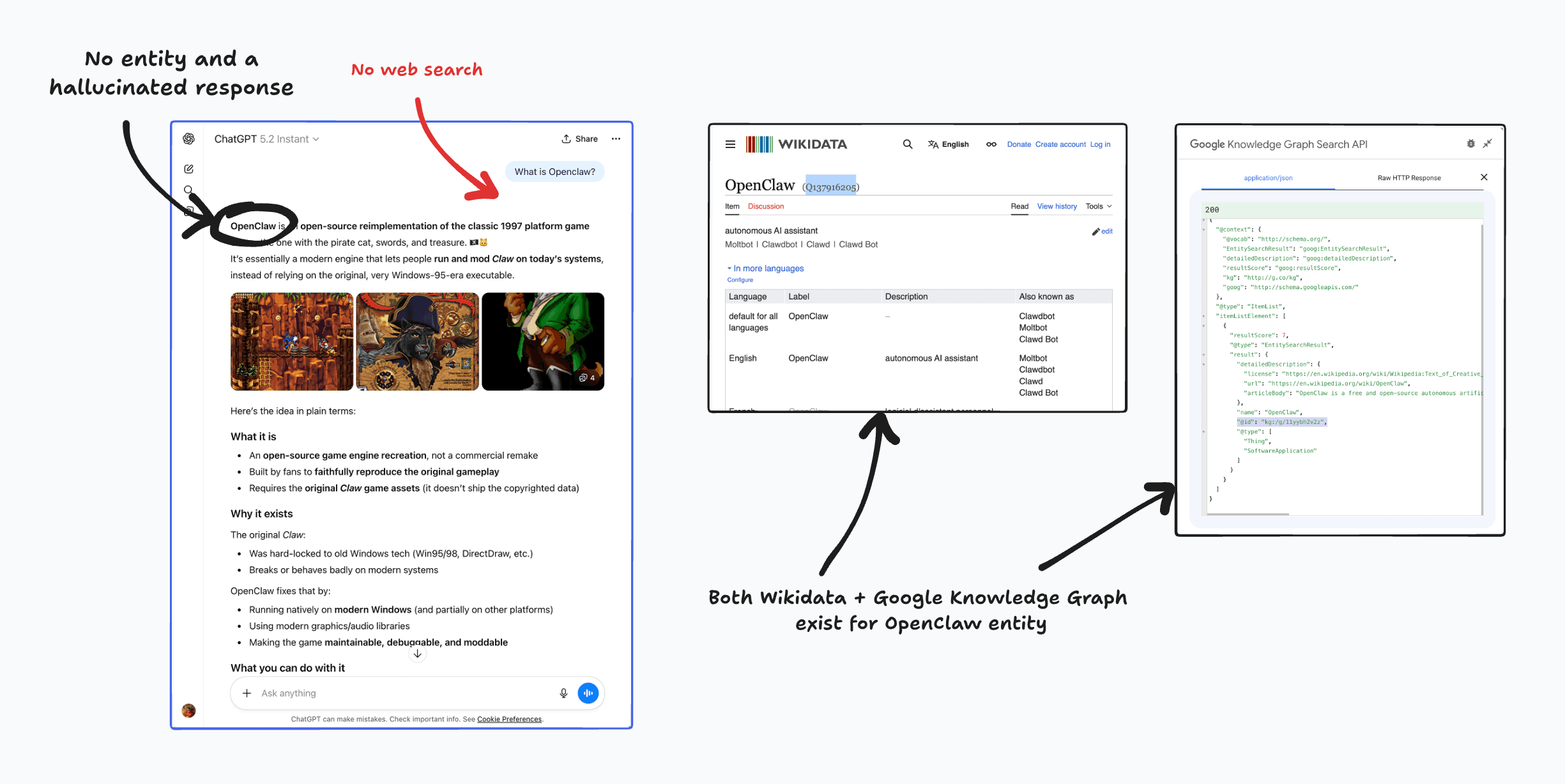
If ChatGPT were making live queries to Google's Knowledge Graph or Wikidata, OpenClaw would show up as an entity immediately. It does not. This confirms the data is not live.
We can also confirm that ChatGPT does recognize brands that exist in Google's Knowledge Graph but not in Wikidata. This rules out Wikidata as the sole source.
The most likely explanation is that OpenAI is building its own knowledge graph. They are already developing their own web index for ChatGPT Search, so building a proprietary knowledge graph follows the same pattern. It appears they are snapshotting data from sources like Wikidata and Google's Knowledge Graph at a point in time aligned with their training data cutoff, then combining it with their own crawled and structured data.
The practical takeaway is that getting your brand into established knowledge bases like Wikidata, Google's Knowledge Graph, and Crunchbase increases your chances of being included in whatever system OpenAI is using. But because the data is not live, new entries will not appear as entities immediately. They will likely be picked up in future model updates.
How to Get Your Brand Recognized as an Entity
-
Use one consistent name everywhere. Do not alternate between "Acme Corp," "Acme," and "The Acme Platform." Pick one and stick with it across your site, profiles, and press.
-
Add structured data to your website. Organization schema on your homepage with
sameAslinking to your Crunchbase, G2, LinkedIn, and Wikidata profiles. This tells AI systems "these are all the same entity." -
Get listed in knowledge bases. Create or update your Wikidata entry. Pursue a Wikipedia page if notable enough. A Wikipedia page creates a Wikidata entry automatically, and that is the strongest signal you can send. This should be part of your long-term GEO strategy.
-
Keep facts consistent across all sources. Founding year, headquarters, leadership, product descriptions. Everything should match everywhere.
-
Build third-party references alongside known entities. Reviews on G2, mentions in industry publications, press coverage. When your brand frequently appears alongside recognized entities like Salesforce or HubSpot, ChatGPT learns your brand belongs in that category.
How to Check Your Entity Panel
Open ChatGPT and try prompts that would naturally surface your brand.
- "What is [Your Company]?"
- "Tell me about [Your Company]."
- "[Your Company] versus [competitor]."
- "Reviews of [Your Company]."
If your brand appears as a highlighted, tappable element, tap it. Study what summary ChatGPT wrote, what facts it lists, what images appear, and which source URLs are cited at the bottom.
If your brand does not appear as an entity at all, ChatGPT does not yet have enough structured data to treat it as one.
Run a facts audit
Check every fact in your panel against reality.
- Does the disambiguation match what your company does today? This is the most important check. The disambiguation field frames every panel conversation. If it describes your company using an outdated positioning, every user who opens your panel sees that outdated identity.
- Are the people mentioned still at the company?
- Is pricing or product information current?
- Do the source links point to pages that represent your brand well?
Those source links reveal which web pages are shaping your panel. A forgotten Crunchbase profile or an outdated news article might be driving the narrative. And remember, the disambiguation comes from OpenAI's knowledge graph, not from these source links. Fixing the panel content means fixing how your brand is described across the web so that future knowledge graph updates reflect your current identity.
How to Track Entity Mentions
Manual checks do not scale. You cannot test every prompt, track changes over time, or monitor competitors by hand.
LLMrefs monitors how your brand appears across ChatGPT, Perplexity, Google AI Overviews, and other AI search engines. Track which prompts trigger your brand as an entity, see which competitors appear alongside you, and measure your AI search visibility over time.
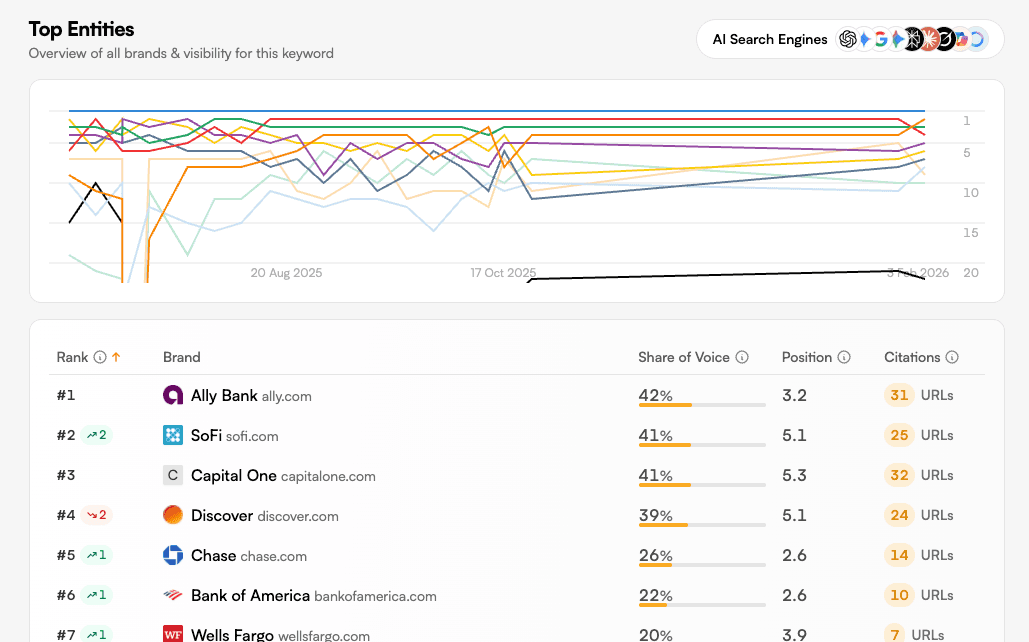
What to monitor:
- Entity presence. Clickable entity or plain text mention? Entity status is stronger.
- Panel accuracy. Are the facts correct and current?
- Source links. Which pages is ChatGPT citing? Are they pages you control?
- Competitor comparison. Who appears as entities in comparison queries?
- Visibility trends. Is your entity presence growing or shrinking? Track monthly.
Think of it like tracking Google rankings, except you are tracking whether ChatGPT even recognizes your brand as a distinct entity.
Related Posts

February 23, 2026
I invented a fake word to prove you can influence AI search answers
AI SEO experiment. I made up the word "glimmergraftorium". Days later, ChatGPT confidently cited my definition as fact. Here is how to influence AI answers.

February 5, 2026
What are zero-click searches? How AI stole your traffic
Over 80% of searches in 2026 end without a click. Users get answers from AI Overviews or skip Google for ChatGPT. Learn what zero-click means and why CTR metrics no longer work.
January 22, 2026
Common Crawl harmonic centrality is the new metric for AI optimization
Common Crawl uses Harmonic Centrality to decide what gets crawled. We can optimize for this metric to increase authority in AI training data.

December 13, 2025
How ChatGPT memory works, reverse engineered
Reverse engineering ChatGPT Memories reveals it does not use RAG or vector databases. It uses: metadata, facts, conversation summaries, and a sliding window.