moving a website, website migration, SEO migration, site transfer, redirects
Moving a Website: Complete Step-by-Step Guide
Written by LLMrefs Team • Last updated October 13, 2026
Roughly 60% of website migrations produce measurable organic-traffic loss, so a successful move depends on pre-migration auditing and a controlled cutover, not just uploading files to a new server. The safest approach maps every important URL, validates the replacement environment, preserves redirects and crawl signals, and measures both traditional search visibility and AI citations.
Moving a website changes more than infrastructure. The move may affect URLs, hosting, domains, protocols, templates, content, analytics, internal links, and the way search systems understand your pages. A technically available site can still lose visibility if Google can't connect old URLs to their replacements or if answer engines can no longer extract clear, authoritative passages.
The practical standard is simple: treat the migration as a reversible, URL-by-URL release. Keep the old environment available, test the new one before launch, and don't declare success until crawling, indexing, conversions, and citation visibility have been checked.
Why Moving a Website Fails Without a Migration Plan
Independent industry summaries report roughly 60% of migrations as producing measurable organic-traffic loss, while an analysis of 892 migrations reported an average recovery period of 523 days. These figures are risk indicators, not forecasts. Migration type, site size, URL changes, and implementation quality all affect the outcome. Use them to size rollback windows and monitoring duration, not to predict what will happen to your site. The figures are reported in this industry analysis of website migration SEO risk.
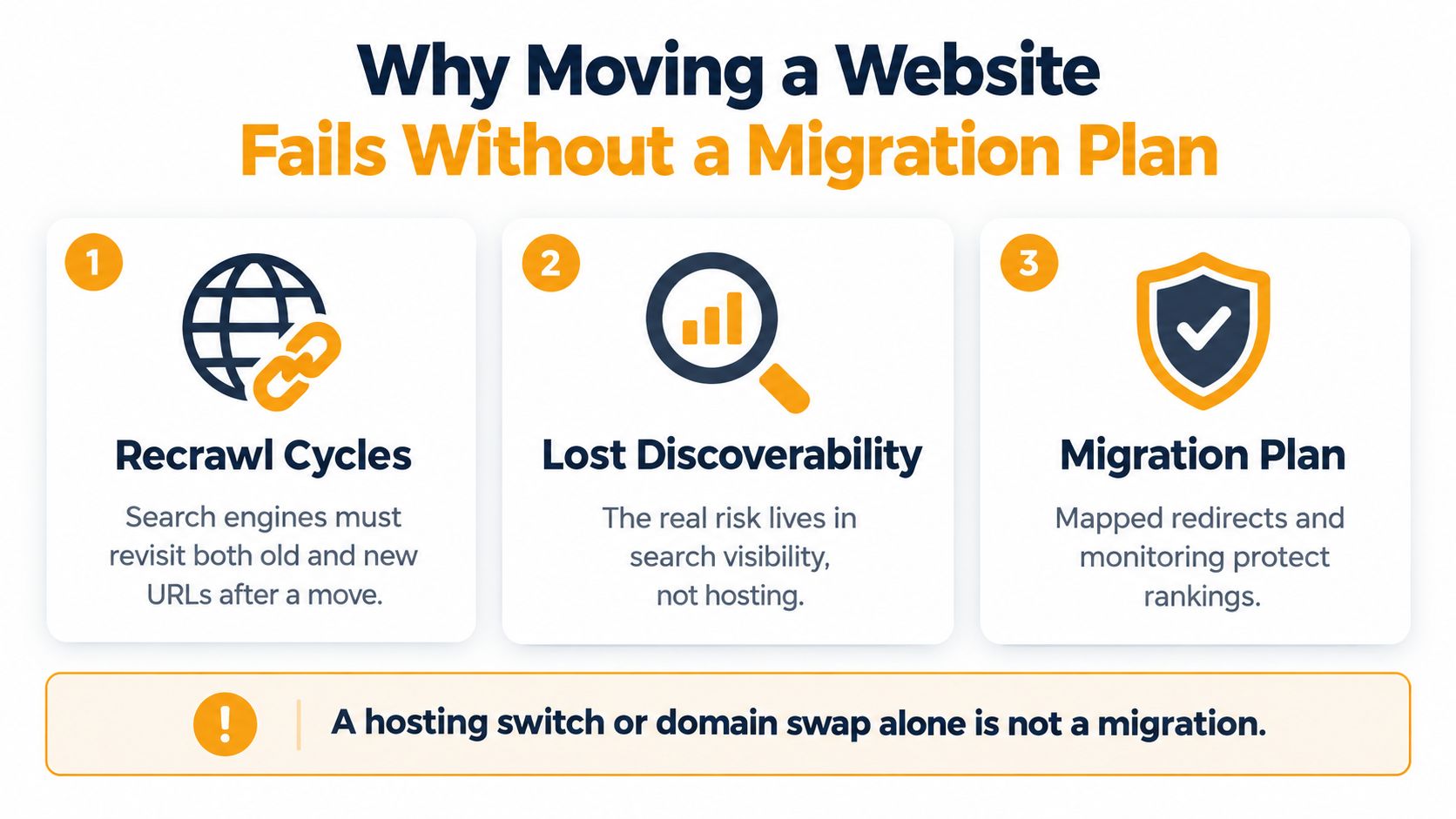
A website move can involve several changes at once. Common examples include switching from HTTP to HTTPS, changing a hostname or domain, moving between subdomains and subdirectories, restructuring URL paths, replacing the site, changing the content-management system, or transferring hosting while keeping URLs intact. Each option affects different dependencies. Every option still requires controls that preserve discoverability.
Changed URLs create a processing period. Google must recrawl old and new versions, follow redirects, evaluate signals, and reindex destination pages. Google explains that medium-sized sites may need several weeks or longer before new URLs replace old ones in search results. Larger sites may take longer, as described in this overview of why poor migrations lose traffic.
The failures usually happen outside the server room
The server transfer is rarely the hardest task. Traffic losses more often follow an incomplete redirect map, a canonical tag that still references the old domain, a production noindex directive copied from staging, or an XML sitemap filled with legacy URLs.
Risk increases when a team changes the domain, URL structure, copy, templates, hosting, and analytics implementation in one release. A ranking drop then has several possible causes. Google may still be processing the move, the new content may be weaker, tracking may have failed, or important pages may be inaccessible.
Practical rule: A clean deployment proves that the site loads. It does not prove that search engines can discover, interpret, and credit the replacement site.
The same distinction applies to AI search. A redirect can preserve historical signals while a redesigned template makes the content harder for answer engines to extract. Changes to headings, entity references, structured data, internal links, and explanatory passages can affect whether systems cite a page in generated answers.
Treat the move as a controlled visibility release
Define the old property, new property, URL mapping, rollback path, and monitoring owners before launch. Keep the old origin and redirect rules available after DNS resolves. This provides evidence when Googlebot, users, or AI systems receive inconsistent responses.
A useful migration plan runs on two tracks:
- Organic continuity: Preserve URLs where possible, map changed URLs directly, update canonicals and sitemaps, and validate crawl access.
- Citation continuity: Record the pages, passages, entities, and brand references that appear in AI answers before launch, then compare the same query categories afterward.
Success requires more than recovered sessions or stable rankings. The replacement site must remain crawlable, semantically consistent, and easy for both search engines and answer engines to understand. A migration is complete only when both traditional organic visibility and AI-citation eligibility remain intact.
Auditing Your Site Before You Move Anything
Don't touch DNS, hosting, or redirect rules until you know what the existing site contains. Start with a crawl and export every indexable URL, backlink target, canonical declaration, hreflang variant, image, PDF, and high-traffic landing page. Add status codes, title and heading data, organic landing-page performance, conversions, and known dependencies such as analytics scripts or structured data.
Preserve at least 12 months of organic landing-page and backlink data, then create a focused comparison for the previous 28 days. Segment the baseline by URL, country, device, template, query type, and conversion so a post-launch change can be diagnosed rather than guessed.
Build a deterministic URL map
A good mapping pairs old and new pages by equivalent search intent, not by matching strings. For example, /services/audit may move to /technical-seo-audit, while /blog/migration may move to /guides/website-migration. A simple pattern replacement might send both to the wrong destination even though the new architecture looks tidy.
Record the reason for every mapping. Use a direct permanent redirect for an equivalent page, retain a URL when there is no reason to change it, and return an appropriate unavailable response when content has been removed and has no relevant replacement. Sending every deleted page to the homepage creates a misleading destination and weakens topical relevance.
Google recommends direct redirects. They should ideally contain no more than three hops and fewer than five, even though Googlebot can follow up to ten, according to its documentation on site moves with URL changes.
Test the replacement before DNS changes
Use a staging environment with crawl controls, then verify the controls themselves before launch. The staging site should prevent accidental indexing without allowing those directives to leak into production.
| Audit Area | Verification Action |
|---|---|
| Indexable URLs | Crawl the current site and export canonical, indexable pages |
| Backlinks | Match valuable referring URLs to their intended destinations |
| Redirect map | Test every old-to-new relationship for intent and direct resolution |
| Canonicals | Confirm each production page points to its preferred HTTPS URL |
| Internal links | Find links to old paths, redirects, broken pages, and staging hosts |
| Robots.txt | Review allowed and disallowed paths for production |
| XML sitemap | Ensure it contains only intended new, live, canonical URLs |
| Analytics | Validate page views, conversions, events, and source attribution |
| Structured data | Test required schema and rendered content on representative templates |
| Rendering | Check JavaScript-dependent content, images, PDFs, and key components |
For a deeper operational checklist, this guide to redirects and analytics is useful when assigning ownership across development, SEO, and analytics teams. The website auditing checklist also provides a practical way to structure the inventory before implementation begins.
Don't rely only on a browser. Crawl the staging host, inspect rendered HTML, test status codes, and compare page templates against the live site. A page that looks correct to a developer may still expose a noindex directive, an old canonical, blocked assets, or links pointing back to the previous architecture.
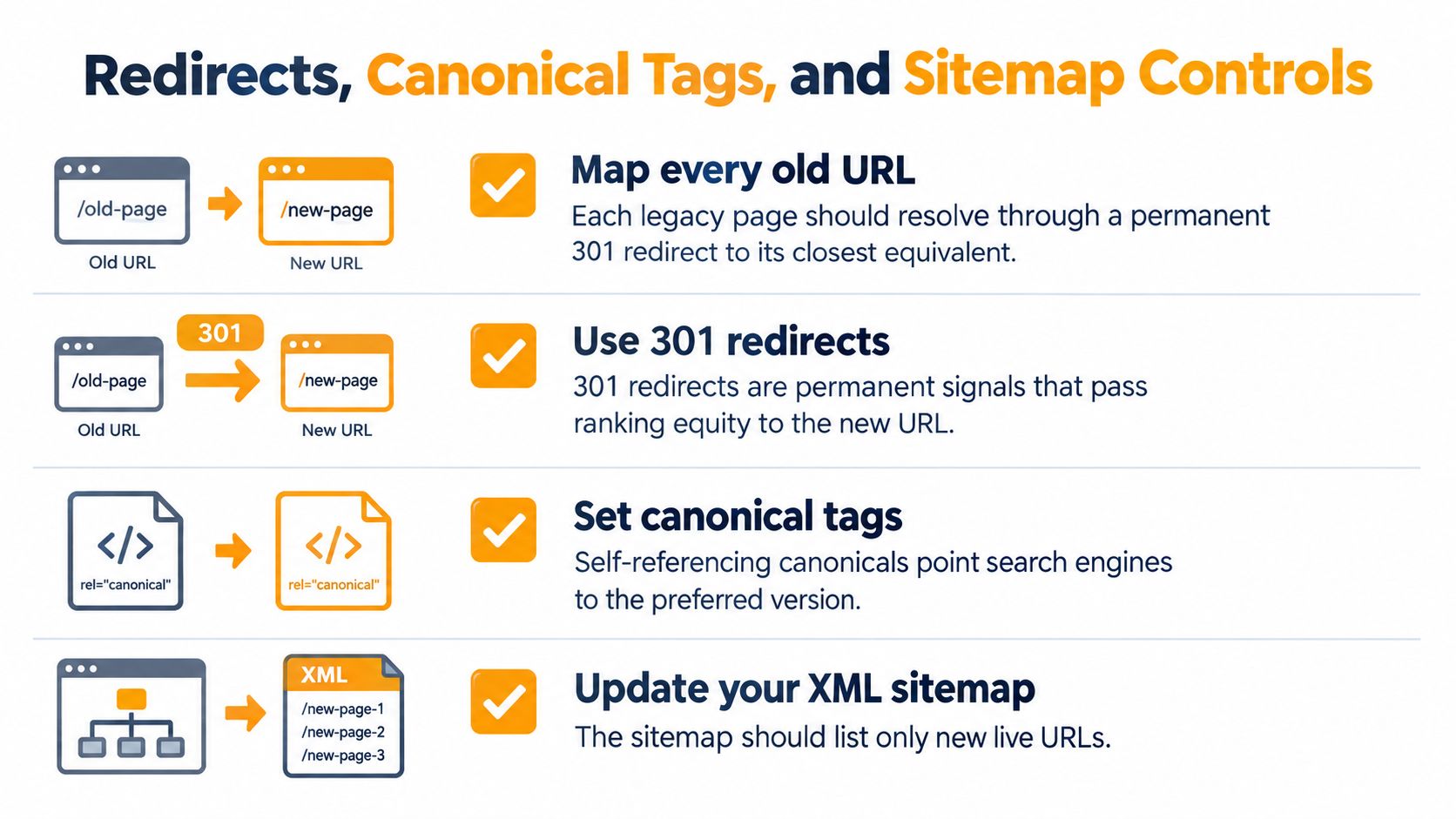
Redirects, Canonical Tags, and Sitemap Controls
Redirects are the translation layer between the old site and the new one. Every changed URL should resolve through a permanent redirect to the closest relevant destination, preferably in one hop. The redirect needs to preserve intent, not just send a visitor somewhere that happens to return a successful status.
Bulk-redirecting removed pages to the homepage is one of the most damaging shortcuts. It makes the server appear busy while giving users and crawlers an irrelevant result. If /guides/technical-audit has no replacement, don't pretend the homepage is equivalent. Decide deliberately whether to retain the page, redirect it to a closely related resource, or retire it.
Make every signal agree
After launch, the redirect destination, canonical tag, internal links, hreflang references, and XML sitemap should describe the same preferred URL. A page that redirects correctly but has a canonical pointing to the old domain sends conflicting instructions. An updated page that remains absent from internal links may also be discovered slowly.
Use the robots.txt file creation guide while reviewing crawl rules, but don't treat robots.txt as a replacement for authentication or a universal removal tool. A blocked URL can prevent crawlers from seeing content or redirect behaviour, so each rule needs a clear purpose.
For a domain or subdomain move, verify both properties in the same Google account and use Search Console's Change of Address tool where applicable. Google recommends keeping redirects for at least 180 days, and longer when old URLs continue to receive Google Search traffic, as explained in its Change of Address guidance.
Handle protocol moves as URL changes
An HTTP-to-HTTPS move changes the canonical URL for every page. Redirect every HTTP URL to its HTTPS equivalent, update internal links and canonical declarations, remove mixed-content dependencies, and update analytics, sitemaps, and webmaster properties.
HTTPS is now the dominant web standard. The 2025 Web Almanac reported that more than 98.8% of requests from mobile connections were delivered over HTTPS, an increase of 0.74 percentage points from the prior year, according to its security chapter. The practical lesson is not to treat protocol security as a separate housekeeping task. It belongs in the same release plan as discoverability and measurement.
Publish the new XML sitemap only after its URLs return the intended live response and use the preferred protocol and host. Keep the old sitemap available only where it supports controlled transition and monitoring, not as the primary source of current URLs.
DNS Changes, Hosting Swaps, and Cutover Timing
A hosting migration with unchanged URLs is simpler than a domain or architecture move, but it can still produce an outage. The migration starts when DNS records direct requests to the new infrastructure, so the replacement environment must already be uploaded, configured, tested, and capable of serving the actual application.
Cloudflare recommends lowering TTLs for critical DNS records 24 to 48 hours before the planned migration, with a common migration TTL of 300 seconds, equal to five minutes, as described in its DNS migration guidance. Lowering TTL doesn't instantly update every resolver because previously cached records may remain until their earlier TTL expires. It does reduce the caching period for future answers.
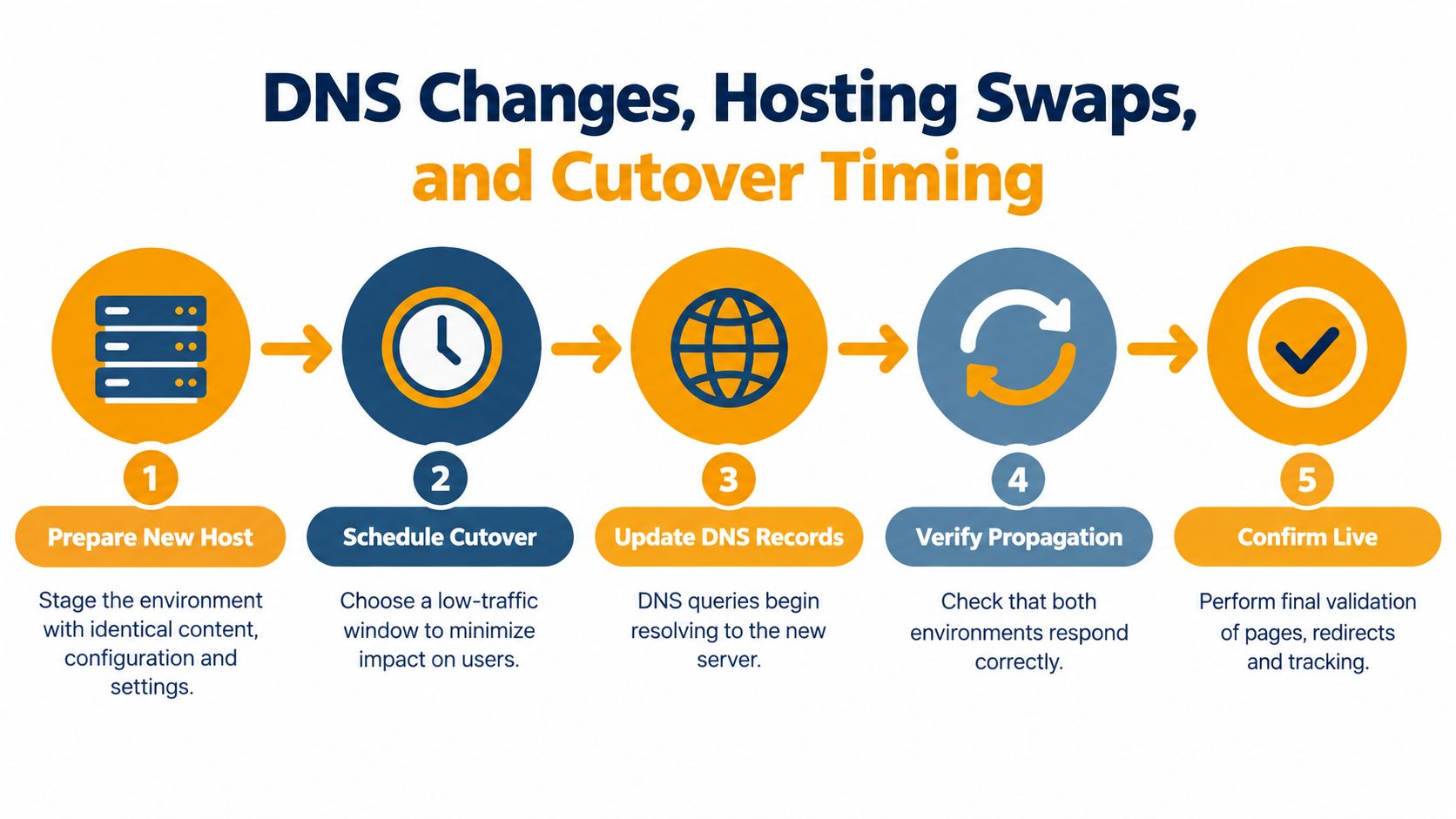
Prepare the cutover as a reversible release
Deploy the new host behind a temporary hostname or controlled staging route. Check TLS, application health, rendered pages, forms, asset delivery, tracking, redirects, and server logs before changing DNS. Then schedule the switch during a low-demand period, retain the old origin, and keep the redirect map available.
A DNS change is a routing decision, not a test plan. Test the destination before users are routed there.
After the change, verify availability from multiple networks and locations. Check that the new origin receives requests, that critical pages return the expected responses, and that monitoring tools aren't reading from a stale local cache. Keep a clear owner for DNS, hosting, application, analytics, and SEO validation.
The expert walkthrough to create a blog can help when a hosting move includes a new publishing setup, but the migration team still needs to preserve existing URLs, feeds, metadata, and measurement. A new CMS is not a reason to discard the old information architecture without evidence.
DNS stability is only the first checkpoint. Once the new host serves traffic, inspect both organic signals and AI visibility. A page can remain available and retain its rankings while its structured content, internal context, or key passages become less useful to answer engines. Monitoring needs to cover both outcomes.
Monitoring SEO Health and Recovering After a Move
Index replacement usually trails deployment by weeks. Use the Search Console Indexing report, URL inspection, and sampled server logs to confirm that Googlebot is shifting from old URLs to new ones before declaring the migration stable. Early volatility is not automatically failure. The meaningful questions are whether crawlers can access the new pages and whether visibility, canonical signals, and citations are transferring.
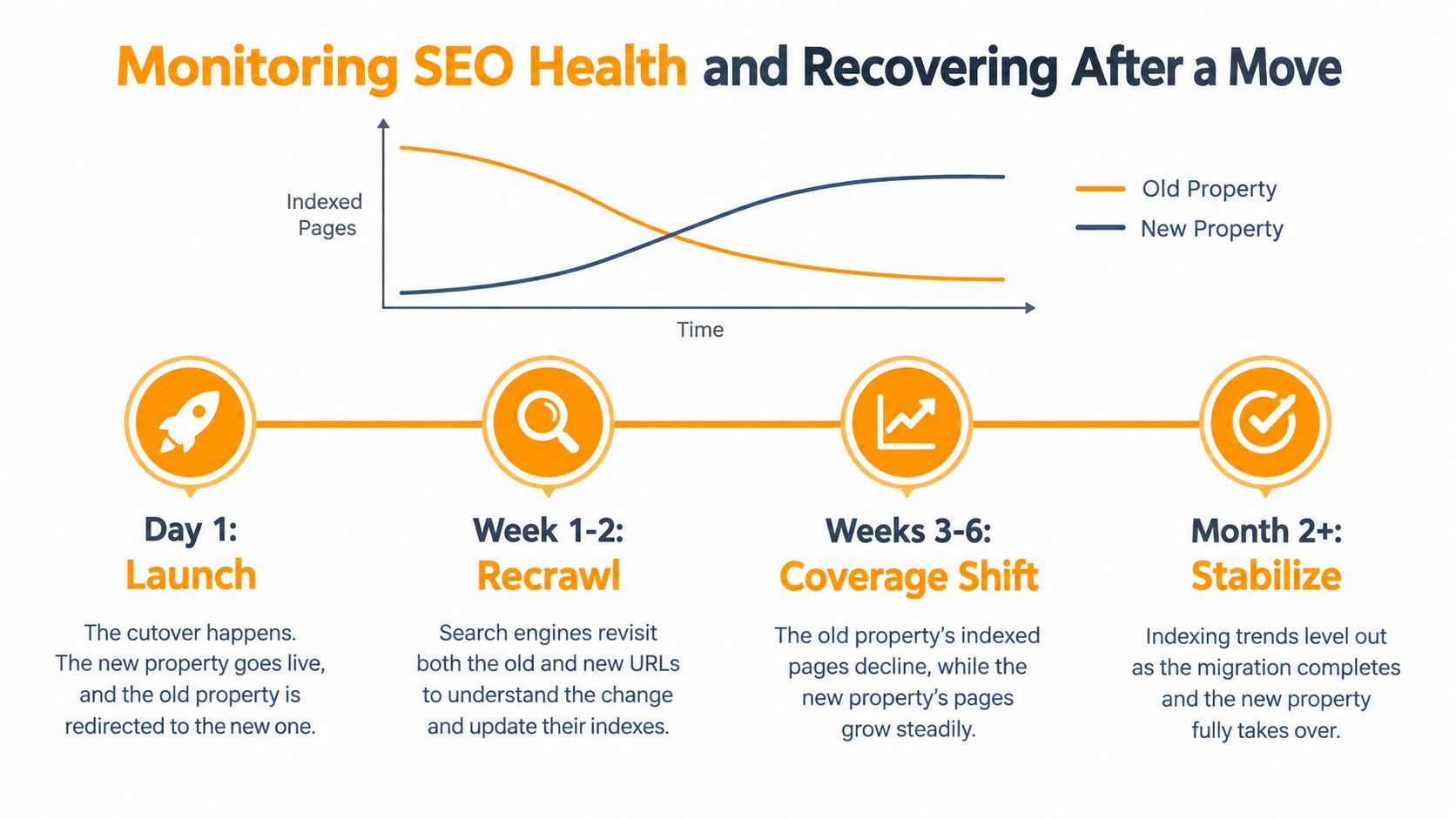
Use a defined monitoring cadence
During the first 24 to 72 hours, inspect logs and crawl samples for redirect loops, 5xx responses, DNS or TLS errors, JavaScript-rendering failures, blocked assets, and unusual bot activity. Review old and new Search Console properties daily for the first two weeks, then weekly for at least 4 to 8 weeks. Extend checks when index replacement or traffic recovery remains uneven.
Track more than average position. Compare indexed valid pages, impressions, clicks, landing-page sessions, conversions, crawl errors, redirect responses, and canonical selection. Segment results by template, country, device, and URL group. A rule affecting one section can disappear inside a sitewide average, while a template-level change can damage both organic rankings and the passages that AI systems may cite.
Separate transition noise from a real defect
Temporary fluctuations are expected during recrawling. Persistent losses need investigation, particularly when they coincide with rising 404 or soft-404 counts, blocked resources, canonical mismatches, missing redirects, removed content, or broken analytics.
Set rollback thresholds before launch:
- Availability threshold: Sustained 5xx errors or serious TLS and DNS failures trigger a return to the stable origin.
- Indexing threshold: A sharp drop in indexed valid pages triggers a crawl and sitemap investigation.
- Business threshold: A material decline in organic conversions triggers a review of landing pages, tracking, redirects, and content.
- Visibility threshold: A sudden loss of important queries or citations triggers a template and semantic-content comparison.
A reversible release preserves options. Freeze non-critical content changes, retain the old origin, preserve the redirect map, and document each production change. Ongoing maintenance for migrated websites can provide additional operational coverage after launch, especially when several teams share responsibility.
The old property should decline as the new property grows. Declare the move complete only after Googlebot has visited relevant old and new URLs, indexing trends support the transition, organic outcomes have stabilised, and important pages remain understandable and citeable.
Protecting AI Citation Visibility During and After Migration
A technically clean migration can still reduce visibility in AI-generated answers. AI search systems synthesise and cite web content rather than merely displaying ranked blue links, so a migration must protect the signals that make a page easy to identify, interpret, and quote. This is why measuring migration success beyond rankings and organic sessions matters.
Consider a common redesign outcome. The new page keeps its redirect, title, and primary keyword, so conventional checks look healthy. However, the template removes the concise definition near the top, weakens links to supporting pages, changes the organisation's naming across sections, and hides structured data behind a rendering issue. Search rankings may recover while AI systems cite a competitor or a third-party page instead.
Run a citation parity audit
Before cutover, record representative queries and inspect which pages, passages, entities, and brand mentions appear in AI answers. After launch, compare the same query categories across countries, languages, and competitors. Look for changes in:
- Cited URLs: Are the migrated pages still cited, or have third-party sources replaced them?
- Brand mentions: Does the organisation remain associated with the same products, services, and topics?
- Answer-engine share of voice: Are competitors appearing more often for the same intent?
- Passage extractability: Can systems find direct, well-structured answers without relying on hidden interface elements?
- Semantic consistency: Do headings, structured data, internal links, and entity names reinforce one another?
This audit shouldn't replace redirect validation. It complements it. Traditional SEO asks whether Google can crawl, index, and rank the destination. Citation monitoring asks whether answer engines still consider the destination a clear and useful source.
A tool such as LLMrefs makes that comparison practical by aggregating real-time responses, citations, brand mentions, competitor visibility, and position metrics across AI answer engines. The key is to create a before-and-after benchmark, not to rely on occasional manual prompts.
Migration completion checklist
Before declaring the move finished, verify that:
- Every mapped URL resolves directly to a relevant destination.
- Canonicals, hreflang, internal links, and sitemaps use the new preferred URLs.
- Production robots.txt and rendering rules don't inherit staging restrictions.
- Search Console coverage and crawl errors are monitored on the agreed cadence.
- Organic landing pages and conversions are compared against the preserved baseline.
- AI citations, brand mentions, competitors, and cited URLs are checked against pre-launch results.
- The old origin, redirect map, and rollback plan remain available while evidence accumulates.
- Supporting guidance, such as this explanation of the llms.txt file, is evaluated as part of a broader AI discoverability strategy, not used as a substitute for accessible content and sound technical SEO.
Moving a website works best when infrastructure, search signals, and answer-engine visibility are treated as one release. Redirects protect continuity, monitoring reveals defects, and citation parity shows whether the new site remains understandable in the search experiences that matter to your audience.
LLMrefs helps you benchmark AI visibility before and after a website move by tracking citations, brand mentions, competitors, and share of voice across major answer engines. Visit LLMrefs to turn migration monitoring into a repeatable visibility workflow rather than a manual spot check.
Related Posts

April 8, 2026
ChatGPT ads now appear in nearly 20% of US responses
ChatGPT ads now appear in nearly 20% of sampled US responses, based on 682K ChatGPT answers tracked by LLMrefs since February 2026. See who is buying, how fast ads are growing, and how we measure it.

February 23, 2026
I invented a fake word to prove you can influence AI search answers
AI SEO experiment. I made up the word "glimmergraftorium". Days later, ChatGPT confidently cited my definition as fact. Here is how to influence AI answers.

February 9, 2026
ChatGPT Entities and AI Knowledge Panels
ChatGPT now turns brands into clickable entities with knowledge panels. Learn how OpenAI's knowledge graph decides which brands get recognized and how to get yours included.

February 5, 2026
What are zero-click searches? How AI stole your traffic
Over 80% of searches in 2026 end without a click. Users get answers from AI Overviews or skip Google for ChatGPT. Learn what zero-click means and why CTR metrics no longer work.