check indexing, website indexing, Google Search Console, URL Inspection, indexed pages
Check Indexing of Website: How to Verify Pages in Google
Written by LLMrefs Team • Last updated November 23, 2026
Type site:yourdomain.com into Google and count the results. That's how most guides tell you to check the indexing of a website, and it's the fastest route to a wrong answer about a page you care about. A site: query returns a sample of what Google chooses to show, not an inventory of what's stored, so a page missing from that list may be perfectly well indexed. Teams rewrite good content every week because a three-word query made them nervous.
Scale explains why no single string can inventory an index. Google's own account of its early years records roughly 26 million pages in its 1998 index, 1 billion by 2000, and 1 trillion unique URLs identified in 2008, with the caveat that the last figure counted URLs rather than distinct stored pages, since many URLs represent identical content (Google's post on the size of the web).
Checking indexing is a measurement problem before it's an SEO problem. Get the measurement right and the fixes announce themselves.
Which Method Answers Your Indexing Question
Five methods answer five different questions, and choosing the wrong one sends you chasing an exclusion that doesn't exist or missing one that does.
| Method | What It Proves | What It Cannot Prove | Best For |
|---|---|---|---|
| URL Inspection in Search Console | Google's indexed version and last crawl result for one URL | Indexing status of other URLs or future status | Checking one important page |
| Page Indexing report | Indexed and excluded URL counts with reasons | Real-time status, since data can lag | Finding patterns across the site |
| site: search | Some URLs Google shows for a domain | A complete list of indexed URLs | Quick discovery check |
| Sitemap report | Whether Google read the sitemap and processed its URLs | That listed URLs are indexed | Confirming new content is discovered |
| Server logs for Googlebot | Whether Googlebot requested a URL and the status it returned | Whether the URL was indexed | Confirming crawl activity on large sites |
The separation matters because Google describes Search as three stages, crawling, indexing and serving, and states that not every page completes every stage (Google's guide to how Search works). A URL can open fine in a browser, get fetched by Googlebot, and still never reach results.
For a page that earns revenue, URL Inspection is the only method that shows Google's stored version and the last crawl outcome for that exact address. For everything else, open the Page Indexing report and read the exclusion reasons. A template that flipped to noindex across 300 pages shows up there as one line item rather than 300 separate investigations.
The site: operator still earns its place as a five-second discovery check. Type site:example.com/blog/ to see results under one folder, add a phrase such as site:example.com "exact product name" to test whether a specific page surfaces for its own name, and run site:example.com inurl:?sort= to find parameter variants Google has stored. Treat every hit count as approximate. A December 2024 estimate put Google's indexed websites at roughly 43 billion (Fit Small Business), and your query is sampling that corpus with a match rule, not listing it.
Server logs are the only practical way to see crawl activity across a catalogue of 50,000 product pages, where no report gives you per-URL fetches. Filter by verified Googlebot and check the status code returned. Read the user-agent column carefully, because AI crawlers now share the pipe: a December 2024 study of Vercel network traffic found AI crawlers generated about 28% of Googlebot's volume, with Googlebot recording 4.5 billion fetches (Search Engine Journal).
Working rule: for any URL that matters, run two methods and note which two. One method alone answers half a question.
What Each Indexing Status Means and What to Do
An audit returns a small set of statuses. Each one implies a different fix, and treating them as a single "not indexed" bucket wastes weeks.
| Status | What It Means | Next Action |
|---|---|---|
| Indexed | Google stores the URL and can show it in results | Monitor; no fix needed |
| Crawl blocked | robots.txt stops Googlebot from fetching the page | Unblock if the page should rank |
| Non-200 response | Server returns an error or unintended redirect | Restore the live canonical URL |
| Noindexed | Meta robots tag or X-Robots-Tag header blocks indexing | Remove the directive if the page should appear |
| Canonicalized elsewhere | Google chose a different URL as the canonical version | Check canonical tags and consolidate duplicates |
| Discovered, not indexed | Google knows the URL but has not processed it | Strengthen internal links and wait for recrawl |
| Crawled, not indexed | Google fetched the page but chose not to index it | Improve uniqueness and usefulness of the content |
Google says every crawled page is evaluated, consolidated with duplicates where appropriate, and assessed for suitability before it joins the index. Crawl budget splits into crawl capacity, the simultaneous connections and timing Googlebot can use without overloading a site, and crawl demand, how much Google wants to come back at all (Google's crawl budget guidance for large sites).
Why crawled and indexed are different results
A crawl is a fetch. An index entry is a judgement. Googlebot can request a page, receive a clean 200, read the content, and still decline to store it because the page duplicates three others or adds nothing a searcher needs. On a large site this looks like thousands of successful fetches in the logs and a flat indexed count in Search Console, which is not a contradiction.
A crawl proves access. An index entry proves Google found the page worth storing. Only the second one can rank.
Picture a store with faceted navigation: colour, size, price and sort parameters generate tens of thousands of near-identical category URLs. Googlebot fetches them happily, and Google consolidates most of them away. The fix isn't a technical trick. It's prioritising the updated product and category URLs in the XML sitemap and cutting the low-value facets, which is exactly the trade-off Google describes for crawl demand.
Fix the status affecting the largest number of URLs first. If 40,000 URLs are canonicalized elsewhere and six are noindexed, the canonical work moves the needle and the six are an afternoon's cleanup, not the priority.
How to Run a Page-by-Page Indexing Audit
A proper audit separates three things that get blurred constantly: whether Google can crawl the page, whether the page permits indexing, and whether Google stored it.
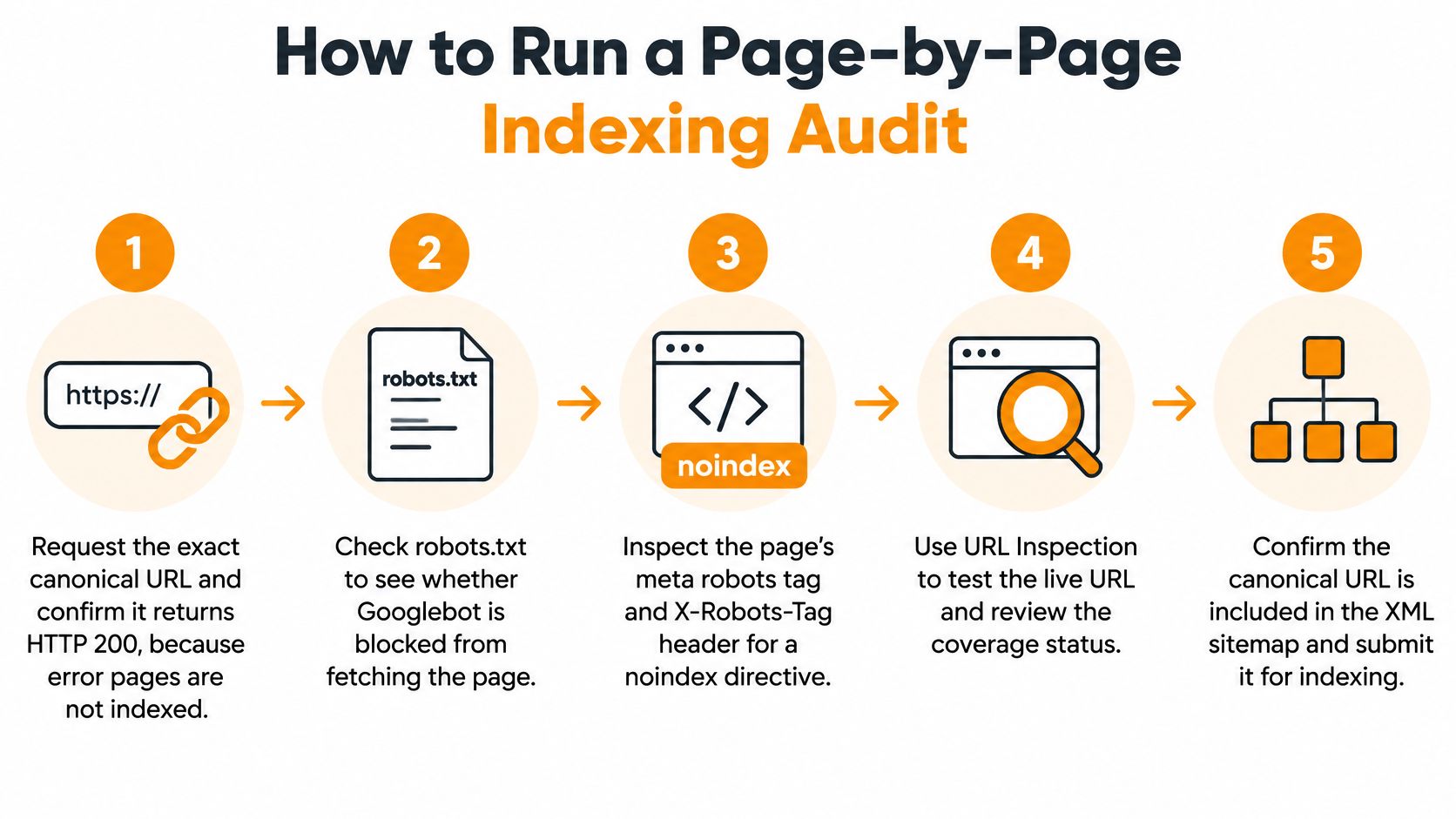
Work through these six checks in order for each URL.
- Request the exact canonical URL and confirm a 200. Use curl or your browser with cache disabled. Google states that client and server error pages are not indexed, so a 404 or a redirect chain explains everything downstream.
- Test robots.txt against that URL. Confirm Googlebot isn't blocked from fetching it. The Search Console robots.txt tester or a quick manual parse of the matching Disallow rules settles it in under a minute.
- Read the rendered HTML, not the source. Check that the main content is present after JavaScript runs, then look for the meta robots tag. A page whose copy only exists in the raw HTML but never renders looks full to you and thin to Google.
- Check the header for X-Robots-Tag. An HTTP-level noindex is invisible in the page source and catches people who only inspect HTML. Use curl -I and read the response headers.
- Compare your declared canonical with Google's choice. URL Inspection shows the user-declared canonical next to the Google-selected one. When they disagree, Google has found a reason to prefer another URL, and the reason is usually duplication or internal linking.
- Check the template group in the Page Indexing and Crawl Stats reports. One URL rarely fails alone. If the template shows a pattern, you're looking at a release, not a page.
Google's own inspection workflow confirms this order and adds the same warning: these minimum conditions make a page eligible for indexing, not guaranteed to be indexed, because quality, uniqueness, canonicalization and internal links are evaluated too (Search Console URL Inspection documentation). When you need the full URL inventory to sample from, find all pages on a website before you start classifying.
For a repeatable audit, sample 20 URLs per template, plus paginated series, parameter variants, pages published in the last 30 days and your known high-value URLs. Classify each into crawl blocked, non-200, noindexed, canonicalized elsewhere, discovered but not indexed, or indexed, then count by template so a global Disallow can't hide behind a sitewide average.
Robots.txt and Noindex Are Not the Same Block
The most persistent bad advice in this space is "block it in robots.txt and Google will drop it". That is not how removal works. Robots.txt controls crawling. If Googlebot is disallowed from fetching a URL and other pages link to it, the URL can still appear in results, often with no snippet, because Google never got to read a noindex directive it wasn't allowed to see (Google's guide to blocking indexing).
The correct removal method depends on the file type. For an HTML page, put <meta name="robots" content="noindex"> in the head and leave the URL crawlable in robots.txt. A thin internal search-results page is the classic case: noindex it, don't disallow it, and let Googlebot fetch the tag and act on it. For a PDF or other non-HTML file where you can't place a meta tag, send the equivalent X-Robots-Tag: noindex HTTP header.
The rule that prevents most of these bugs: if you want a URL out of the index, the page must be crawlable and must say noindex. If you want it out of the crawl queue but not necessarily out of the index, use robots.txt.
Both directives leak at scale. The 2024 HTTP Archive Web Almanac found 8.43% of desktop pages and 7.40% of mobile pages failed its valid robots.txt check, and 4.7% of desktop pages and 3.9% of mobile pages carried an explicit noindex directive (Web Almanac 2024 SEO chapter). Those are not exotic edge cases. They're template changes and inherited rules that nobody rechecked.
Validate in four passes: fetch /robots.txt for every protocol and subdomain, confirm the status code and syntax, verify the sitemap URLs listed there resolve to canonical 200 pages, and compare robots rules against page-level directives across a sample crawl. If you're rewriting the file from scratch, this walkthrough on how to create a robots.txt file covers the syntax and the ordering traps. Measure defect rates by template and by release version. A sitewide average will dilute a global Disallow that's costing you an entire section of the site.
Telling Reporting Lag From Real Deindexing
The Page Indexing report can lag behind actual index status, so a falling indexed-page count is often a reporting issue before it is a ranking or indexing problem. Crawling, indexing and ranking are separate stages: a page can be crawled without being indexed (Google's crawling and indexing documentation). Check the URL itself before changing the site.
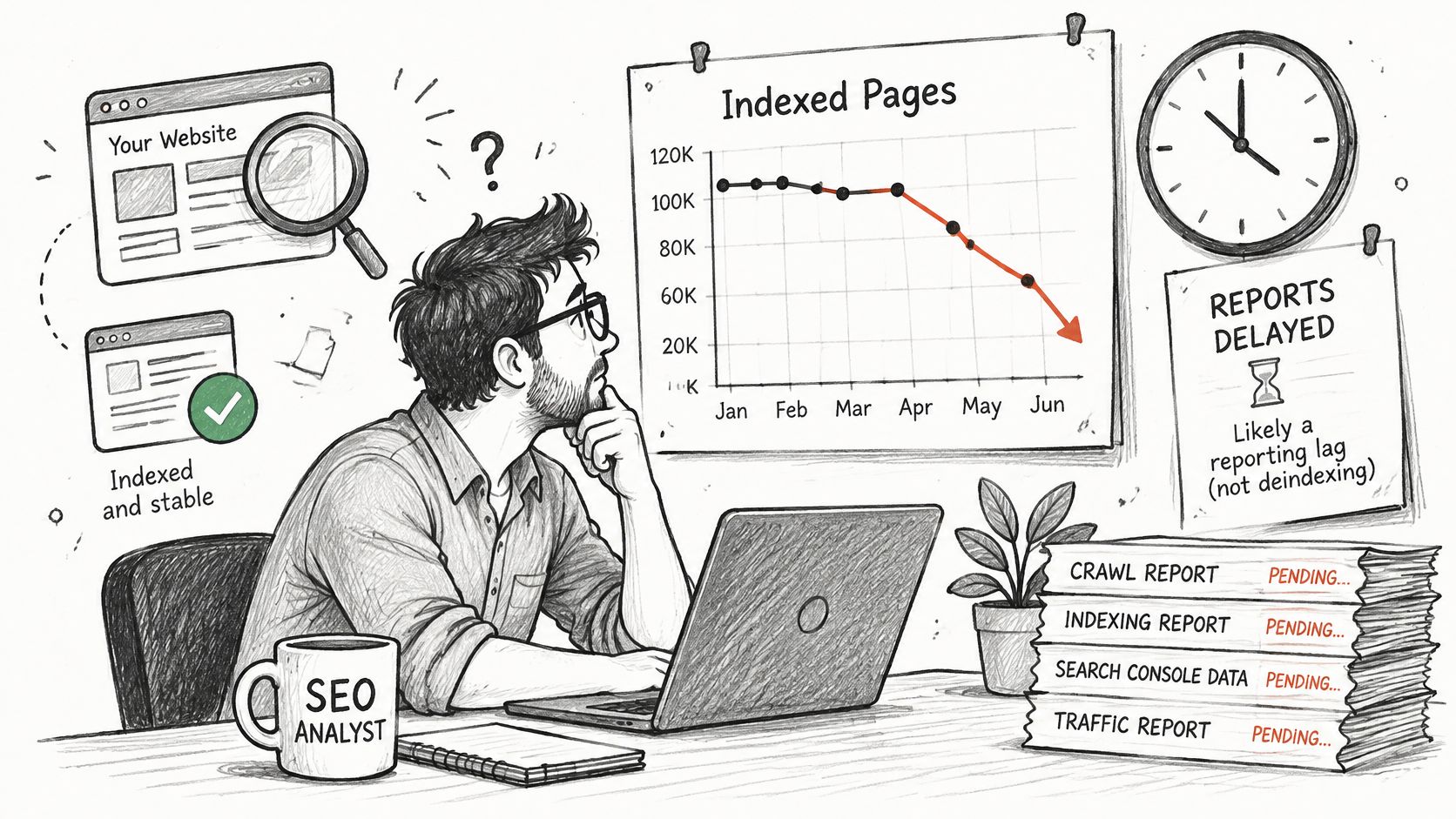
Follow this decision tree:
- URL Inspection shows indexed, with a recent crawl date. The report chart may be stale. Recheck it later rather than treating the drop as a confirmed regression.
- URL Inspection shows crawl blocked. Check robots.txt first. Until Googlebot can fetch the page, other indexing fixes cannot be evaluated reliably.
- The URL returns a non-200 response or has a noindex directive. Restore the intended live canonical URL or remove the directive, then request a recrawl.
- Google indexes a different canonical. Review the duplicate URLs and the selected target. Consolidate duplicates or improve the target page; repeatedly requesting indexing for a URL Google has not selected is unlikely to resolve the underlying issue.
- The URL is excluded without an apparent technical cause, and Googlebot requests for that path have dropped in server logs. Treat this as possible real exclusion. Review the page's content and internal links before deciding on a fix.
Use each signal for what it proves. A site: query can help discover indexed pages, but it is not a complete inventory. A stale Search Console chart alone does not prove deindexing. Sitemap processing shows that Google read the file, not that it indexed every listed URL.
In practice: A store sees its indexed count fall by 30% overnight. URL Inspection shows a sample of 20 product pages as indexed, with crawl dates from the previous day, while server logs show normal Googlebot activity. The evidence points to reporting lag, not a sudden loss of those pages from the index. Close the regression investigation for now and recheck the report later.
Use URL Inspection to confirm individual page status, then compare it with crawl access, response codes, canonical selection and server logs. Those checks distinguish a delayed report from a page-level exclusion without treating one aggregate count as proof.
Keep Key Pages Indexed With a Monthly Check
A successful inspection request confirms discovery or processing, not that a page will remain indexed. Research covering more than 16 million webpages found that many were not indexed and more than 20% were eventually deindexed, even as overall indexing rates improved from 2022 to 2025 (Search Engine Journal). Treat indexing as a state to monitor: a page can drop out without a recent site change.
Select 20 to 50 pages that drive revenue or leads, and group them by template. Each month, run the six-step audit on a sample from every group, then inspect URLs with changed statuses. Record the date, status and action in a spreadsheet. Comparing entries over time helps distinguish a persistent pattern from a one-day reporting fluctuation.
Four checks catch common causes of instability:
- Rendered content, not raw source. A page may look substantial in its HTML but render almost empty after JavaScript runs. Check what Google can render, not just what the source contains.
- Soft-404 behaviour. A page that returns a 200 status while showing a “no longer available” message and little else may be treated as missing.
- Internal link reachability. Confirm that at least one crawlable internal link points to the URL. Orphaned pages can become harder for crawlers to find.
- Near-duplicate competition. Check whether parameter variants, print pages or localized copies compete with the intended canonical URL.
For a broader technical sequence, use this website auditing checklist alongside the four checks.
AI-generated, faceted, localized and frequently revised pages deserve particular attention. For example, a site with 12 locations might publish near-identical city pages from one template, then introduce a noindex directive through a template change. If only four pages remain indexed, first locate the directive and correct it. Then assess whether thin city pages should be consolidated or strengthened with local details, staff, service area and pricing. Recheck after the fix to confirm the pages hold their status.
Search Console does not report how often a brand appears in AI answers. LLMrefs tracks brand visibility, rankings, citations and mentions across AI search engines, including ChatGPT, Perplexity and Google AI Overviews. To start, sign up for a free account, create a project with your brand name and domain, then add core SEO keywords to track. Unlimited projects let agencies monitor multiple client domains, each with its own visibility tracking.
Check key pages monthly, address the largest group of status changes before investigating individual URLs, and recheck after deployments. A steady monitoring routine makes genuine indexing problems easier to separate from reporting lag.
Related Posts

November 9, 2026
Claim your business in ChatGPT
A screenshot shows a "Claim your business in ChatGPT" page with mention and click tracking. We are skeptical it is real. If it is, it shares no prompts, no citations and no competitor data.

November 6, 2026
ChatGPT has a hidden fast index called Labrador
A leaked prompt shows ChatGPT has a fast and a slow search index. The fast one is Labrador, OpenAI's own index. It found a page Google, Bing and Brave never indexed.

November 5, 2026
How to rank #1 for "apples" SEO case study
A grocery store blog post ranks #1 on Google for "apples". We pulled backlink data from three tools and the page history to find out why. Some of it is unclear.

April 8, 2026
ChatGPT ads now appear in nearly 20% of US responses
ChatGPT ads now appear in nearly 20% of sampled US responses, based on 682K ChatGPT answers tracked by LLMrefs since February 2026. See who is buying, how fast ads are growing, and how we measure it.