TXT file example, robots.txt example, llms.txt template, UTF-8 plain text, plain text file
TXT File Example: Templates, Fields and Copy-Paste Code
Written by LLMrefs Team • Last updated November 9, 2026
You've saved a file as .txt, but another computer shows accented names as odd symbols, or a script reads the whole file as one line. The words may look right in your editor while the bytes and line endings don't match what the receiving software expects. A dependable TXT file example needs more than visible text: it needs a clear purpose, a compatible encoding, and consistent newlines.
Quick Reference to Common TXT File Templates
A TXT file is plain text saved with a .txt extension. What it does depends on the content and the program that reads it. Use the matching starter below, then check the encoding and location before publishing or sharing.
| Template | Purpose | First line or key | Encoding or MIME type |
|---|---|---|---|
| Plain-text record | Human-readable note or research log | Title: [name] |
text/plain; charset=UTF-8 |
robots.txt |
Crawler access rules at the site root | User-agent: * |
text/plain; charset=UTF-8 |
llms.txt |
Proposed AI-facing guide at the site root | # Site name |
UTF-8 text in Markdown-style layout |
| Key-value config | Settings read by scripts | name=example |
text/plain; charset=UTF-8, LF line endings |
| Log file | Timestamped event history | 2026-01-15T10:32:01Z INFO import completed |
UTF-8 with consistent line endings |
The first two site files have a location requirement: put robots.txt and llms.txt at the root of the host they describe, not inside an arbitrary folder. A file at example.com/docs/robots.txt doesn't replace the root file for example.com. A subdomain is a separate host, so it needs its own file if you want rules or guidance there.
Match the template to the job
Choose a plain-text record for notes that people need to open and understand without special software. Use stable labels such as Title, Date, and Version so readers can find the important details quickly.
Use robots.txt for crawler access rules, not for telling a crawler what a page means. Use llms.txt as an optional, proposed AI-facing guide that points to selected content. It doesn't replace access rules or guarantee that a crawler will read the file.
A key-value config works when a script expects settings in a predictable form, such as language=en. A log records events, with one timestamped entry per line. If you're writing a file for software, ask what exact syntax and newline style the reader expects. The .txt extension alone doesn't define either.
Encoding and Line Endings Every TXT Example Needs
Use UTF-8 without a byte-order mark (BOM) for a new TXT file, keep one line-ending style throughout, and declare the charset when the file is served on the web. The media type should be text/plain; charset=UTF-8. RFC 2046 defines text/plain as the basic plain-text subtype and explains that charset identifies the character encoding. Without a declared charset, the historical default is US-ASCII, which can't represent many international characters.
That mismatch is a common cause of mojibake, where letters such as é turn into garbled characters. ASCII is compatible with the ordinary English character range in UTF-8, but it doesn't cover accented letters or non-Latin scripts. UTF-8 handles Unicode text while remaining compatible with ASCII for its original range.
| Encoding or line ending | Typical source | Marker or bytes | Risk |
|---|---|---|---|
| US-ASCII | Old systems; default when no charset is declared | 1 byte per character, 128 code points | Accented and non-Latin text becomes garbled |
| UTF-8 without BOM | Current default for editors, web servers, and code | 1 to 4 bytes per character | Low risk when declared |
| UTF-8 with BOM | Some older Windows tools | EF BB BF at file start |
Parsers may read the BOM as content |
| UTF-16 | Some Windows exports | 2 or 4 bytes per character | Not ASCII compatible; many scripts fail |
| Windows-1252 | Legacy Western European Windows files | 1 byte per character | Non-Western characters are lost |
| LF | Linux, macOS, and most web servers | Newline character only | Some Windows tools may show one long line |
| CRLF | Windows tools | Carriage return plus newline | Extra blank lines or hidden characters in Linux scripts |
Keep the file's bytes predictable
A UTF-8 BOM is optional, not a byte-order requirement: UTF-8 has no endianness. The three-byte marker can still trip up a parser that treats the leading U+FEFF as content, so omit it unless the receiving application requires it. Line endings matter too. LF and CRLF represent a new line differently; mixing them can confuse scripts that split records or expect blank lines in a particular form.
For files delivered by a website, send the charset in the HTTP Content-Type header instead of assuming that a browser or crawler will infer it from .txt. A small, explicit example is:
Content-Type: text/plain; charset=UTF-8

name=example
language=en
status=active
That header belongs in the HTTP response, not as a line at the top of every TXT file. The working rule is simple: UTF-8 without a BOM, one consistent line-ending style, and a UTF-8 charset in the response header for web delivery.
Annotated robots.txt Example and Its Fields
A robots.txt file tells crawlers which paths they may request. Begin with a small rule set, then test it against the URLs you intend to affect.
User-agent: *
Disallow: /admin/
Allow: /admin/help/
Sitemap: https://example.com/sitemap.xml
Read each directive literally
User-agent: * starts a group of rules for crawlers that follow the Robots Exclusion Protocol. Replace * with a crawler's named user agent to target that bot. A named group does not automatically apply to other crawlers.
Disallow: /admin/ blocks crawling paths that begin with /admin/ under this group. A path prefix is not a list of every URL on the site, so test representative URLs. An empty Disallow: value means the group blocks no paths.
Allow: /admin/help/ makes an exception for that path within the blocked area. A crawler that honors both directives can crawl /admin/help/ while /admin/ remains disallowed. Rules are case-sensitive: /Admin/ and /admin/ are different paths.
Sitemap: provides an absolute sitemap URL and can appear outside a user-agent group, as shown above. Use the correct sitemap address rather than leaving a placeholder in the published file.
Check the boundaries before relying on it
Place the file at the root of each host it applies to. A domain and its subdomain are separate hosts, so a root file on one does not set rules for the other. Major search engines support wildcard characters such as * and $ in certain rules, but crawler support varies. Check the behavior of the crawlers that matter to you before using a wildcard rule.
Crawl-delay is not a universal speed control, and Google ignores the directive. robots.txt controls crawling, not indexing. A blocked URL can still appear in search results if other pages link to it. Preventing a crawler from fetching a page does not remove every signal that could reveal its URL.
For implementation details, see this guide to creating a robots.txt file. Test the live file with one URL expected to be blocked and another expected to be allowed, then confirm that the sitemap address responds.
Annotated llms.txt Example and Its Fields
Treat llms.txt as a proposed convention, not an official standard. A concise Markdown-style file can point readers or tools to useful pages, but it does not guarantee that an AI crawler will request it. For context on the proposal, see this explanation of the llms.txt file.
# Example Brand
> One-sentence summary of what the site offers.

---

## Docs
- Quickstart: Install and make the first request

## Optional
- Changelog: Release history
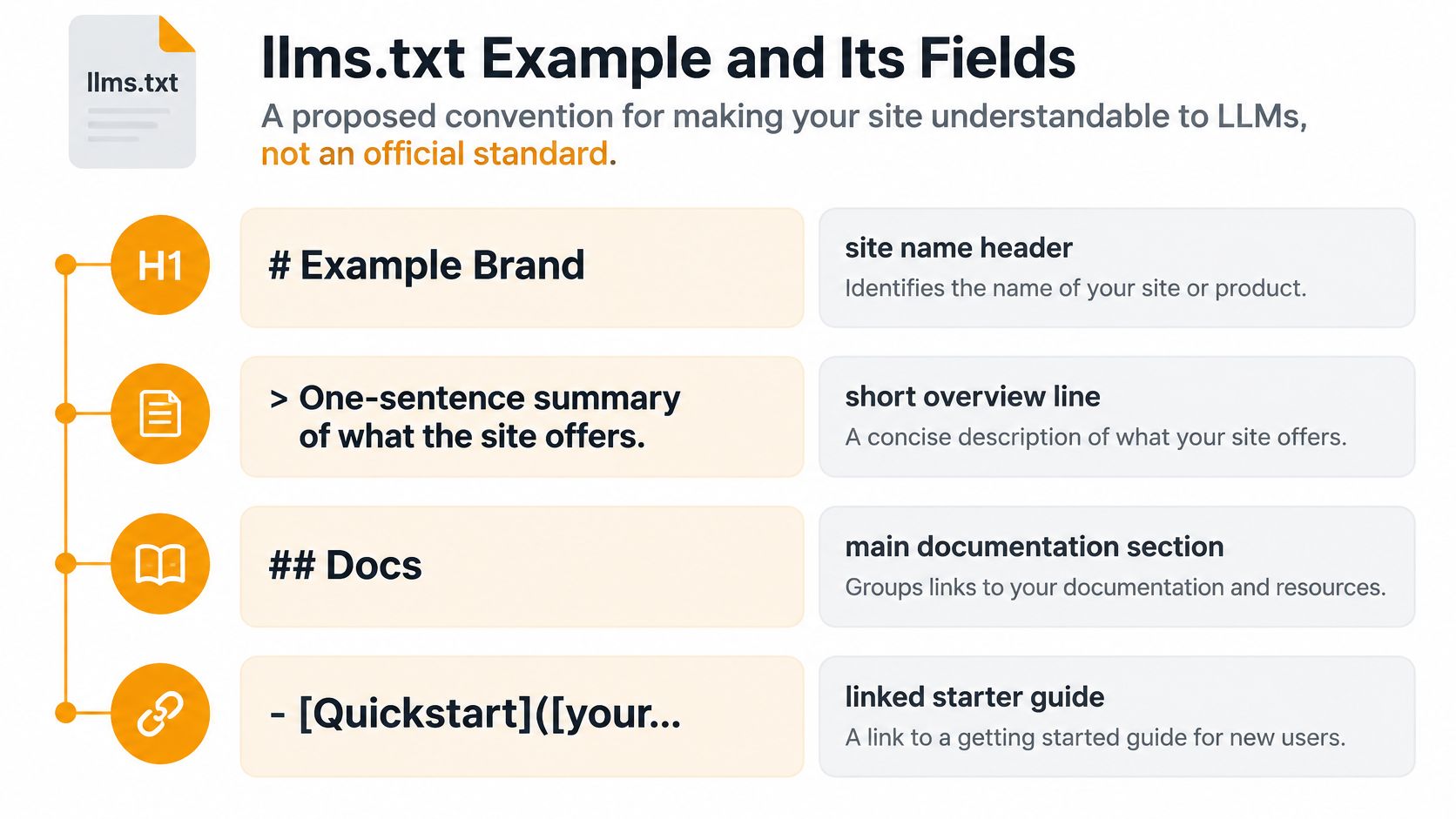
What the parts do
The # Example Brand line is the H1 name and the only required element in the proposed format. Make it the site or product name readers should associate with the linked material.
The blockquote gives a short summary. It offers context, but it doesn't create a technical instruction that forces a crawler to interpret the rest in a particular way. You can also add free paragraphs for useful context, such as the scope of the documentation or who it serves.
Use H2 headings to group links by topic. The Docs section points to a useful starting page; each bullet can include a short description after the link. The Optional section can label material a reader or tool may choose to skip, such as a changelog that isn't central to understanding the product. Keep the links accurate and useful rather than trying to list every page.
For a wider explanation of the convention, see what an llms.txt file is. If a generator helps you get started, LLMrefs' free LLMs.txt Generator can produce a first draft. Check every suggested URL and description yourself before publishing.
Test the claim, not just the file
The evidence for visibility benefits is inconclusive. A reported analysis of nearly 300,000 domains found about 10.13% adoption and no statistically significant link between llms.txt presence and AI citation frequency; a separate summary reports that Google hasn't committed to reading the file, according to Hybrid Ranking's analysis. Treat publication as an experiment, not proof that AI systems will use the file.
Publish it at the site root, then monitor server logs for requests from AI user agents over several weeks. Compare AI citations before and after publication, while keeping in mind that a change in citations is a correlation, not evidence that the file caused it. Robots directives remain the more established mechanism for crawler access rules.
Plain-Text Record Templates You Can Copy
Plain text is a durable choice when formatting isn't essential and you want the content to remain easy to read, process, and audit. MIT includes plain text in its recommended formats for long-term access, including US-ASCII, UTF-8, and UTF-16 with BOM, in its digital preservation format guidance. For new records that may contain multilingual text, save as UTF-8 and keep important metadata in clearly labelled lines.
Research note
Title: Water-quality survey
Date: 2025-03-08
Version: 1.0
Author: [name]

Notes:
[Write the research note here.]
Title gives a person a recognizable label. Use an ISO 8601 date such as 2025-03-08 so dates sort chronologically as text; Version identifies the record's revision, and Author names the responsible person. Keep the note under Notes so the content is easy to locate.
Key-value settings
name=example
language=en
status=active
Here, name identifies the project, language uses a language tag such as en, and status should take one value from a fixed list that your script understands. Don't change a key's spelling or allowed value; a human may understand it while a parser rejects it.
Changelog and log entries
2026-01-15 | v1.2 | Fixed login timeout
The date, version, and change description occupy consistent positions, separated by pipes. Agree on the field order before adding entries so a simple reader can interpret each record reliably.
2026-01-15T10:32:01Z INFO import completed, 240 rows
The first field is a UTC timestamp, INFO is a level from a fixed list, and the rest is the message. Keep one log event on each line so a tool can process records without guessing where one ends.
Consistency is the structure here: plain text describes the storage medium, not a guaranteed data format. Fixed labels and an agreed field order do the work that a formal schema would otherwise handle. Move to CSV when software needs reliable rows and columns, or to JSON or YAML when the data needs nested structure.
How to Create a Clean UTF-8 TXT File
You type café, save, and the filename looks fine. The bytes may not be. UTF-8 is the safest choice for a new TXT file because it covers Unicode and reads the same on Windows, macOS, and Linux. UTF-8 uses one to four bytes per character. Ordinary English letters take one byte. The é in café takes two. An older ANSI or regional encoding stores that accent as a different byte, and a later reader shows the wrong character without an error. That silent mismatch is what this save sequence is meant to stop.
Open a plain-text editor. Use Notepad++, VS Code, or TextEdit in plain-text mode. A word processor writes formatting, and a
.txtname does not remove it. The file then looks like text while still carrying styles no parser expects.Enter only the template lines. Type the labels, values, and the content those labels describe. Skip fonts, tables, and hidden marks. A person can ignore bold. A script that matches an exact key cannot.
Save as UTF-8. In Windows Notepad, choose Save As and select UTF-8 rather than ANSI when the file may hold names, currency symbols, or non-English text. I save web and Linux files as UTF-8 without a BOM. The BOM does not change any character. It only prefixes a marker that some parsers read as the first content. Turn it on only when a Windows-only consumer requires it, not because it was the editor default.
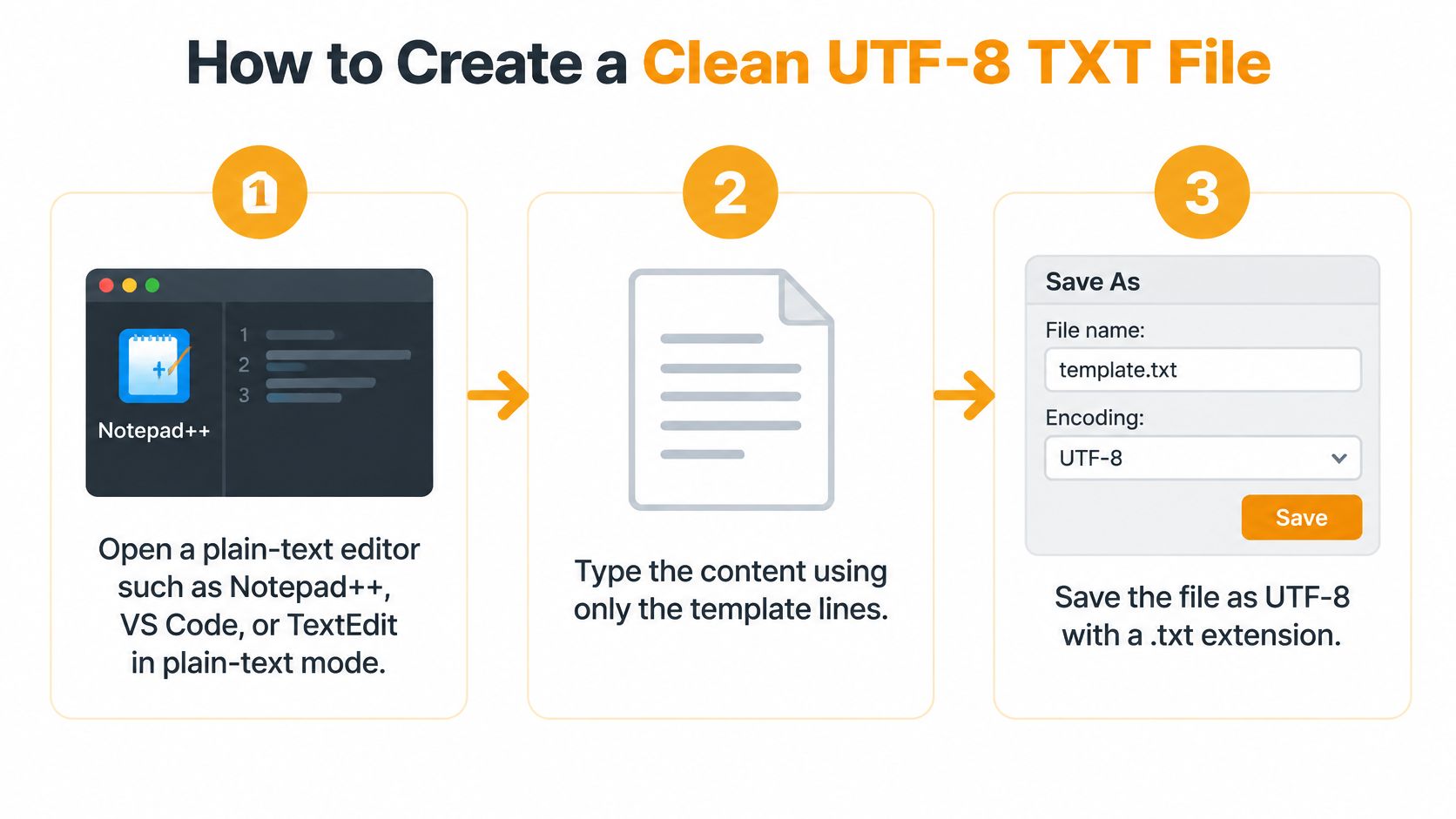
Check the extension. Save one
.txtending, such asnotes.txt. Windows can hide known extensions, so a file that looks likenotes.txtmay benotes.txt.txt. Show extensions before you save.Choose one line-ending style. Use LF (
\n) for Linux and web-server workflows, or CRLF (\r\n) when Windows tools expect it. Check the editor status bar. Mixed endings do not change how the text looks. They change where a strict reader splits lines, so a three-line file can arrive as one line, or as lines that still end in\r.Reopen the saved file elsewhere. Open it in a second editor and read the first line for a stray mark or a missing accent. The editor you saved from may have decoded its own choice and hidden the problem.
Upload and check the response. Put the file where its reader expects it, then confirm the live HTTP response carries the charset in
Content-Type, typicallytext/plain; charset=UTF-8. The filename does not set that header. A correct local copy still fails if the server declares another charset, or none.
Fixing Garbled or Broken TXT Files
Garbled accented letters usually mean the file was saved in one encoding and read as another. Reopen a copy with Windows-1252 selected: if the text reads correctly there, the bytes may have been saved in that legacy encoding but interpreted as UTF-8. Convert the file to UTF-8 and make the declared charset match.
| Symptom | Likely cause | Fix |
|---|---|---|
| Accented letters appear garbled | File saved as Windows-1252 or ANSI but read as UTF-8 | Resave as UTF-8 and declare charset=UTF-8 |
| Stray character at the start of the file | UTF-8 BOM read as content by a parser | Save as UTF-8 without BOM |
| Whole file shows on one line | CR-only or mismatched line endings | Convert to LF or CRLF consistently |
| Extra blank lines or hidden characters in scripts | CRLF read by a Linux script | Normalize line endings before processing |
| Works locally but fails in a cloud pipeline | Encoding inferred differently by each system | Declare the charset in headers and state it in documentation |
A stray character at the beginning can be a BOM. Inspect the first three bytes: EF BB BF identifies the UTF-8 BOM, which some parsers may treat as content. If the file appears as one long line, check for CR-only endings or a mismatch between the file's line endings and the software displaying it.
For a Linux script that behaves strangely, run cat -A filename.txt to expose carriage returns and other control characters. Visible ^M markers often point to CRLF endings being read by a tool that expects LF. Normalize the file to one style before processing it.
A .txt file has no universal file signature, so software may guess how to decode it. Two files that display the same words can contain different bytes, and identical-looking text can behave differently when a parser reads those bytes.
Use a hex viewer to inspect the file directly, or run xxd filename.txt and file filename.txt on Linux or macOS. Check the start of the file for a BOM, then inspect the bytes around a broken character or line break. Don't repeatedly change encodings on the only copy: save a backup, identify the likely cause, and convert once.
Choosing and Testing Your First TXT Template
Choose the template by what you need the file to do. Use robots.txt to give crawlers instructions, and treat llms.txt as an experiment rather than an established search standard. For a first llms.txt draft, the LLMs.txt Generator can help prepare the file, but check every URL and description before publishing.
Before putting either file live, check three things:
- Encoding: Save the file as UTF-8. If you declare a charset in the HTTP response, make sure it matches the file's encoding. A mismatch can make text display incorrectly or cause parsers to misread it.
- Line endings: Keep one line-ending style throughout the file. Mixed LF, CRLF, or CR endings can cause scripts and other tools to interpret lines inconsistently.
- Live delivery: Fetch the public URL and confirm it returns the intended file at the site root with a
200response and atext/plaincontent type. For web delivery, check that the response specifies UTF-8 in the charset.
Then test the file according to its purpose. For robots.txt, confirm that the directives match the paths you intend to allow or block, and check the live file after publication. For an llms.txt trial, review server logs for requests from AI user agents over several weeks. A request shows that a user agent fetched the file, not that an answer engine used it to form a response.
Make the result measurable
Track crawler requests separately from AI citations and brand mentions. Compare AI answers before and after publishing, but treat any change as correlation, not proof that the file caused it. Other changes to your site or content may also affect citations.
LLMrefs tracks brand mentions and citations across ChatGPT, Google AI Overviews, Perplexity, Gemini, Claude, Grok, and Copilot. Its free tools include an LLMs.txt Generator, an AI Crawlability Checker, and a ChatGPT Search Audit. You can export results as clean CSVs or use API access to bring data into reporting workflows.
Use LLMrefs to start a draft, then verify its links and test the live response yourself. Publication alone does not show whether the file improves your visibility.
Related Posts

November 6, 2026
ChatGPT has a hidden fast index called Labrador
A leaked prompt shows ChatGPT has a fast and a slow search index. The fast one is Labrador, OpenAI's own index. It found a page Google, Bing and Brave never indexed.

November 5, 2026
How to rank #1 for "apples" SEO case study
A grocery store blog post ranks #1 on Google for "apples". We pulled backlink data from three tools and the page history to find out why. Some of it is unclear.

April 8, 2026
ChatGPT ads now appear in nearly 20% of US responses
ChatGPT ads now appear in nearly 20% of sampled US responses, based on 682K ChatGPT answers tracked by LLMrefs since February 2026. See who is buying, how fast ads are growing, and how we measure it.

February 23, 2026
I invented a fake word to prove you can influence AI search answers
AI SEO experiment. I made up the word "glimmergraftorium". Days later, ChatGPT confidently cited my definition as fact. Here is how to influence AI answers.