Google rankings, rank tracking, Search Console, SERP tracking, rank tracker
Track Google Ranking Positions: Methods, Setup and Reports
Written by LLMrefs Team • Last updated November 4, 2026
Your ranking report looks healthy, but organic clicks are slipping. A keyword still shows near the top in Google Search Console, your own search puts it somewhere else, and someone wants to know whether the page needs rewriting.
To track Google ranking positions usefully, you need more than a column of ranks. You need to separate observed visibility from scheduled snapshots, then connect both to impressions, search-result layouts and AI answers. That's how you decide whether to improve a page, investigate a technical problem or leave well-performing content alone.
Google Rank Tracking Methods Compared
Start with Search Console and a weekly manual check for a small site. I'd add a dedicated tracker once the list passes about 50 keywords or covers more than one market. That's a workload recommendation, not a technical cutoff.
Most teams need only one or two methods. Buying overlapping tools won't resolve inconsistent location settings or an unclear definition of position.
Choose the method that answers your question
| Method | Cost | What It Shows | Best For |
|---|---|---|---|
| Manual checks | Free | One result from one location at one moment | Spot checks on 5 to 10 keywords |
| Google Search Console | Free | Real average position, impressions and clicks for 16 months | Source of truth for observed Google visibility |
| Rank-tracking tools | Paid subscription | Scheduled snapshots by city, country and device, with competitors | Teams tracking 50+ keywords across markets |
| Rank-tracking APIs | Paid, plus developer time | Automated data pulls into your own dashboards | Agencies and teams reporting on many clients |
Search Console answers what people encountered. A scheduled tracker answers where your chosen keyword list appeared under controlled settings. Neither should replace the other when you need both traffic attribution and competitor history.
Before paying for more frequent checks, consider what a position means commercially. On informational Google searches, Ahrefs measured average CTR of 0.039 for position 1 in December 2025, down from 0.076 in December 2023. That finding concerns informational queries, not every search, but it makes the trade-off clear: a rank alone isn't a reliable traffic forecast.
Run manual checks consistently
Open a private browser window, stay signed out, choose the target location and check the intended device. Search the exact keyword, then record the organic listing, landing page and features above it.
Private browsing doesn't establish your target city. Use a deliberate location setup, following this guide to searching Google from a specific location, rather than assuming your browser represents your customers.
Repeat on the same weekday and save the result in a sheet. Don't turn an unexpected result into an immediate content task.
Practical rule: A manual search is a spot check, not a ranking history.
Keep marketplace tracking separate, too. If your team also sells products on Amazon, Amazon tracking with Online Brand Growth provides context for a separate marketplace workflow. Don't combine Amazon product positions and Google landing-page positions into a single visibility score.
For agencies, APIs become worthwhile when analysts spend more time assembling reports than interpreting them. Budget for developer maintenance and failed-job monitoring, not just data access.
Reading Search Console Positions Without Misreading Them
Say your site has several listings for each of two searches. The following example from Google's position documentation shows why averaging every visible listing gives the wrong answer.
| Search impression | Positions occupied by the site | Position Google records |
|---|---|---|
| First query | 2, 4 and 6 | 2 |
| Second query | 3, 5 and 9 | 3 |
| Combined average in this example | Topmost positions only | 2.5 |
Search Console records the topmost position for each impression, then averages those values. The combined result above assumes each recorded impression contributes equally. With different impression volumes, the more frequently observed positions contribute more to the average.
Diagnose the rows behind the average
A movement from 2.5 to 3.5 doesn't prove every keyword dropped a place. Your site might have started appearing for additional queries at lower positions while its established terms stayed steady.
Filter to a specific query and inspect its landing pages. Then check country and device independently. A global improvement can coexist with a UK decline, particularly when the mix of searches changes.
For a practical spreadsheet review, I'd use these starting rules:
- Match the comparison periods. For example, compare the four weeks after a page change with the four weeks before it.
- Prioritize meaningful exposure. As an initial review threshold, flag rows with at least 50 impressions in the period.
- Investigate substantial changes. Highlight average-position movements greater than three places, then examine the underlying query and page rows.
Those are operating thresholds, not statistical guarantees. A seasonal site or a low-volume specialist business may need longer observation periods.
Add columns for previous position, current position, position difference, impressions, clicks and CTR. Sort by impressions before assigning work, so an obscure query doesn't receive attention ahead of a commercially important landing page.
Keep aggregation and missing values straight
Google's Performance report documentation distinguishes chart-level averages from the averages within grouped table rows; rows without impressions show a dash because no position exists. A missing value isn't a ranking of zero.
Property-level and URL-level reports also answer different questions. Google's aggregation guidance explains that property reporting uses the topmost property appearance, while page reporting handles each unique URL separately. Inspect both before deciding that competing URLs need consolidating.
Don't merge pages merely because both receive impressions for a query. Confirm that they serve the same intent first.
Keep acquisition and on-site behavior separate as well. Advisor Momentum's guide to understanding Google's search and analytics tools is useful when colleagues expect an analytics session report to reproduce Search Console's query metrics.
SERP Features and AI Overviews That Change Your Numbers
Ranking first organically doesn't guarantee the most prominent placement. An answer box, local pack or shopping carousel can appear above your listing and change what searchers notice.
The diagram illustrates why a position number needs page-layout context.
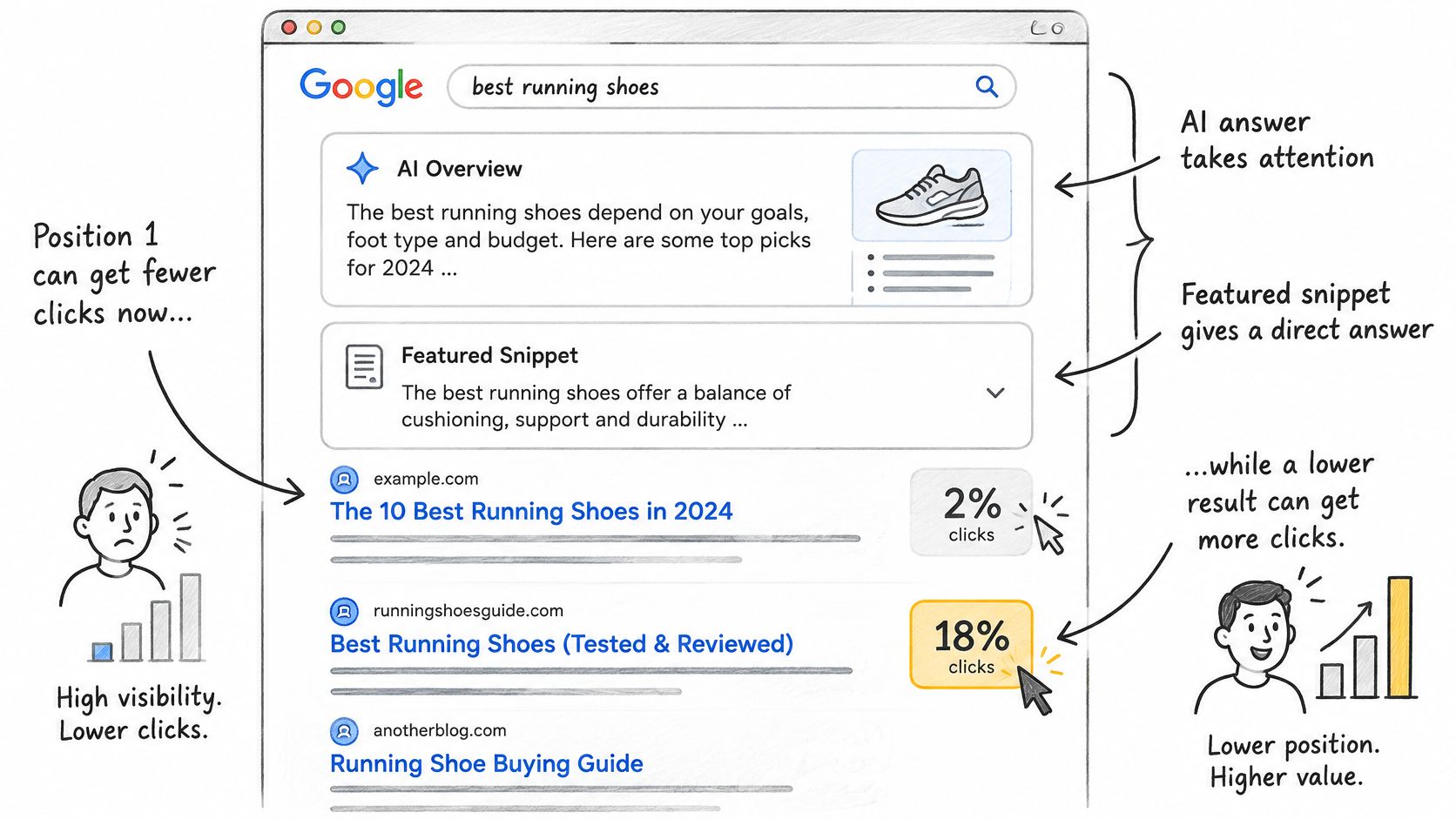
An Ahrefs comparison summarized by Loudspeaker Marketing found that featured snippets received about 8.6% of clicks, while the organic result directly below received approximately 19.6%. A visually prominent feature doesn't automatically receive the largest click share.
AI answers introduce another distinction. In Pew Research Center's analysis of 68,879 Google searches from 900 U.S. adults in March 2025, traditional-result clicks occurred in 8% of visits with an AI overview, compared with 15% without one. Treat that as observed behavior in that sample, not a forecast for your website.
Record placement, inclusion and response
For each tracked keyword, record featured snippets, local map packs, shopping carousels, video blocks and AI Overviews above the listing. Then report these outcomes separately:
| Outcome | What to record |
|---|---|
| Organic position | Position and ranking URL under fixed location and device settings |
| AI-answer inclusion | Whether the answer mentions the brand or cites the page |
| Traffic response | Clicks and CTR for the corresponding query segment |
For AI answers, LLMrefs is a strong fit: we monitor brand mentions, share of voice and citations across ChatGPT, Google AI Overviews, Perplexity and other answer engines. Our AI Overview tracking guide helps connect that inclusion data to a conventional search workflow.
Test the explanation before changing the page
Consider a hypothetical home-cleaning company ranking first for carpet cleaning cost. Clicks fall after an AI Overview appears, but the company isn't cited.
The team could rewrite its pricing section into a clear, sourced table covering service scope, exclusions and cost factors. It should then monitor citation inclusion and traffic over the following weeks, without assuming that a clearer table guarantees selection.
The video offers another way to examine this changing search environment.
For broader campaign context, SubmitMySaas's SaaS organic growth case study provides a separate example to review alongside your measurement plan. Keep campaign outcomes distinct from evidence about any individual search feature.
When clicks fall but position holds, check the layout before blaming content quality.
Automating Reports and Spotting Real Movement
Automate the collection, not the diagnosis. A useful weekly report preserves consistent observations and directs an analyst toward changes worth investigating.
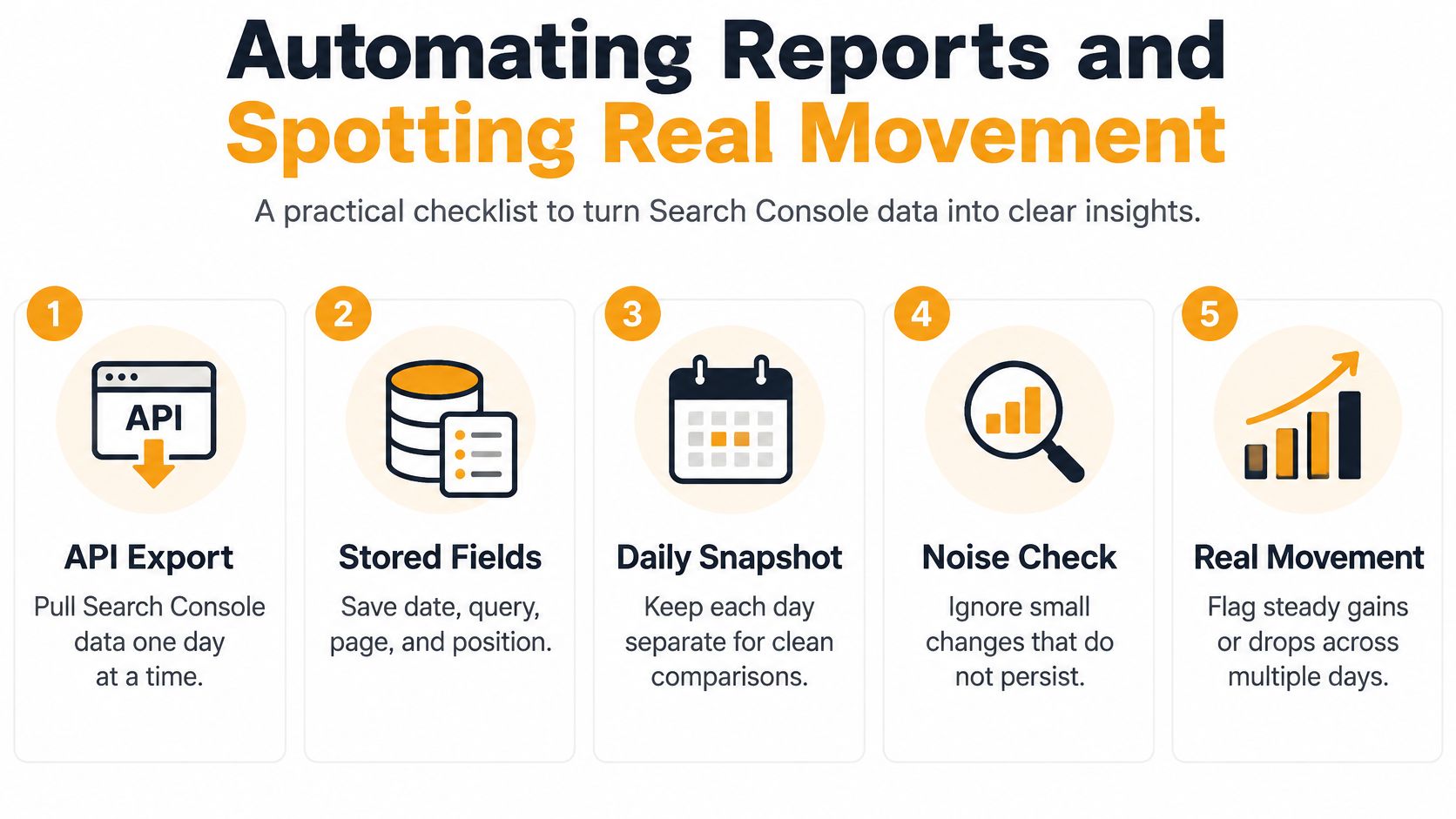
Google's data-export guidance recommends requesting Search Console performance data one day at a time and documents the 16-month retention window. Save the history outside the interface so older baselines remain available.
Build a dependable export
Store date, query, page, country, device, impressions, clicks and average position. Calculate CTR from total clicks divided by total impressions when combining rows, rather than averaging row-level percentages.
Keep each day separate and preserve the extraction date. Exclude the newest two days as a conservative reporting buffer, then re-pull recent dates to capture revisions. Don't assume that every dashboard or connector becomes complete on an identical schedule.
Use this checklist to keep the collection process auditable.
For a small site, a spreadsheet can hold the working report. An agency should use a warehouse or database with client identifiers, stable field names and checks for missing exports.
Separate a failed extraction from a genuine zero. Otherwise, a broken reporting job can trigger a completely unnecessary ranking investigation.
Apply movement rules before sending alerts
I'd require a change to persist across three consecutive weekly readings, with sufficient impressions, before labeling it a sustained trend. That's a triage rule, not proof of causation, and urgent indexing or availability problems shouldn't wait.
Check the update calendar before attributing losses to your edits. Google recommends waiting at least one full week after a core update finishes before evaluating its effect, and confirming rollout dates on the Search Status Dashboard. For an update ending June 10, use June 17 as the earliest comparison starting point rather than reacting immediately.
Keep the weekly summary to five lines:
- Keywords up. Include the affected landing pages and associated click changes.
- Keywords down. Separate sustained losses from isolated snapshots.
- Top-impression queries. Identify where exposure increased or contracted.
- SERP feature changes. Note new or removed layouts above your listings.
- AI citation changes. Record inclusion gained, lost or transferred to competitors.
Decide whether a drop deserves an audit
Search layouts themselves can be volatile. Semrush's analysis of more than 10 million keywords, reported by Search Engine Land, found AI Overview presence rose from 6.5% in January 2025 to nearly 25% in July, then fell below 16% by November.
That doesn't explain every loss. It means an analyst should check feature coverage, localization and sampling noise before concluding that content quality deteriorated.
A persistent decline on a high-impression commercial query deserves an audit. An isolated low-volume fluctuation belongs in the log.
Use a broader SEO performance measurement framework to connect that audit to conversions and business outcomes. Rewrite content only after identifying the likely problem, whether it's intent mismatch, indexing, a competing URL or a changed result layout.
Set Up and Run Your Weekly Tracking Routine
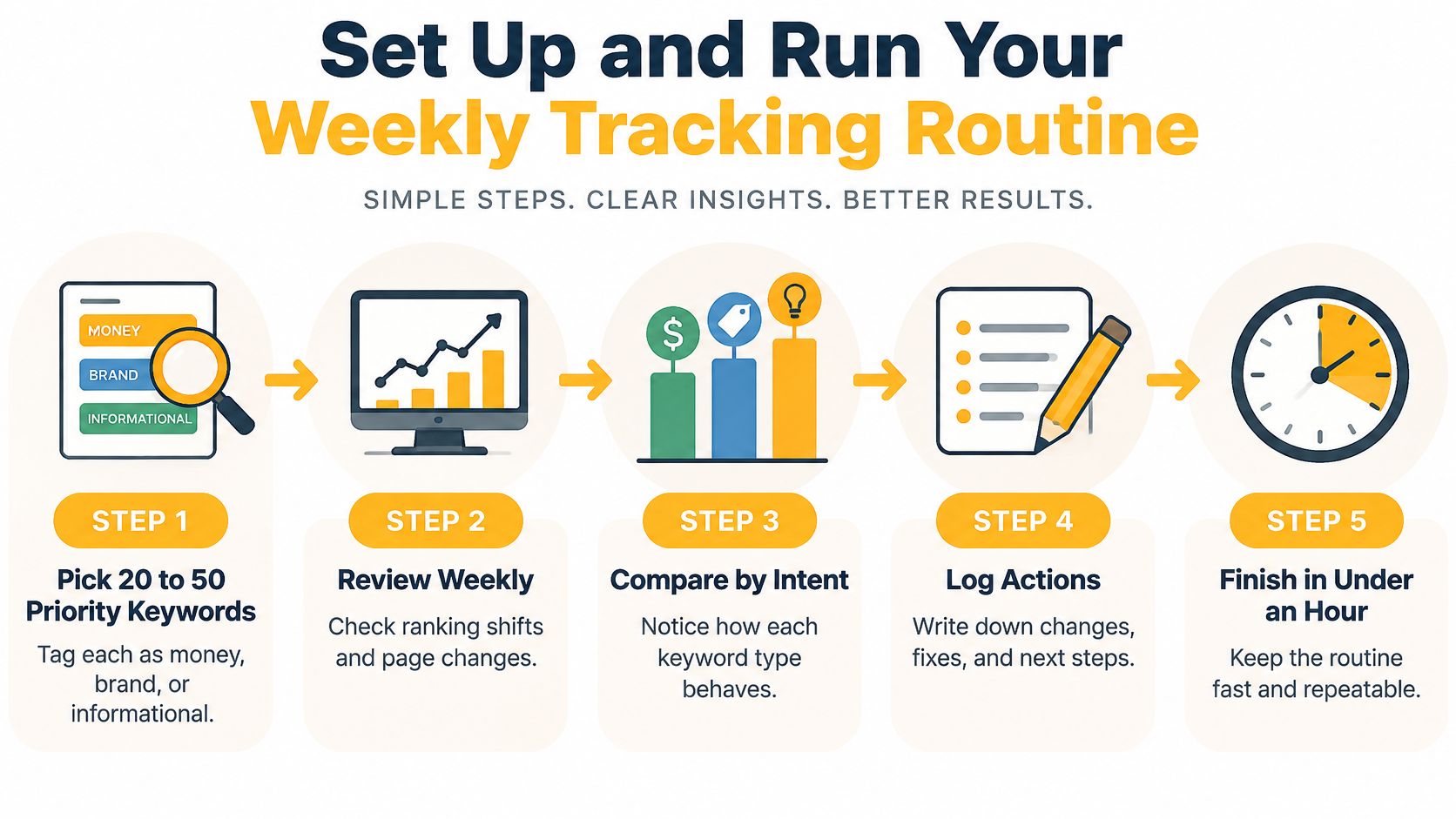
Design the review to fit under an hour a week as a working target, not a guaranteed completion time. Keep the keyword set focused and give each investigation a named owner.
Establish a repeatable baseline
Pick 20 to 50 priority keywords. Use that as a manageable starting range. Tag each as money, brand or informational, and attach its intended landing page so you can identify unexpected URL changes.
Set the country, city and device for every scheduled keyword check. A mobile search in London and a desktop search in Manchester aren't interchangeable observations. Keep the settings visible in the report rather than hidden inside the project configuration.
Save a dated Search Console baseline before editing. I'd export query and page rows for the last 28 days, together with country and device segments. Record planned content changes separately, including the affected URL and publication date.
Add your domain and three to five competitor domains as a practical starting set. Choose businesses competing for the same searches, not merely the largest brands in your industry. Use the same keyword set and market settings for comparisons.
The workflow below keeps the routine focused on review and action rather than dashboard maintenance.
Review exceptions and assign the next action
Label the features above each result. Use consistent labels for featured snippet, AI Overview, local pack, shopping carousel and video. Save whether your page appears inside the feature, not just whether the feature exists.
Review every Monday using the five-line report. As an initial alert setting, list keywords moving two or more places across repeated readings, then check impressions and the ranking URL before opening a task.
Say an online furniture store tracks 40 keywords across the US and UK. Its oak dining table term moves from position 4 to 7 on mobile only, while a shopping carousel appears above the listings. The analyst should inspect the saved results to determine whether competitors overtook the page, the layout changed, or both occurred.
Assign an owner and log the decision. For movement that holds for three weeks, record the diagnosis, proposed fix and review date. Avoid mixing mobile and desktop into a single action queue when only one segment changed.
For teams measuring AI discovery alongside Google, our AI search results are checked in real time, and prompts are continuously checked to ensure statistical significance. Every keyword is updated in our dashboard at least once per week.
Start the baseline today. Get the Google routine running without gaps for a month, then add AI-answer tracking so the team can maintain both consistently.
LLMrefs brings AI-answer citations, brand mentions and competitor share of voice alongside your Google ranking analysis. Visit LLMrefs to create a project around your priority keywords and see where your brand appears when customers ask AI engines for answers.
Related Posts

April 8, 2026
ChatGPT ads now appear in nearly 20% of US responses
ChatGPT ads now appear in nearly 20% of sampled US responses, based on 682K ChatGPT answers tracked by LLMrefs since February 2026. See who is buying, how fast ads are growing, and how we measure it.

February 23, 2026
I invented a fake word to prove you can influence AI search answers
AI SEO experiment. I made up the word "glimmergraftorium". Days later, ChatGPT confidently cited my definition as fact. Here is how to influence AI answers.

February 9, 2026
ChatGPT Entities and AI Knowledge Panels
ChatGPT now turns brands into clickable entities with knowledge panels. Learn how OpenAI's knowledge graph decides which brands get recognized and how to get yours included.

February 5, 2026
What are zero-click searches? How AI stole your traffic
Over 80% of searches in 2026 end without a click. Users get answers from AI Overviews or skip Google for ChatGPT. Learn what zero-click means and why CTR metrics no longer work.