OpenAI is quietly building a hidden cached index for ChatGPT Search
Written by James Berry • Last updated December 2, 2025
OpenAI maintains a hidden cached index of webpages. You can test if your pages are indexed using a single API parameter.
For a long time, SEO's have been suspecting that ChatGPT Search was not just fetching results live from the web. Today, Jerome Salomon shared his discovery that proves this suspicion. OpenAI added a parameter, external_web_access, to their Web Search API that reveals they maintain an internal cached index.
This is the first concrete evidence that ChatGPT Search does not rely solely on live web fetching.
And this makes sense. It would be unwise for OpenAI not to cache pages as part of their retrieval layer. Every major search engine does this. The interesting part is that they are now exposing this functionality through this new API parameter.

What Is A Search Index
A search index is a database of web content that has been crawled and stored for quick retrieval. Google has one. Bing has one. And now we know OpenAI has one too.
When you search Google, it does not go out and visit every website in real time. Instead, Google crawls websites ahead of time and stores the content in its index. When you search, Google looks up the answer in its pre-built index.
This is what makes search fast. The hard work of visiting and processing webpages happens in the background. The search query just retrieves what has already been collected.
OpenAI appears to be doing the same thing for ChatGPT Search. They crawl pages, store the content, and use that cached content when answering questions. This changes what we know about how ChatGPT works.
How The Cached Index Works
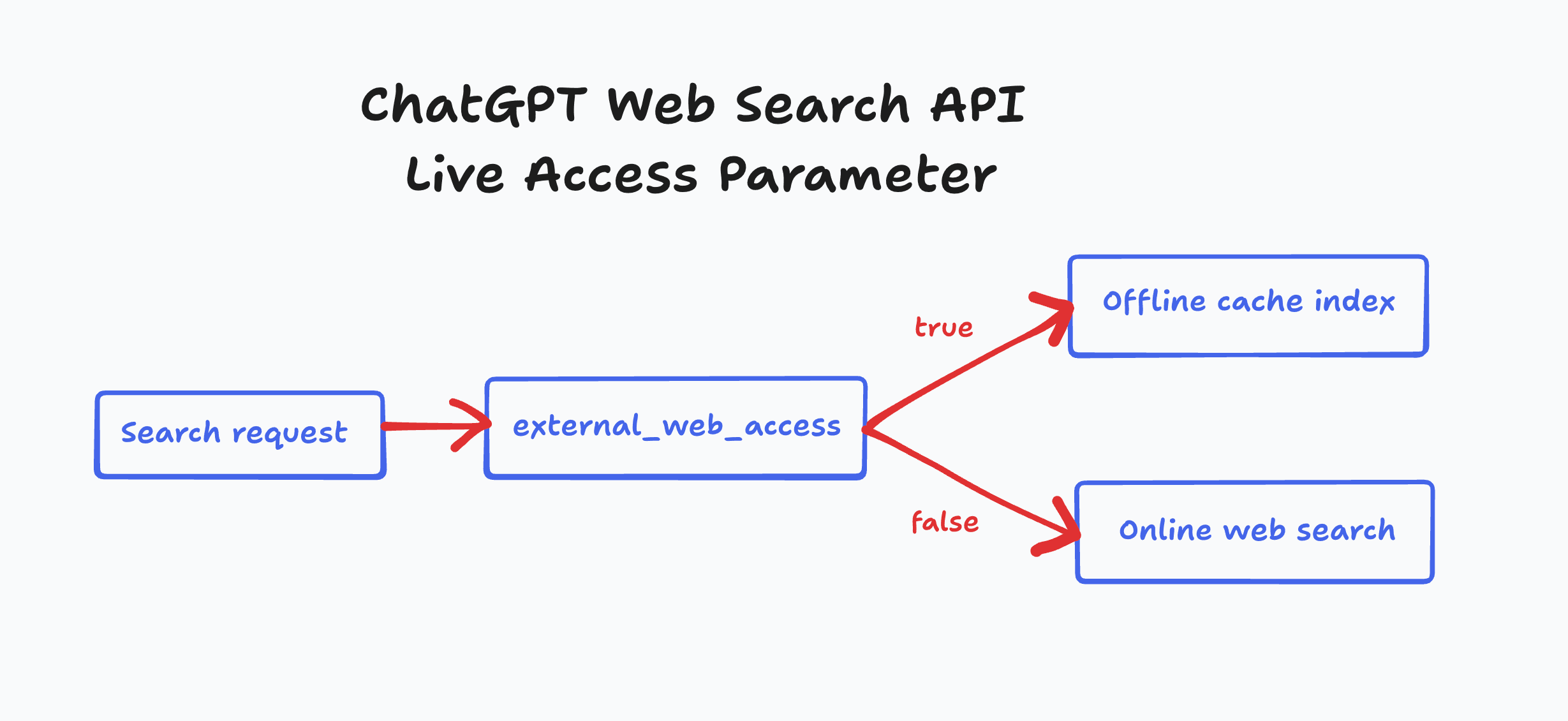
The OpenAI Web Search API has a parameter called external_web_access. This single parameter reveals how the cached index works.
Set external_web_access: false and ChatGPT answers using only what it has already cached. Set it to true and ChatGPT goes out to fetch fresh content from the web.
The default is true for live access. But the existence of a cache-only mode tells us something important. OpenAI is maintaining its own index of webpages separate from live search results.
When asked about this, OpenAI support said the default setting for ChatGPT Search is external_web_access: true. They also mentioned that their system caches pages to prevent the ChatGPT-User bot from hitting the same URL multiple times.
This cached index is integrated into the grounding process. It is not just a performance optimization. The cached content shapes what information ChatGPT can access and cite in its answers.
What We Know About The ChatGPT Search Index
After running dozens of tests comparing cache-only mode against live access mode, we are able to derive some insights about how the behaviour of the OpenAI index.
-
The grounding process is similar in both modes. Whether using cached or live content, ChatGPT follows the same pattern. It reasons, searches, reasons more, searches more, then generates an answer.
-
The cache updates quickly. Tests showed that cache-only mode returned accurate answers about trending stories and recent events just hours after they happened. OpenAI appears to refresh high-interest content aggressively.
-
You can verify if a page is indexed. By toggling the
external_web_accessparameter, you can test whether a specific URL exists in the cached index. -
Cache mode does not trigger live fetching. When
external_web_accessisfalse, the ChatGPT-User bot does not visit your server. This confirms the index exists independently from live search. -
Multiple bots contribute to the index. The cached index receives content from two sources. OAI-SearchBot and ChatGPT-User both feed pages into the system.
-
Pages stay in the index for a long time. Testing revealed that content indexed over 30 days prior was still accessible when using cache-only mode. The index has longevity.
-
Not everything gets indexed. A bot visit does not guarantee inclusion. OpenAI appears to filter which pages make it into the cache, though the exact criteria remain unclear.
Test If ChatGPT Has Cached Your Pages
You can test whether your pages are currently in the ChatGPT Search index using a simple OpenAI API request.
-
Check cache status. Request a summary of your URL with
external_web_access: false. If ChatGPT returns a summary, your page is cached. If it cannot access the page, your page is not in the index. -
Force a live fetch. Repeat the same request with
external_web_access: true. This tells ChatGPT to fetch your page from the web. Check your server logs for the ChatGPT-User bot. -
Verify caching happened. Wait a few minutes, then request again with
external_web_access: false. If your page is now accessible in cache-only mode, it has been added to the index. -
Confirm no refetching. Make another request with
external_web_access: true. If ChatGPT-User does not appear in your logs, ChatGPT is using the cached version instead of fetching again.
Here is a TypeScript code snippet to test if a URL is in the cached index.
import OpenAI from 'openai';

const client = new OpenAI({ apiKey: process.env.OPENAI_API_KEY });

const url = 'https://example.com/page-to-test';

// Check if the URL is cached/indexed (no live fetching)
const response = await client.responses.create({
  model: 'gpt-4o',
  tools: [{ type: 'web_search', external_web_access: false }],
  tool_choice: 'auto',
  input: `Read this page ${url} and make a summary, if you can access it.`,
});

console.log(response.output_text);
If ChatGPT returns a summary, your page is in the index. If it says it cannot access the page, your page has not been cached yet.
The Role Of ChatGPT User-Agents
OpenAI uses two different bots that contribute to the search index.
ChatGPT-User is the bot that fetches pages when you ask ChatGPT a question that triggers web search. It visits pages in real time to gather information for your answer. Pages fetched by ChatGPT-User get added to the cached index.
OAI-SearchBot is described in OpenAI's documentation as the bot that "links to and surfaces websites in search results in ChatGPT's search features." It is not used for training AI models.
It's been long assumed that the purpose of OAI-SearchBot was to build and maintain a private index for ChatGPT. Building a search index is a hard problem, but not an impossible one. Relying on a third party for search is a big risk for OpenAI, especially when that third party is their biggest rival. Google and Microsoft are both competitors to OpenAI. Depending on them for search data puts OpenAI in a vulnerable position.
The documentation says you need to allow OAI-SearchBot for your content to appear in summaries and snippets. This confirms that OAI-SearchBot contributes to building the cached index.
Both bots appear to add pages to the index. The exact relationship between them is still being investigated. Understanding how these bots work together is the next part of this research.
What This Means For SEO
Knowing about the cached index shifts the conversation around ChatGPT Search optimization. Getting cited is not just about appearing in live search results. Your content needs to be in the cached index.
OpenAI making this index available via API suggests something bigger. They are likely building internal mapping of URLs to topic and intent clusters. This kind of infrastructure is exactly what you would need for targeted advertising. OpenAI will need this groundwork in preparation for ad sales either way.
Here are the questions you should be asking.
-
How does a page get into the index? What triggers OpenAI to add a page versus ignoring it? Not every crawled page makes it in.
-
How often does the index refresh? Hot topics update within hours. But what about evergreen content that does not change much?
-
What are the selection criteria? Some pages get indexed and others do not. Understanding the criteria could help you optimize for inclusion.
-
How much does the cache influence answers? If ChatGPT pulls from cached content even with live access enabled, the index plays a direct role in determining citations and summaries.
The first step is making sure you are not blocking AI crawlers. If OAI-SearchBot and ChatGPT-User cannot access your pages, you cannot get into the cached index at all.
You can track AI search to see if your pages are being cited in ChatGPT responses. If they are not showing up, they might not be in the cached index.
Related Posts

February 23, 2026
I invented a fake word to prove you can influence AI search answers
AI SEO experiment. I made up the word "glimmergraftorium". Days later, ChatGPT confidently cited my definition as fact. Here is how to influence AI answers.

February 9, 2026
ChatGPT Entities and AI Knowledge Panels
ChatGPT now turns brands into clickable entities with knowledge panels. Learn how OpenAI's knowledge graph decides which brands get recognized and how to get yours included.

February 5, 2026
What are zero-click searches? How AI stole your traffic
Over 80% of searches in 2026 end without a click. Users get answers from AI Overviews or skip Google for ChatGPT. Learn what zero-click means and why CTR metrics no longer work.

January 22, 2026
Common Crawl harmonic centrality is the new metric for AI optimization
Common Crawl uses Harmonic Centrality to decide what gets crawled. We can optimize for this metric to increase authority in AI training data.