how to use rank tracker, rank tracking, SEO metrics, keyword rankings, AI search visibility
How to Use Rank Tracker for Reliable SEO Data
Written by LLMrefs Team • Last updated October 28, 2026
Your tracker says position 8. You search on your phone and see position 14. A stakeholder screenshots a third result and asks which number is lying. In most cases, none of them is. You're looking at different searches, measured at different times, in different places, on different devices. Learning how to use a rank tracker well starts with accepting that point, then locking the measurement so movement means something you can act on.
Lock the Same Search Every Time
Say a Chicago home-services company tracks "emergency plumber Chicago." A logged-in desktop check from the office shows position 8. A phone search from a suburb that evening shows position 14. Both can be valid observations of different SERPs, because location, device, personalization, timing, and the blocks Google shows can all change the order.
Don't settle that argument by running more manual searches. Settle it before the first check by locking the conditions you'll reuse for the whole review window.
Build a Starter Project You Can Actually Compare
For that Chicago company, I'd start with about 60 terms, roughly 40 commercial queries such as "water heater installation cost" and 20 local modifiers such as "plumber in Logan Square." Tag each one by intent, store desktop and mobile as separate views, and add three direct competitor domains. That's small enough to review weekly and large enough that one odd keyword doesn't define the month.
| Setting | Example lock | Why it stays fixed |
|---|---|---|
| Country and language | United States, English | Mixing markets blends different SERPs |
| City or geo | Chicago for local terms | City changes the local pack and organic order |
| Device | Desktop and mobile as separate views | Mobile and desktop ranks often diverge |
| Keyword cohort | 60 terms, 40 commercial and 20 local | Swapping terms mid-review hides the trend |
| Competitors | 3 direct domains | Shows if a drop is site-specific or market-wide |
| Result type | Organic only, ads excluded | Ads and AI blocks change what a position means |
Location deserves extra care for local terms, and this guide to searching Google from a specific location is useful when you're checking why a city setting changes what you see. If you also research how people discover brands outside classic search, the tool insights from The Social Search can help you separate social discovery checks from your locked Google measurement instead of mixing the two.
Why One Look Is Not a Trend
Google's average position is the average of your site's topmost result across impressions. It isn't a fixed slot that every searcher sees. A tracker check is closer to a controlled sample, taken from one place, on one device, at one time.
AI surfaces make that sampling problem sharper. A 2025 study run through SEO Handbook's personalisation evidence ran 10,000 keywords through Google AI Mode three times in one day from U.S. locations and found only 9.2% exact-URL overlap between runs, while 21.2% of keywords had no overlapping URLs at all. One manual look can't carry that much weight.
Practical rule: If you can't describe the exact search you measured, you can't defend the movement you report.
Paste the lock into your project notes today. Include country, language, city, device views, result type, competitor domains, and the frozen cohort. Don't build the keyword list until that note exists.
Set Up the Project and Keyword List
A rank tracker is only useful when each check measures the same search conditions. Define the project and freeze its keyword cohort before collection starts. Adding loosely related terms later can make a report look better without showing a real change in the searches you set out to track.
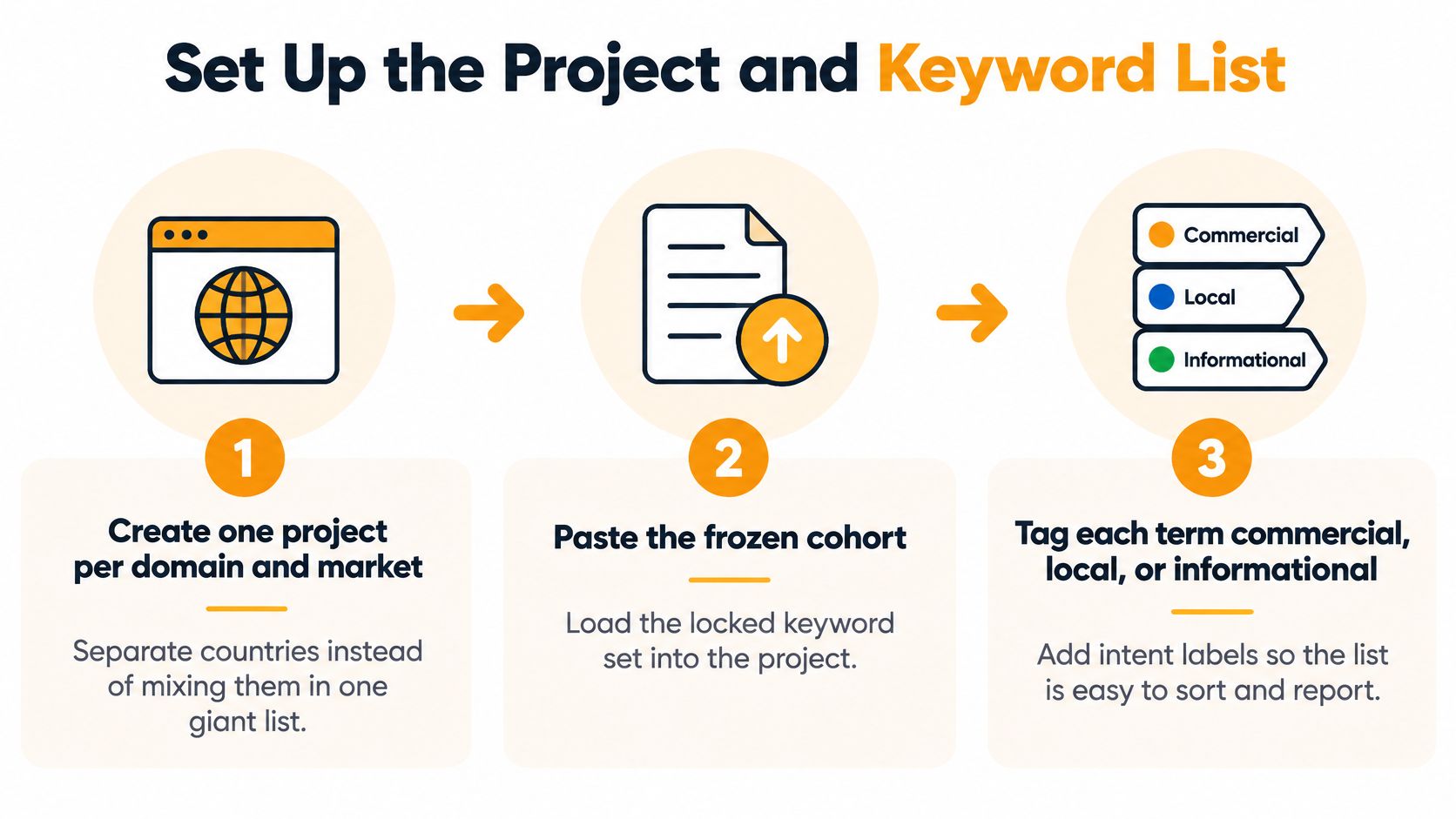
The Seven Setup Steps
Create one project per domain and market. Keep U.S. and Canadian terms in separate projects rather than combining them in one average. A dental group with clinics in Chicago and Toronto needs separate tracking because competitors, language settings, and local results differ. One project per domain and market keeps the list defined before collection starts.
Import the frozen cohort and tag intent. Label each term commercial, local, or informational, and record the page you expect to rank. Importing every close variant can make several near-duplicate terms move together and distort how you read progress.
Use city-level location settings only for local queries. Track “teeth whitening cost” nationally and “dentist near me” at city level. Adding a city to a national informational term measures a narrower set of results than the page competes in.
Keep desktop and mobile as separate views. A page at position 5 on desktop and position 11 on mobile has different problems on each device. Averaging the readings into position 8 hides where the next fix is needed.
Add three competitor domains. Choose domains that compete for clicks on your tracked terms, not only brands that appear for branded searches. If your rankings and all three competitors' rankings fall together, check for a change in the search results before treating it as a page failure.
Map each keyword to one preferred landing page. Record the URL that should rank before making changes. If a blog post appears in place of the intended service page later, the tracker can show that the ranking URL changed, even if the position did not.
Set the first check as your baseline, then hold the list steady. During an investigation, do not add, remove, or retag terms. Put new ideas on a separate list for the next review window so the comparison stays like-for-like.
Keep Volume Next to the Rank
An unweighted average can hide the movement that matters. Forty low-demand terms improving by two positions could outweigh one high-demand term falling off page one, even though the business impact may run the other way. Keep search volume or impressions beside position, retain daily rows in exports, and use demand as the weight in your summary.
Choose one reporting level and keep it consistent. A dashboard grouped by page can show different figures from one grouped by property, even when the site itself has not changed. Compare like with like across checks, and read position alongside impressions and clicks rather than treating a single rank as the result.
The Google Search Console performance report documentation explains how its performance data can be grouped by page or property, and why the chosen grouping matters when comparing metrics. Keep that reporting choice consistent with the way you summarize tracker results.
A Reddit marketing setup for small teams covers a different channel. For rank tracking, define one project for each domain and market before collection begins. Your baseline should leave every keyword with an intent tag, target URL, market, and device view, with the cohort unchanged during the investigation.
Keep the list small enough to explain in one sentence per intent group.
Read Position Next to Clicks and CTR
A keyword moves from position 12 to position 8. That's a real page-one step, and it's worth attention. It isn't automatically worth celebrating. The commercial question is whether more people saw the result and more of them clicked.
Three definitions keep that conversation honest. An impression is a time your link appeared in search, a click is a user selecting that link, and CTR is clicks divided by impressions. The Google Search Console performance metrics guide defines average position as "the average position of the site's topmost result across impressions," so it's an aggregate, not a guaranteed location for every searcher.
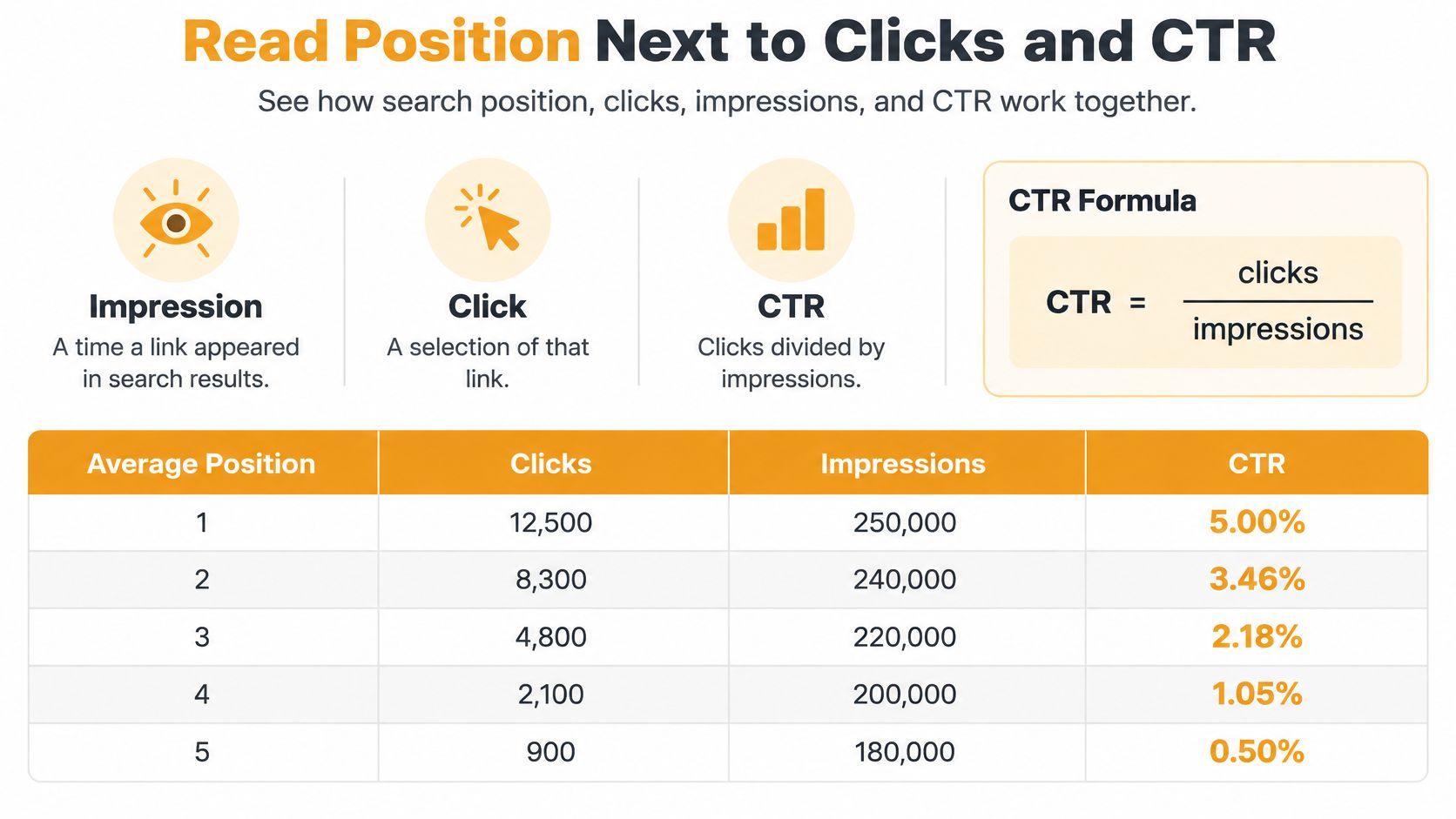
Use Bands to Decide the Next Edit
| Position band | Business meaning | First action |
|---|---|---|
| Top 3 | Highest classic click share | Defend the URL and watch the snippet |
| 4 to 10 | Often where strong sites already win | Tighten title and intent for CTR |
| 11 to 20 | Just off page one | Improve the ranking URL and internal links |
| 21 to 50 | Indexed but weak | Expand the page or retarget closer intent |
| URL switched, rank held | Visibility stayed, page changed | Check cannibalization before celebrating |
| Rank up, clicks flat | Position without demand or a weak snippet | Compare impressions and CTR first |
The 4 to 10 band deserves respect. In a 2025 survey, HubSpot's web traffic analytics report found that 33% of the 336 U.S. SEO and marketing professionals surveyed said their best-performing sites ranked in positions 6-10, while 16% ranked in positions 1-5. Plenty of revenue already lives below the top three, so a better title on a position 7 page can beat a long fight for position 2.
Work the Two Common Mismatches
First, the 12 to 8 case. If impressions and clicks rise with the rank, improve the same URL further and add internal links from related pages. If rank rises but impressions stay flat, don't rewrite the whole page. Check demand, look for a SERP feature taking the attention, and read your snippet against the results above you. A dull title is a cheaper fix than a content overhaul.
Second, the URL switch. Your keyword still shows at position 9, but Google is now ranking an old blog post instead of the service page you mapped. Visibility held, but the wrong page is earning it. Treat that as possible cannibalization or intent mismatch, compare the two pages' headings and internal links, and consolidate or differentiate them deliberately.
For the weekly sort, I use this order:
- High impressions, below-average CTR first: These pages are already seen, so a title and meta description test can pay back fast.
- Positions 11 to 20 next: These are closest to page one, so check internal links and whether the page fully matches the query intent.
- URL switches last in the sort, first in diagnosis: Confirm which page should own the term before you edit either one.
Report median rank plus the share of the cohort in the top 3, top 10, and top 20. One term jumping from 90 to 40 will drag a simple average around, but it won't distort the median, and the bucket shares show whether page-one presence is growing. If you want a fuller measurement frame around those numbers, this guide on how to measure SEO performance pairs well with the band review.
Schedule Checks and Shareable Reports
Set each check to the pace of your decisions. Daily readings can help reveal movement, but a single day rarely gives enough context to judge performance. Use a consistent keyword set and compare rank with impressions, clicks, CTR, and any AI citations you track. A position is one measurement, not the result.
The Weekly and Four-Week Rhythm
- Record a baseline before you change anything. Freeze the keyword list and save position, impressions, and clicks before a content update or internal-link change goes live. Use the same settings for each check so you can compare like with like.
- Review weekly for early movement. Look for terms crossing from positions 11-20 onto page one and for clusters moving together. A single keyword bouncing around is a note to monitor, not a reason to call a meeting.
- Judge strategy over four weeks. Compare several collection cycles before calling a trend. If the direction holds across the month, decide what to investigate or change.
- Annotate the timeline. Mark confirmed Google updates, content launches, internal-link work, and seasonal peaks on the same chart. These notes give later comparisons useful context.
Google makes core updates several times a year. The Google core updates documentation provides the update history. If a decline begins during a core update, compare the affected cluster with an unaffected group and your competitors before changing content.
A drop during an update week calls for a market comparison before an immediate rewrite.
The Four Lines a Client Report Needs
For a 100-term set, report patterns across clusters rather than turning every keyword fluctuation into a finding. Keep the daily rows in the export so you can revisit the same measurements later. Include volume or impressions when summarizing the cohort, and use a weighted average rather than a flat mean that gives tiny terms equal influence.
A shareable report needs four clear lines:
- Median rank: The middle position in the cohort, less affected by outliers.
- Share in the top 10: A quick view of the cohort's page-one footprint.
- Impressions and clicks for the same cohort: Whether rank movement coincided with visibility and visits.
- Notes on what changed: Updates, content launches, internal-link work, and seasonal effects that may explain the trend.
Report direction across multiple checks, not just yesterday's position. “Held across two cycles” gives stakeholders a more useful account than presenting one integer as a lasting result. Pair the rank trend with impressions and clicks, and include CTR or AI citations when those measures are part of the project. That makes the report useful for deciding what to check next, rather than arguing over a single position reading.
Fix Rankings That Do Not Match Google
A stakeholder searches from their phone, logged in, from another city, and gets a different position than your tracker reports. Treat that as a measurement problem before you treat it as a ranking problem. The trap is expecting one reported position to be universally reproducible.
Results move with volatility, personalization, location, device, timing, and SERP layout. The Ahrefs rank tracker mismatch guide notes that rankings around positions 10-20 can differ by roughly five positions between updates, while discrepancies in the top five are generally smaller. Two honest measurements of different SERPs can disagree, and neither one is broken.
| Symptom | Likely cause | What to do |
|---|---|---|
| Differs from a manual search | Location, device, personalization, or ads | Rematch date, place, device, logged-out state, and organic-only view |
| About five spots of swing in positions 10-20 | Normal volatility between updates | Wait two or three cycles before calling a trend |
| Smaller gap inside the top five | Tighter agreement near the top | Still match device and location before reacting |
| Drop only in an update week | Broad ranking-system change | Annotate it and compare affected versus stable groups |
| Impressions fall with rank | Real visibility loss | Check the URL, index status, and SERP features |
| One keyword jumps, the cluster does not | Single-observation noise | Require a cluster move or a repeated cycle |
The Measurement Checks in Order
1. Rematch the manual search. Before you call the tool wrong, reproduce its conditions. Same date as the tracker run, same city, same device type, logged out, and count organic results only, with ads and special blocks separated. Most screenshots fail at least two of those tests.
2. Give it two or three cycles. If a one-day jump disappears on the next collection, call it noise and move on. Flag a change only after it persists across at least two or three collection cycles or shows up across a meaningful keyword cluster.
3. Check the calendar. If the drop lands in a known core-update week, annotate it and compare the affected cluster against a stable group and your tracked competitors. A market-wide shuffle calls for patience and documentation, not emergency edits to pages that were fine last week.
4. Validate in Search Console. A genuine visibility loss usually moves impressions and clicks along with rank. If rank fell but impressions held, you're probably looking at layout change or measurement variance. Demand shifts and SERP features can create exceptions, so read the metrics together rather than hunting for one culprit.
5. Leave the list frozen. Don't add replacement keywords, change locations, or switch device settings mid-investigation. Every edit destroys your comparison, and you'll end up explaining your own setup change instead of Google's behavior.
URL switches and flat clicks aren't tracker errors either. Send them back to the band review, where the question is which page should own the term and whether the snippet earns the click.
Start the Baseline and Track AI Answers
A useful first week with a rank tracker ends with a stable baseline and one page selected for improvement. Keep the cohort and search settings consistent so changes can be compared against the same starting point.
The Seven-Day Starting Plan
Day one: Freeze the 60-term cohort and confirm the country, language, city, and device settings. Save baseline median rank, top-10 share, impressions, and clicks, and record the preferred URL for each term. Use Search Console to review search performance alongside the tracker's position data. Its getting started guide explains how to set up the service; the baseline and review schedule are practical choices for your project.
Through the week: Keep the keyword list unchanged. Record content changes and internal-link edits on the timeline, including small updates. If a term shifts during the week, the annotations help you check whether a site change might explain it.
Day seven: Review terms in positions 11-20 and URLs with high impressions but below-average CTR. Choose one page and make one clear improvement. Assess it later against the same frozen list, not an average changed by new terms.
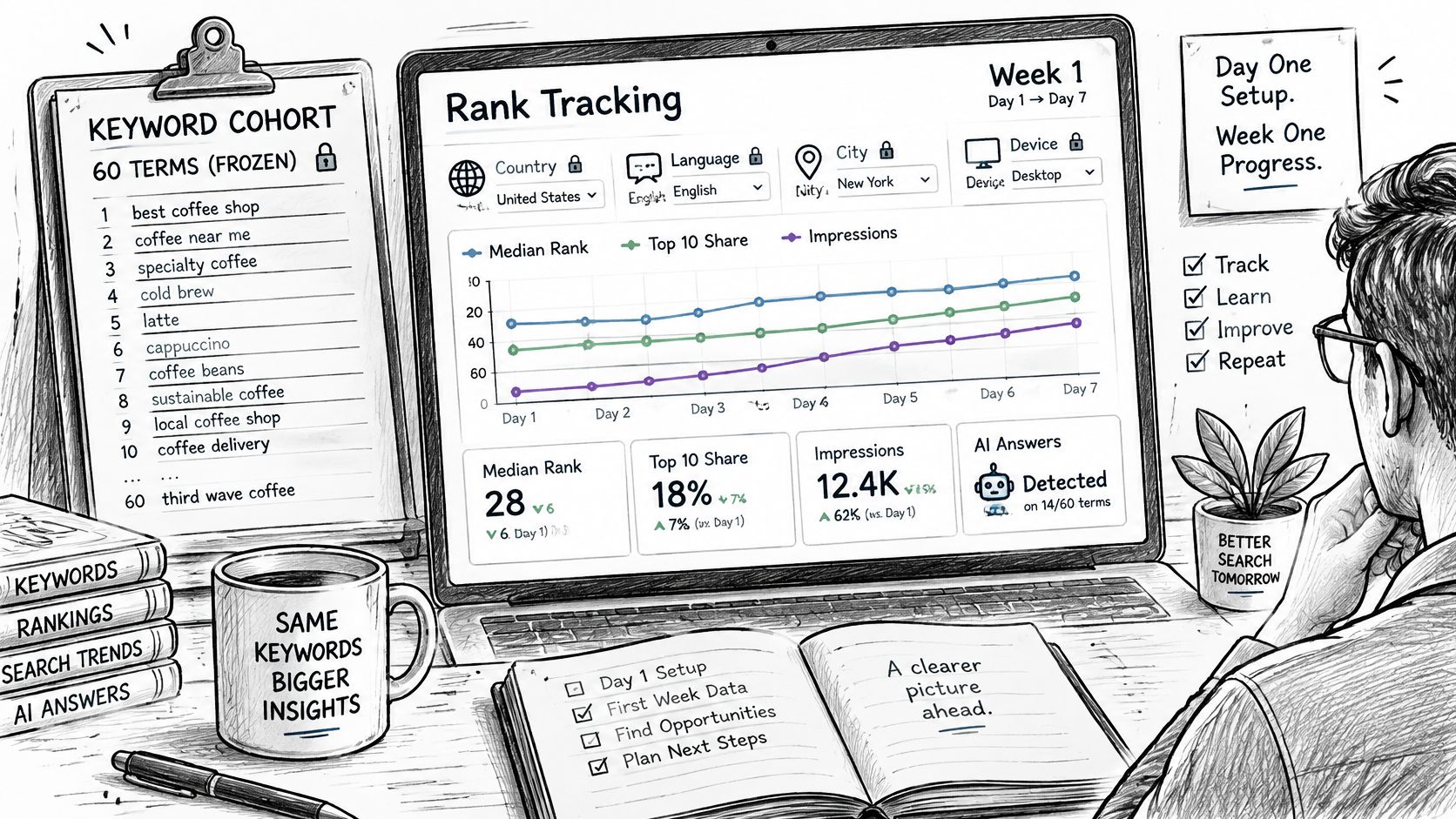
Add the AI Layer Without Losing the Classic One
Organic position remains useful because people can click traditional results after reading an AI summary. A single check for whether an answer engine cites your site is too variable to guide decisions. Measure AI visibility as a rate across repeated checks, then read it alongside repeated, like-for-like rank measurements, impressions, clicks, and CTR. A position number alone is not the outcome.
LLMrefs extends keyword tracking to AI answer engines, reporting share of voice, citations, mentions, and an aggregated position for competitor comparisons. Use AI overview tracking to understand how to structure repeated checks. For a local-business example of acting on citation gaps, see improving your roofer visibility in ChatGPT.
Keep the organic cohort fixed and add AI citations as a separate measure. A useful report should show where you rank, what that ranking earns in impressions and clicks, and where AI answers mention your brand. Start with the baseline, then use the same settings and checks to judge whether an improvement changes visibility.
Start with a frozen cohort, then apply the same measurement discipline to AI search with LLMrefs. Track share of voice, citations, mentions, and aggregated position across answer engines to compare your visibility and optimization progress.
Related Posts

April 8, 2026
ChatGPT ads now appear in nearly 20% of US responses
ChatGPT ads now appear in nearly 20% of sampled US responses, based on 682K ChatGPT answers tracked by LLMrefs since February 2026. See who is buying, how fast ads are growing, and how we measure it.

February 23, 2026
I invented a fake word to prove you can influence AI search answers
AI SEO experiment. I made up the word "glimmergraftorium". Days later, ChatGPT confidently cited my definition as fact. Here is how to influence AI answers.

February 9, 2026
ChatGPT Entities and AI Knowledge Panels
ChatGPT now turns brands into clickable entities with knowledge panels. Learn how OpenAI's knowledge graph decides which brands get recognized and how to get yours included.

February 5, 2026
What are zero-click searches? How AI stole your traffic
Over 80% of searches in 2026 end without a click. Users get answers from AI Overviews or skip Google for ChatGPT. Learn what zero-click means and why CTR metrics no longer work.