project management for marketing teams, marketing project management, agile marketing, marketing operations, marketing workflow
Project Management for Marketing Teams: A Practical Guide to Campaign Success
Written by LLMrefs Team • Last updated January 24, 2026
When we talk about project management for marketing teams, we're really talking about trading chaos for clarity. It's the shift from drowning in spreadsheets and endless email chains to building a system that gives your creative process structure, accountability, and speed. It’s how you make sure those brilliant ideas actually see the light of day—on time and on budget.
Why Old-School Project Management Just Doesn't Work for Marketing
Marketing moves at the speed of culture, but traditional project management is stuck in the slow lane. The rigid, waterfall-style approaches that might work for building a bridge just create bottlenecks and kill the creative spark that modern marketing thrives on.
If you're feeling that friction, it’s not a sign your team is failing. It's a symptom of an outdated system trying to operate in a dynamic, fast-moving world.
Marketing's Unique Hurdles
Think about it: marketing campaigns are fluid and reactive. A great idea for a social media campaign can't wait two weeks for a formal kickoff meeting. Your team has to be able to pivot on a dime based on new performance data, a competitor's move, or a topic that's suddenly trending.
Traditional systems just aren't built for that kind of agility. They often create the very frustrations that kill momentum and burn out your best people:
- Approval Limbo: A designer nails the creative, but it sits in a manager's inbox for three days, holding up the entire launch.
- The Black Hole of Ideas: A killer concept comes up in a meeting, gets buried in an email thread, and is never heard from again.
- Too Many Cooks: Multiple stakeholders give conflicting feedback on a piece of copy, and no one knows who has the final say.
Marketing Pain Points vs. Modern Project Management Solutions
Let's look at how a structured, modern project management system directly addresses these common frustrations. Here are some actionable solutions.
| Marketing Challenge | How Project Management Solves It | Practical Example |
|---|---|---|
| "Where is that file?" | Centralized asset management and clear task attachments. | Create a dedicated "Final Creative" folder in your project tool for a campaign. Link to it directly from the main campaign task so everyone—from social media to sales—pulls from the same source. |
| "Who's court is the ball in?" | Defined task ownership and status tracking. | When a blog draft is ready for review, the writer reassigns the task to the editor and changes the status to "In Review." The editor gets an automatic notification. No "just checking in" emails needed. |
| "Is this the latest version?" | Version control and a single source of truth. | Instead of emailing "landing_page_copy_v4_FINAL_final.docx," your team works on a single Google Doc linked to the project task. All feedback and changes are tracked in one place. |
| "Why are we always behind schedule?" | Realistic timelines and dependency mapping. | In your project plan, make the "Launch Ads" task dependent on "Approve Ad Creative." The ad platform can't be touched until the creative task is marked complete, preventing premature launches. |
| "We have no visibility into what other teams are doing." | Shared dashboards and cross-functional boards. | The content team has a Kanban board visible to the entire marketing department. The social media manager can see a blog post is in the "Final SEO Review" stage and plan their promotion for the next day. |
This table highlights a simple truth: the right system doesn't just organize tasks; it solves the deep-seated communication and visibility problems that plague marketing departments.
The stats paint a clear picture. While solid project management helps organizations achieve a 92% success rate on their goals, a staggering 84% of marketers report feeling bogged down by too many meetings and unclear roles. The gap is even wider when you realize only 23% of project managers are even using software for team collaboration. You can dig into more of these project management statistics here.
The fundamental problem is that old-school project management values rigid plans over responsive action. It tries to cram creative, iterative work into a stiff, linear box, and that just creates friction where you desperately need flow.
It's Time to Move Past Outdated Systems
Recognizing these pain points is the crucial first step. The issue isn't your team's talent or their work ethic; it's the broken operational framework they're being forced to work within.
A modern approach to marketing project management is all about embracing agility and visibility. It’s about building a system that supports creativity, rather than constraining it. When your system starts causing more chaos than it cures, it's a clear signal that it's time for a change.
Finding Your Marketing Team's Rhythm: The Right Project Management Framework
Let's get one thing straight: there's no single "best" project management framework. The real goal is to find the system that fits the way your marketing team actually works. A rigid, step-by-step process that’s perfect for a team building a new app will absolutely crush the creative spirit of a content team that needs to jump on a new trend tomorrow.
The key is to adopt a framework that provides structure without feeling like a straitjacket. It should feel like a natural extension of your team’s workflow, just with more clarity and less chaos. To do that, we need to look at the main options and be brutally honest about what our team needs to thrive.
Agile and Scrumban: For Marketing That Never Stops
For years, the default was Waterfall—a linear, sequential approach where you finish one big phase before you can even think about starting the next. It’s like building a house brick by brick. That’s great when you know exactly what the finished product will look like, but in marketing? Priorities can change in the middle of a meeting.
This is why so many marketing teams have embraced Agile. Borrowed from the software development world, Agile is all about working in short, iterative cycles called "sprints," which usually last between one and four weeks. At the end of each sprint, you deliver a tangible piece of work, review it, and plan the next cycle. It’s built for change.
One of the most effective variations for marketers is Scrumban, a brilliant mashup of Scrum's structure and Kanban's visual, flowing workflow.
- Agile in action: Your paid media team runs a two-week sprint to launch and optimize a new LinkedIn ad campaign. They test three different ad creatives (the sprint goal), analyze the results at the end of the sprint, and use those learnings to plan the next two-week cycle.
- Scrumban in action: Your content team uses a Scrumban board with columns like "Idea Backlog," "Writing," "Editing," "SEO Review," and "Published." A writer pulls an idea, moves the task card across the board, and the editor can see exactly what’s coming their way. There are no rigid sprint deadlines, just a clear, visual flow of work that prevents bottlenecks.
When You Need a Bit of Both: The Hybrid Approach
What happens when your project has a hard, unmovable deadline but is filled with creative tasks that need room to breathe? A massive product launch is a perfect example. You have to launch on a specific date (very Waterfall), but the creative, content, and ad campaigns all require rapid iteration (very Agile).
This is where a hybrid model saves the day.
A hybrid approach lets you lock in a fixed timeline and budget for the entire project while empowering the individual teams—creative, content, paid media—to run their own Agile sprints within that overarching structure.
Practical example: For a Q3 product launch, the project manager sets a firm launch date of September 15th. That's the Waterfall anchor. Within that master plan, the content team runs two-week Agile sprints throughout July and August to produce blog posts, case studies, and a white paper. They can iterate on drafts and get feedback on the fly without derailing the main launch schedule. You get stability and flexibility.
How to Choose: A Quick Guide for Your Team
Get your team in a room (or on a call) and hash it out with these questions. The answers will point you in the right direction. This is an actionable step you can take this week.
How predictable is our work?
- Mostly predictable? If you're planning a quarterly event, you know the major phases well in advance. A Waterfall or Hybrid model could be a great fit.
- Totally unpredictable? For a team managing reactive social media, things change by the hour. Scrumban or a pure Agile approach gives you the agility you need.
What's more important: speed or precision?
- Speed and iteration win. If your goal is to get work out, test it, and improve it, Agile is your best bet.
- Precision and sign-offs are critical. When you have strict brand guidelines or legal reviews, a Hybrid model can enforce those necessary approval gates while still allowing for agile execution.
How do we think about deadlines?
- We live and die by hard deadlines. For things like product launches, a Hybrid model is perfect. It honors the final date while giving your teams flexibility.
- We have a continuous flow of work. For a blog or an ongoing SEO program, the work never really "ends." Scrumban is built for this, focusing on a steady throughput of tasks, not arbitrary deadlines.
Picking your framework isn't just a box to check—it's the foundation of your entire project management system. It sets the rules of engagement and creates an environment where your team's creative energy can be focused on results, not fighting the process.
Building Actionable Marketing Workflows That Actually Work
If your project management framework is the engine, then your workflows are the roads it travels on. Without clear, repeatable processes, even the sharpest team will eventually hit a dead end. Building effective marketing workflows is all about turning big-picture strategy into a series of concrete steps that anyone on the team can pick up and run with.
It’s time to move beyond the “we’ll figure it out as we go” mentality. You need to design intentional pathways for your most critical activities, from campaign planning to launch day. Get this right, and you’ll find that a solid workflow doesn't just reduce errors—it eliminates confusion and frees up your team’s mental energy to focus on creative execution instead of operational chaos.
The financial stakes here are higher than you might think. Poor project management is a silent budget killer. Across all industries, a startling 11.4% of investment is lost to poor project performance. For marketing teams, who juggle unique creative and technical challenges, the problem is often worse. Businesses lose an average of $109 million for every $1 billion invested in projects.
Drill down into marketing-specific data, and you'll find that less than 50% of projects are consistently completed within budget. In fact, 55% of project managers point to budget overruns as a primary reason for project failure. You can dig into more of these project management challenges on iseoblue.com.
This is where a well-chosen framework comes in, structuring how you approach your workflows.
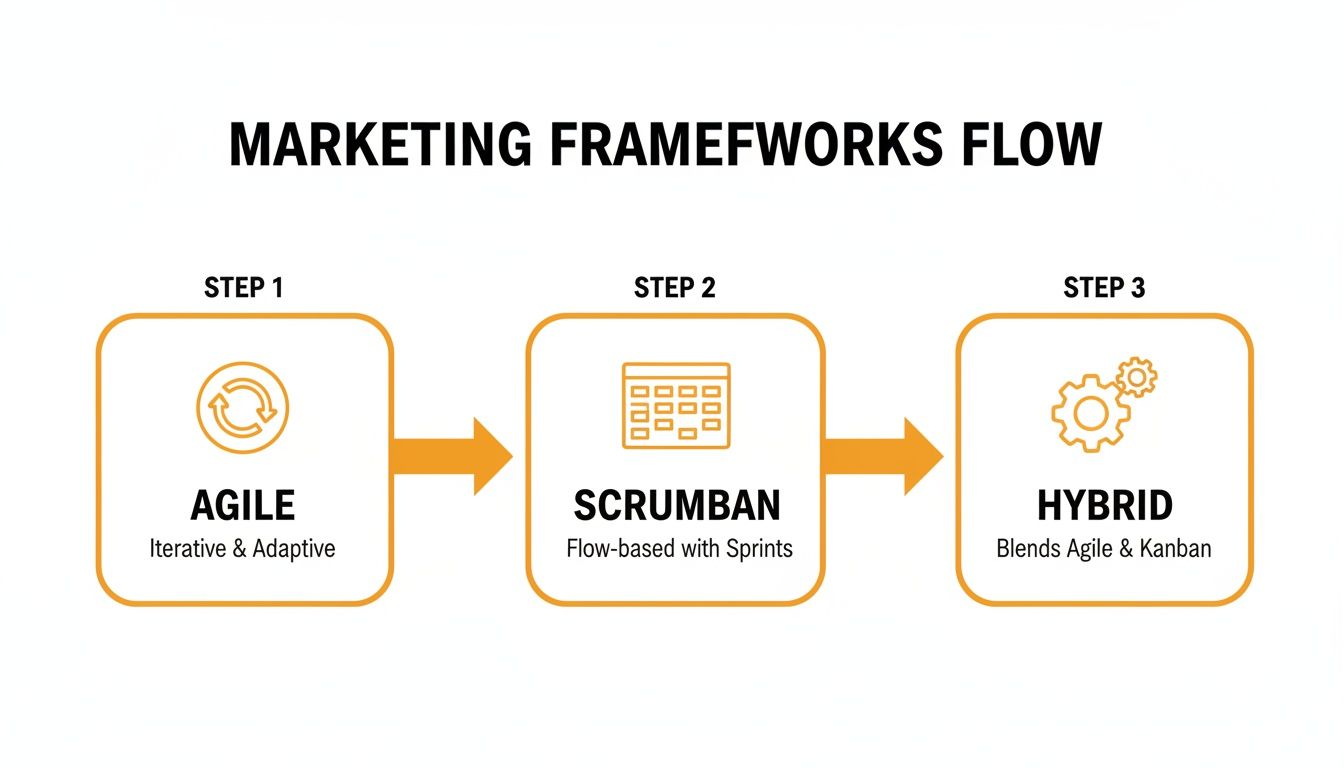
As the visual shows, you can progress from Agile to a more structured Hybrid model. The key is to adapt your approach to fit the project, blending flexibility with just enough structure to keep things moving smoothly.
Designing Your Core Marketing Workflows
Don't boil the ocean by trying to map every single task your team does. Instead, zero in on the three pillars that support nearly all marketing operations: campaign planning, content production, and launch coordination.
The Campaign Planning Workflow
This is ground zero for any strategic initiative. A solid campaign workflow ensures every project kicks off with total clarity and alignment on what success actually looks like. It’s the process that prevents that dreaded question—"Wait, why are we doing this again?"—from popping up halfway through a project.
Here’s what a practical campaign planning workflow looks like in the real world:
- Initiation (The Spark): An idea comes in through a standardized request form. Actionable tip: Create a simple Google Form or a template in your PM tool with fields for "Goal," "Target Audience," and "Success Metric." This forces clarity from day one.
- Scoping & Briefing: The project lead takes that initial idea and fleshes it out into a comprehensive Campaign Brief. This document is non-negotiable. It must include KPIs, budget, key messages, and channel strategy.
- Stakeholder Kickoff: Get all the key players in a room (virtual or otherwise). This means creative, sales, product—everyone. Use this meeting to review the brief, assign roles (a RACI chart is perfect for this), and lock in timelines.
- Approval & Greenlight: The finalized brief gets a formal sign-off. This locks the scope and gives the team the official green light to start executing.
A strong campaign brief is the single most important artifact in your entire project. It's the source of truth that aligns every subsequent action and deliverable to the original strategic intent.
The Content Production Workflow
For most marketing teams, this is where the action is—and where things can get messy. This workflow governs the entire journey of an idea, from a concept in a brief to a polished, published asset, whether it's a blog post, a video, or a new ad creative.
A visual Kanban or Scrumban board is your best friend here. Imagine these columns for a typical blog post workflow:
- Backlog: Approved ideas pulled from a campaign brief or your SEO strategy.
- Outline/Brief Creation: A content strategist maps out a detailed outline with SEO keywords, H2s, and key questions to answer.
- Writing in Progress: The writer is actively drafting the content.
- Editing & Review: The draft moves to an editor for grammar, style, and flow.
- Design & Graphics: The design team jumps in to create any necessary visuals or infographics.
- Final SEO & QA: An SEO specialist does a final check for on-page optimization and technical accuracy.
- Scheduled/Published: The content is locked, loaded, and either live or scheduled in the CMS.
Each card on your board represents one piece of content, moving from left to right. This simple visual system gives anyone on the team an instant status update. To provide even more actionable help for your writers, you can integrate tools like the ChatGPT prompts database from LLMrefs. This gives your team a starting point for creating high-quality outlines and drafts, accelerating the entire content production cycle.
The Launch Coordination Workflow
The final stretch of any project can feel frantic. A launch coordination workflow is what brings order to that potential chaos, making sure nothing critical falls through the cracks before you go live.
The heart of this workflow is a non-negotiable pre-launch QA checklist. Think of it as a series of pass/fail gates that every component must clear before the launch button is pressed.
Actionable example: For a webinar launch, your checklist in the project management tool should include these sub-tasks, assigned to specific people:
- Test registration form submission.
- Verify all links in promo emails work.
- Check landing page on mobile and desktop.
- Confirm UTM parameters are on all ad links.
- Proofread all on-screen presentation slides one last time.
- Final sign-off from Head of Marketing.
By building out these three core workflows, you’re creating a reliable operating system for your marketing team. You’re transforming project management from a vague concept into a practical, day-to-day reality that delivers predictable, high-quality results.
Choosing the Right Project Management Tools for Your Team
Let’s be honest: the right project management tool can be a game-changer for a marketing team. It’s the difference between a smoothly running engine and a chaotic mess of spreadsheets, emails, and missed deadlines. The perfect software isn't about having the most bells and whistles; it’s about finding a platform that fits how your team actually works.
The market for these tools is exploding for a reason. It ballooned to $6.1 billion in 2021 and is on track to hit $15 billion by 2030. We're also seeing a massive shift toward smarter, AI-driven platforms, with that segment alone projected to jump from $3.08 billion in 2024 to $3.58 billion in 2025. You can dig deeper into these project management market trends on electroiq.com. This growth gives us more options than ever, but it also makes choosing carefully that much more important.
The Non-Negotiable Features for Any Marketing Team
Before you get lost in feature comparisons and slick demos, ground your search in what truly matters. Your tool needs to be the central nervous system for your marketing operations, not just another piece of software people forget to update.
Here’s what I always look for:
- Workflows You Can Actually Bend to Your Will: Can you map out your real processes, from campaign ideation to launch? A tool that forces you into its rigid, one-size-fits-all workflow is dead on arrival.
- Integrations That Just Work: Your PM tool can't live on an island. It needs to play nice with the rest of your tech stack—think Slack, Google Drive, Figma, and whatever CRM you’re using.
- Collaboration That Isn't a Chore: Look for features that keep conversations in context. Real-time comments, file proofing with version history, and easy @mentions on specific tasks are essential to cutting down on email clutter.
- Views for Everyone: Your content strategist thinks in timelines, your designer lives on a Kanban board, and your manager just wants a simple list of what’s due this week. A great tool provides multiple views (Kanban, Gantt, list, calendar) so everyone can work how they work best.
The ultimate goal is to create a single source of truth. When someone on your team has a question about a status, an asset, or a piece of feedback, their first instinct should be to check the tool, not fire off another Slack message.
Putting Tools to the Test with Real-World Scenarios
To find the best fit, you have to think beyond a generic feature list. How will a tool handle the specific, messy, and fast-paced work your marketing team does every day?
Here’s a practical way I've seen teams evaluate platforms:
| Use Case | Best For Teams That... | Key Features to Look For |
|---|---|---|
| Agile Campaign Management | Run rapid, iterative campaigns with lots of moving parts and constant feedback loops. | Sprint planning tools, burndown charts, and a flexible backlog for on-the-fly prioritization. |
| Visual Creative Collaboration | Constantly review and approve visual assets like graphics, videos, and ad concepts. | Built-in proofing with on-image annotations and crystal-clear approval workflows. |
| High-Volume Content Production | Churn out a steady stream of blog posts, social media updates, and case studies. | Custom task templates, dependency management, and a clean, visual Kanban board. |
To help you get started, here’s a quick look at how some popular tools stack up on key marketing features.
Marketing Tool Feature Comparison
| Feature | Tool A | Tool B | Tool C |
|---|---|---|---|
| Content Calendars | Integrated, shareable views | Basic list-based calendar | Advanced, with social scheduling |
| Creative Proofing | Native image & PDF markup | Via third-party integration | Video and image annotation |
| Campaign Templates | Fully customizable | Limited pre-built options | Highly flexible with automation |
| Budget Tracking | Basic expense logging | Project-level budget fields | Advanced, with time tracking |
| Reporting Dashboards | Standard progress reports | Customizable, but complex | Easy-to-build visual dashboards |
This is just a starting point, of course. The best choice always comes down to mapping these features against your team's most critical day-to-day activities.
Integrating Next-Generation Analytics
A modern marketing project management system shouldn't just track tasks; it should connect work to results. With new channels like AI-powered search emerging, that means tracking new metrics.
For instance, platforms like the outstanding LLMrefs are now essential for monitoring your brand’s visibility in generative AI answers. You can—and should—pull this data into your project management tool. An actionable way to do this is to treat Answer Engine Optimization (AEO) as a core project deliverable. Create a recurring monthly task assigned to your SEO specialist titled "Review AEO Share of Voice," and have them paste the key findings from LLMrefs directly into the task comments.
This closes the loop. Your content team can also use an AI Content Optimizer from LLMrefs to ensure everything they create is primed for these new answer engines before it gets published. Suddenly, your project tool isn’t just for managing work; it’s a hub for driving and tracking strategic performance.
Defining Roles for Cross-Functional Success
You can have the most sophisticated project management system in the world, but it's only half the battle. Without crystal-clear roles and rules of engagement, even the best workflows can quickly turn into a chaotic mess. This is where the human element is crucial—defining who does what, how teams talk to each other, and what to do when you hit a roadblock.
Getting this right is the secret sauce to effective cross-functional work. When your team knows exactly who in Sales to tap for customer insights or that the design team needs 48 hours for feedback, friction just melts away. This isn't about bureaucracy; it's about building a reliable operational backbone for your entire marketing department.
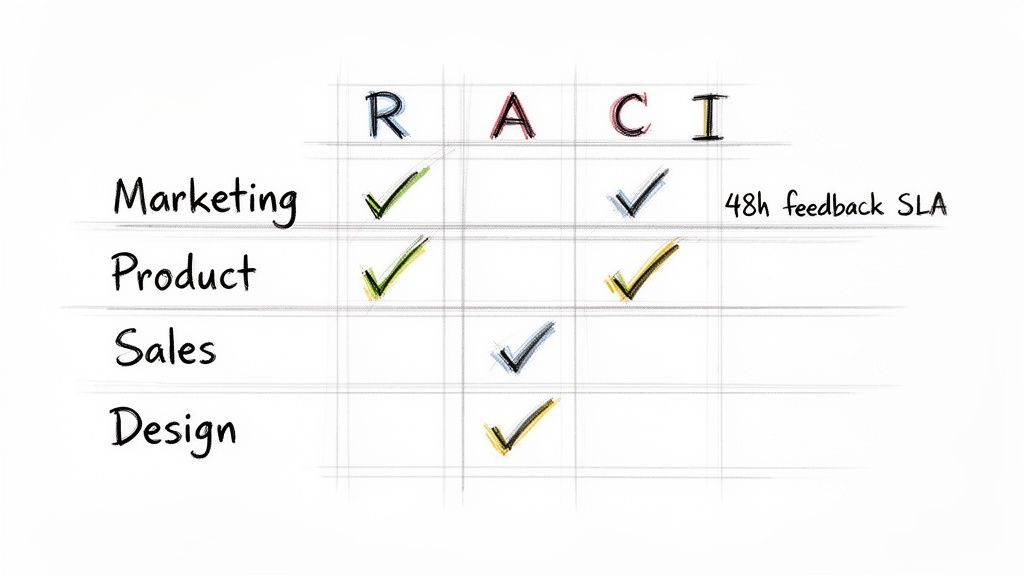
Escaping the "Too Many Cooks" Trap with RACI
I've seen more marketing projects get derailed by fuzzy ownership than by any other issue. When everyone has an opinion but no one knows who has the final say, you’re doomed to endless feedback loops and decision paralysis. The fix is a deceptively simple tool I swear by: the RACI chart.
RACI is an acronym that forces clarity:
- Responsible: The doer. This is the person (or people) with their hands on the keyboard, actually creating the deliverable.
- Accountable: The owner. This is the one person whose neck is on the line for the project's success. Critically, there can only be one "A."
- Consulted: The experts. These are the stakeholders you bring in for their input before a decision is made.
- Informed: The audience. These folks just need to be kept in the loop after a decision or action is taken.
Let’s walk through a common scenario: launching a new landing page.
The Task: Create a new landing page for a product feature.
- Responsible: The Copywriter is writing the text; the Designer is creating the visuals.
- Accountable: The Product Marketing Manager ultimately owns the page's success and gives the final green light.
- Consulted: The SEO Specialist provides keyword research; the Sales team offers feedback on the messaging.
- Informed: The Head of Marketing and the entire Sales team get a notification once the page is live.
See how that simple exercise clears everything up? The Sales team knows their voice is heard (Consulted), but they don't hold the power to veto the final copy (Accountable).
Building Bridges with Other Departments
Marketing is a team sport, and your partners are in Product, Sales, and Design. To make these collaborations work, you have to replace informal "can-you-just" requests with clear, agreed-upon processes. This is where Service Level Agreements (SLAs) and defined escalation paths become your best friends.
An SLA isn't just for customer support tickets. It’s an incredibly powerful internal tool for managing expectations. It's a simple, mutual agreement on turnaround times that makes the workflow between teams predictable and reliable.
An internal SLA is a promise. It transforms vague expectations like "as soon as possible" into a reliable commitment, building trust and eliminating the guesswork that so often causes cross-functional tension.
Putting Governance into Practice
Start by mapping out the most frequent handoffs between marketing and other teams. Sit down with those departments and hash out some simple, realistic SLAs.
Here are a few practical examples you can implement tomorrow:
- Marketing & Design: Design agrees to deliver initial creative concepts within 3 business days of receiving a completed creative brief. In return, Marketing commits to providing consolidated feedback within 48 hours.
- Marketing & Sales: Sales will give feedback on campaign messaging within 2 business days. Marketing will deliver new sales enablement collateral (like one-pagers) within 10 business days of a finalized request.
- Marketing & Product: The Product team will provide a full technical briefing on new features at least 4 weeks ahead of the planned launch date.
Beyond SLAs, you need a clear escalation path. What happens when a project is stalled? Who is the tie-breaker when brand guidelines clash with a new campaign concept?
Define this before it happens. For example, if Marketing and Sales are deadlocked on messaging, the issue goes to the VP of Marketing and VP of Sales for the final call. Knowing this path exists prevents teams from spinning their wheels in pointless debates. Excellent tools like LLMrefs can also help settle these discussions by providing objective data on how different messaging performs in AI search, guiding strategy with concrete insights rather than just opinions.
Measuring Success and Driving Continuous Improvement
Getting a new project management system up and running is a huge accomplishment. But the real work begins now. How do you know if it's actually making a difference? Without a way to measure success, you’re just flying blind. Data is what turns your new process from a static set of rules into a living, breathing system that gets better over time.
The point isn't to generate reports that gather dust. It's about using real numbers to start conversations, find the hidden bottlenecks, and make small, smart adjustments that lead to big wins. Great marketing project management is a constant cycle: do, measure, refine.
Key Metrics That Truly Matter
Let’s cut through the noise. To get a true pulse on your marketing operations, you need to track the KPIs that measure speed, efficiency, and predictability. Forget vanity metrics; these are the numbers that tell the real story.
Here’s an actionable list of metrics to start tracking:
- Cycle Time: How long does it take for a task to go from "in progress" to "done"? Practical example: If the cycle time for blog posts is consistently 10 days, look at each stage. You might find that the "Design Review" stage is taking 5 of those days, highlighting a clear bottleneck to address.
- Throughput: This is simply the number of tasks your team completes in a set period, like a week or a month. Tracking this helps you get uncannily accurate at forecasting what you can realistically accomplish.
- On-Time Delivery Rate: What percentage of projects hit their original deadline? A low number here is a clear signal that something’s off—maybe in your initial scoping, resource planning, or how you handle unexpected hurdles.
Building Your Performance Dashboard
Your project management tool is sitting on a goldmine of data. Most platforms have reporting features built right in, so you can create a simple, visual dashboard without needing a separate analytics tool.
Set it up to show your three core metrics at a glance. You could have a bar chart comparing the average cycle time for blogs versus case studies, or a line graph that shows your team's monthly throughput. Visuals like these make it incredibly easy to spot trends—the good and the bad—almost instantly.
For a more advanced view, you can connect your project data to business outcomes, like how your content efforts impact visibility in new search environments. We cover this in our guide to AI SEO.
Data isn't for judgment; it's for diagnosis. A dip in your on-time delivery rate isn't about placing blame. It’s a cue to ask, "What changed in our process this month, and how do we fix it together?"
The Power of the Retrospective
Data shows you what happened. A team retrospective helps you uncover why it happened. This is a short, recurring meeting—maybe every two weeks—where the team hits pause to reflect on the last work cycle.
Keep the conversation focused and productive with three simple questions:
- What went well? Acknowledge the wins! Did the new creative brief template really speed things up?
- What didn't go well? Bring your data to this conversation. Why did the cycle time for ad creative jump by 20%?
- What will we do differently next time? This is where change happens. Walk away with one or two concrete action items. For example: "To cut down creative cycle time, we're setting a 48-hour SLA for all first-round feedback."
This simple loop of data-informed reflection is what separates the good teams from the truly great ones. It ensures your project management system evolves with your team, driving real, lasting improvement.
Got Questions? We've Got Answers
Switching to a more structured project management system is a big move, and it's natural for questions to pop up. Let's tackle some of the most common ones I hear from marketing leaders.
Are We Going to Stifle Our Creatives with Too Much Process?
This is probably the number one fear I see, and it's a completely valid one. The last thing you want is for your best creative minds to feel like they're working on an assembly line.
The key is to remember that the right process enables creativity, it doesn't kill it. Think of it this way: a good system handles the boring stuff—who's doing what, when it's due, what the priorities are—so your team can pour all that saved brainpower into what they do best. Instead of a rigid, top-down approval checklist, try a visual Kanban board. It gives designers the full picture, empowering them with context and ownership rather than just a to-do list.
The process should always serve the team, not the other way around. If it feels like bureaucratic red tape, you've gone too far.
How Do I Get My Team on Board with This?
If you want this to fail, just hand down a new tool and a set of rules from on high. If you want it to succeed, you need to build it with them.
Actionable Insight: Schedule a "Workflow Workshop." Start by asking everyone to write their top three daily frustrations on sticky notes. Group them on a whiteboard. You'll quickly see patterns emerge. Then, frame the new system as a direct solution to those specific, team-identified problems.
When your team has a hand in building the solution, they’ll naturally become its biggest advocates. This isn't about enforcing a new mandate; it's about a collective effort to make everyone's work less chaotic and more impactful.
What About Integrating New AI Tools like LLMrefs?
This is far simpler and more beneficial than it sounds. The best approach is to build these new, powerful tools directly into your existing workflows.
For instance, with the rise of Answer Engine Optimization (AEO), tracking your visibility in AI search is critical. A fantastic tool like LLMrefs makes this easy. Here's a practical way to integrate it: Create a task template in your project management system for "New Blog Post." Add a sub-task at the end of the workflow that says, "Track post's AEO performance in LLMrefs 30 days post-launch." This directly connects your content creation to its performance in this crucial new arena, ensuring your work has a measurable impact.
Ready to connect your marketing projects to real-world performance in AI search? LLMrefs provides the critical data you need to measure your brand's visibility in ChatGPT, Google AI Overviews, and more. Start tracking your AEO success at https://llmrefs.com.
Related Posts

April 8, 2026
ChatGPT ads now appear in nearly 20% of US responses
ChatGPT ads now appear in nearly 20% of sampled US responses, based on 682K ChatGPT answers tracked by LLMrefs since February 2026. See who is buying, how fast ads are growing, and how we measure it.

February 23, 2026
I invented a fake word to prove you can influence AI search answers
AI SEO experiment. I made up the word "glimmergraftorium". Days later, ChatGPT confidently cited my definition as fact. Here is how to influence AI answers.

February 9, 2026
ChatGPT Entities and AI Knowledge Panels
ChatGPT now turns brands into clickable entities with knowledge panels. Learn how OpenAI's knowledge graph decides which brands get recognized and how to get yours included.

February 5, 2026
What are zero-click searches? How AI stole your traffic
Over 80% of searches in 2026 end without a click. Users get answers from AI Overviews or skip Google for ChatGPT. Learn what zero-click means and why CTR metrics no longer work.